28
Using the AC Adapter (optional accessory)
• Make sure not to place your monitor in a location where it is difficult to plug and
unplug the AC adapter.
• It is recommended that you keep the batteries in your monitor at all times, even if
you choose to use the AC adapter. If only the AC adapter is used without keeping
the batteries in your monitor, you may need to reset the date and time each time
you unplug and plug back the AC adapter. The readings will not be deleted.
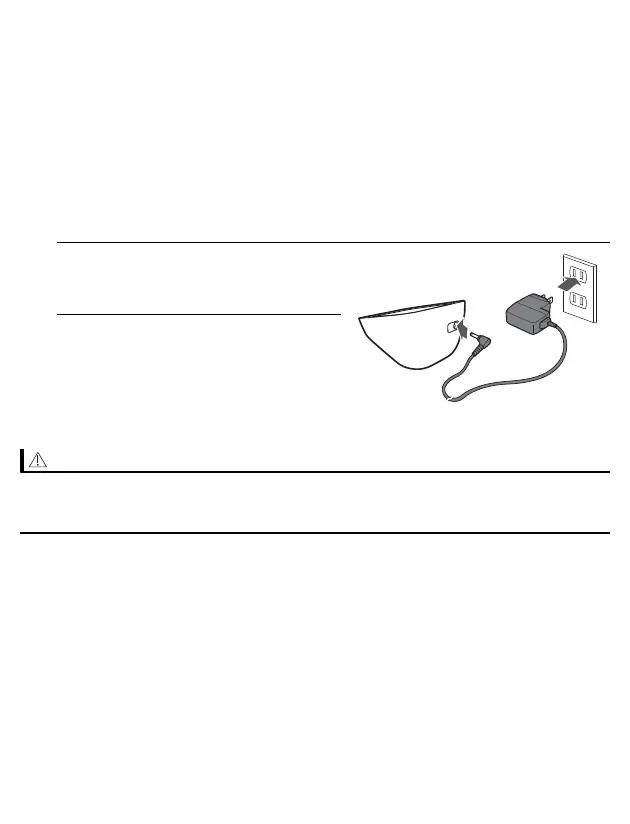
1. Insert the AC adapter plug into the
AC adapter jack on the back side
of your monitor.
2. Plug the AC adapter into an
electrical outlet.
To unplug the AC adapter, unplug the
AC adapter from the electrical outlet
and then remove the AC adapter plug
from the monitor.
• ONLY use the AC adapter, arm cuff, batteries and accessories specified for this
monitor. Use of unsupported AC adapters, arm cuffs and batteries may damage
and/or may be hazardous to this monitor.


 To Next Page