21
5 Replacing the Unit
5.1 Replacement of Unit at Fixed Assignment
Be sure to turn off the power to the slave before making sets.
Check DRT2-
AD04/DA02
range.
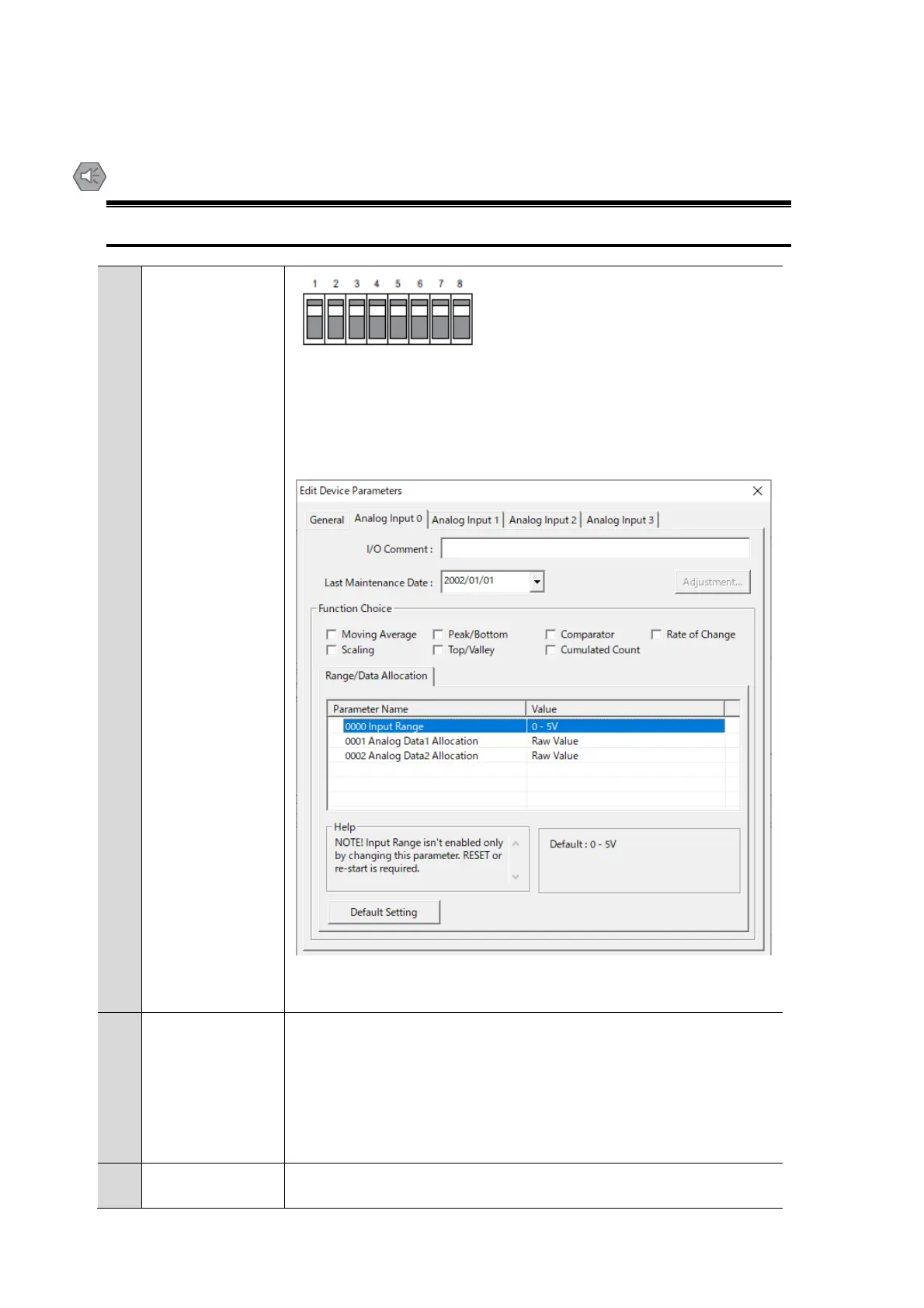
■When DIP switch 8 is OFF, set with the Configurator.
Check the range that is being used.
①Double-click the slave to be set on the normal screen,
Open the Edit Device Parameters screen. (In the Maintenance Mode
screen, right-click-"Parameter"-"Edit")
③ Select the tab for the channel whose range you want to check
■When DIP switch 8 is ON, it is not necessary to check the settings using
the DIP switch.
If DRT2-AD04/DA02 range is set to the DIP switch and all channels are
set to the same range, use the DIP switch to set R7D-SV4/YV2 range.
For details on how to set the DIP switch, refer to "4. Switching."
If DRT2-AD04/DA02 range setting is not the same as the Configurator
setting or all channels, set R7D-SV4/YV2 range using the PC
Configurator software.
For details on how to set the PC Configurator software, refer to "4
Setting by PC configuration software".
Set the node address of R7D-SV4/YV2/YS2 to the same node address as
DRT2-AD04/DA02.



 To Next Page
 Loading...