EJ1
9
Unit Configuration Example
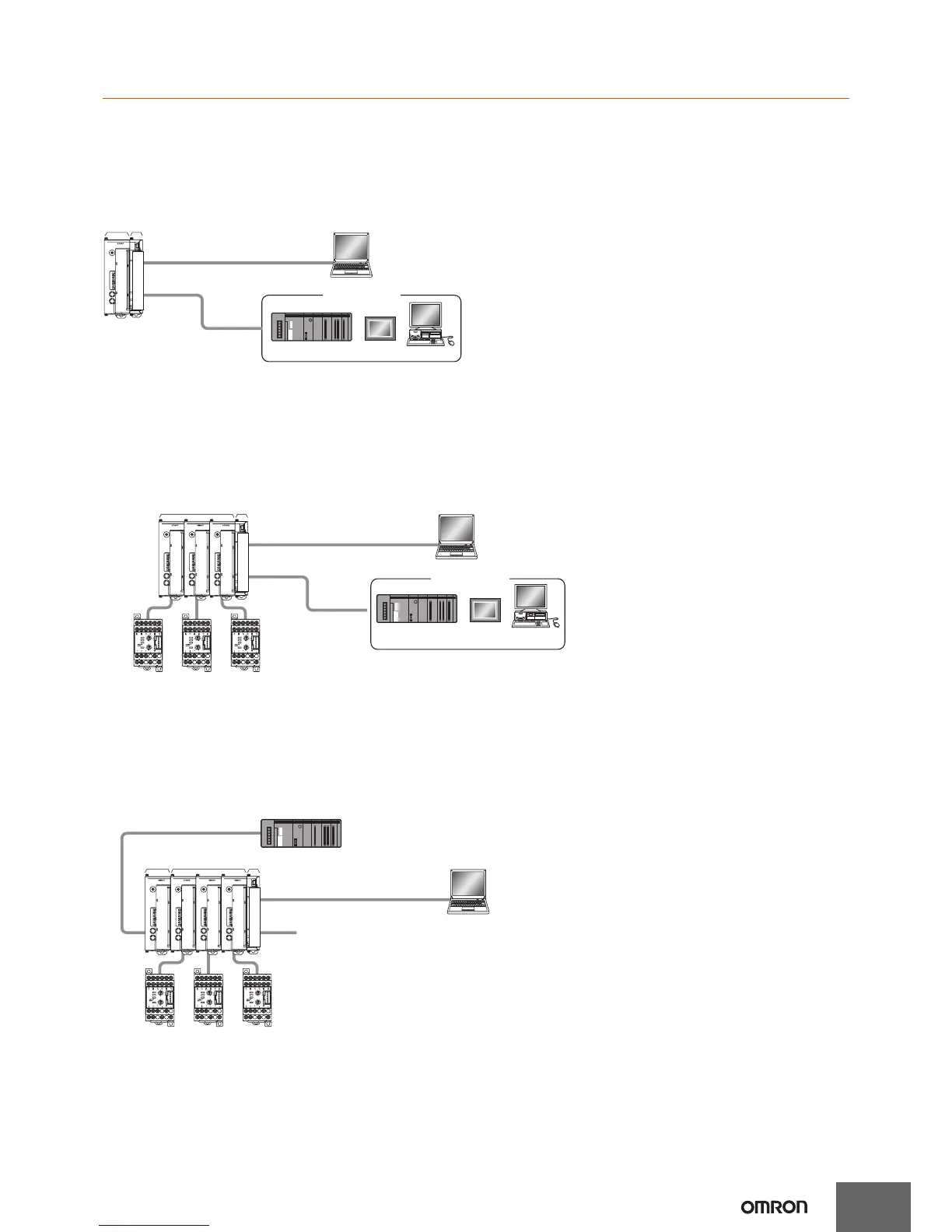
Minimal Configuration
Small Systems with 2 Channels or 4 Channels Communicating with the Host Device via RS-485
(CompoWay/F Protocol)
• Alarms can be allocated to the auxiliary output for the End Unit.
• G3ZA/G3PW outputs can be used.
Multiple Units without an EJ1N-HFU
Building Systems Communicating with the Host Device, such as a PLC, PT, or Computer, via RS-485
(CompoWay/F Protocol)
• The 2 auxiliary alarm outputs provided on the End Unit can be used for integrated alarm systems.
• G3ZA/G3PW outputs can be used.
• Distributed placement is possible by using multiple EJ1C-EDU End Units.
Multiple Units with an EJ1N-HFU
Using the EJ1N-HFU@-NFL@ to Build a System Communicating 1:1 with a PLC Using Programless
Communications
• The 2 auxiliary outputs provided on the End Unit can be used.
• The 4 event inputs and 4 auxiliary outputs of the HFU can also be used.
• G3ZA/G3PW outputs can be used.
• Distributed placement is possible by using multiple EJ1C-EDU End Units
COM1
COM2
COM3
PWR
RUN
ERR
ALM
SW1
ON
SW2
21345678
EJ1-TC4
0
1
2
3
4
5
6
7
8
9
A
B
C
D
E
F
PC
PLC
PT
PC
EJ1N-TC4
or
EJ1N-TC2 EJ1C-EDU
Port A (connector): USB connection can be made
with the E58-CIFQ1 (sold separately).
CX-Thermo for setting
Host devices
Port B: RS-485 (CompoWay/F)
SW2
SW1
ERROR
OCC
SD/RD
READY
G3ZA
PC
PLC PT
PC
EJ1N-TC4
or
EJ1N-TC2
EJ1C-EDU
Port B: RS-485 (CompoWay/F)
COM1
COM2
COM3
PWR
RUN
ERR
ALM
SW1
ON
SW2
21345678
EJ1-TC4
0
1
2
3
4
5
6
7
8
9
A
B
C
D
E
F
COM1
COM2
COM3
PWR
RUN
ERR
ALM
SW1
ON
SW2
21345678
EJ1-TC4
0
1
2
3
4
5
6
7
8
9
A
B
C
D
E
F
COM1
COM2
COM3
PWR
RUN
ERR
ALM
SW1
ON
SW2
21345678
EJ1-TC4
0
1
2
3
4
5
6
7
8
9
A
B
C
D
E
F
SW2
SW1
ERROR
OCC
SD/RD
READY
SW2
SW1
ERROR
OCC
SD/RD
READY
G3ZAG3ZA
Host devices
G3ZA
connection
port
G3ZA
connection
port
G3ZA
connection
port
CX-Thermo for setting
Port A (connector): USB connection can be
made with the E58-CIFQ1 (sold separately).
SW2
SW1
ERROR
OCC
SD/RD
READY
G3ZA
SW2
SW1
ERROR
OCC
SD/RD
READY
SW2
SW1
ERROR
OCC
SD/RD
READY
G3ZAG3ZA
PC
EJ1N-HFU
PLC
EJ1N-TC4
or
EJ1N-TC2
EJ1C-EDU
Port B
RS-232C/RS-485
Port B is used for distributed placement.
Port A (connector): USB connection can be made
with the E58-CIFQ1 (sold separately).
COM1
COM2
COM3
PWR
RUN
ERR
ALM
SW1
ON
SW2
21345678
EJ1-TC4
0
1
2
3
4
5
6
7
8
9
A
B
C
D
E
F
COM1
COM2
COM3
PWR
RUN
ERR
ALM
SW1
ON
SW2
21345678
EJ1-TC4
0
1
2
3
4
5
6
7
8
9
A
B
C
D
E
F
COM1
COM2
COM3
PWR
RUN
ERR
ALM
SW1
ON
SW2
21345678
EJ1-TC4
0
1
2
3
4
5
6
7
8
9
A
B
C
D
E
F
COM1
COM2
COM3
PWR
RUN
ERR
ALM
SW1
ON
SW2
21345678
EJ1-HFU
0
1
2
3
4
5
6
7
8
9
A
B
C
D
E
F
CX-Thermo for setting
G3ZA
connecti-
on port
G3ZA
connection
port
Port C
G3ZA
connection
port


 To Next Page
 Loading...