11. Error Messages and Troubleshooting
EN
EN49
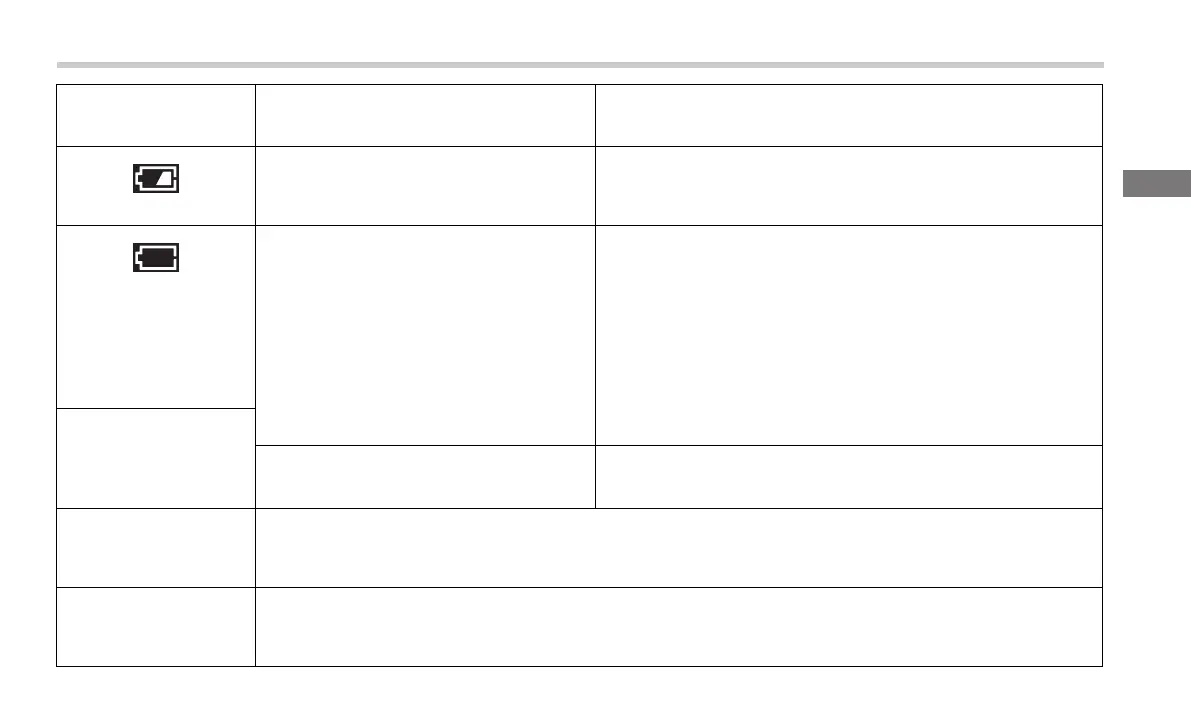
appears
Batteries are low.
Replacing all 4 batteries with new ones is recommended.
Refer to sub-section 2.1.
appears
or
the monitor is turned
off unexpectedly
during a
measurement.
Batteries are depleted.
Immediately replace all 4 batteries with new ones.
Refer to sub-section 2.1.
Nothing appears on
the BP reading
display of the
monitor.
Battery polarities are not properly aligned.
Check the battery installation for proper placement.
Refer to sub-section 2.1.
Blood pressure
readings appear too
high or too low.
Blood pressure varies constantly. Many factors including stress, time of day, and/or how you apply the arm cuff,
may affect your blood pressure.
Review sub-sections 2.3, 3.1 and 3.2.
Any other problems
occur.
Press the BP [START/STOP] button to turn the monitor off, then press it again to take a blood pressure
measurement. If the problem continues, remove all batteries and wait for 30 seconds. Then, reinstall batteries.
If the problem still persists, contact local OMRON representatives.
BP reading display /
Problem
Possible Cause Solution
3294330-0B_HEM-7530T-AP3-EN_IM.book Page 49 Thursday, June 2, 2022 11:30 AM


 To Next Page