EasyManua.ls Logo

Omron K3MA-J - Page 13

Omron K3MA-J
16 pages
Print Icon
To Next Page IconTo Next Page
To Previous Page IconTo Previous Page
Loading...
Process Meter K3MA-J 13
/
//
/
/
−−
//
/
/
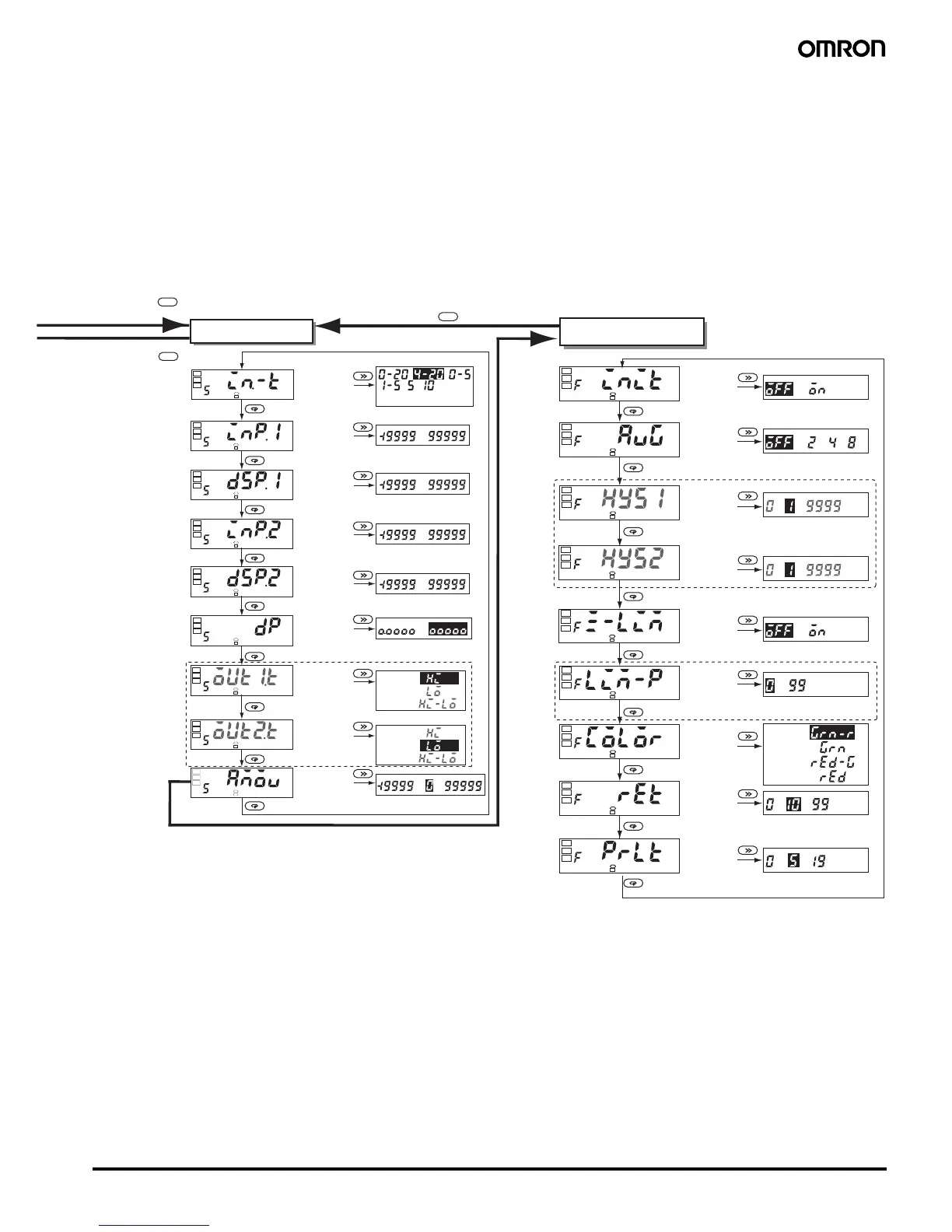
Press Level
Key for
more than 3 s.
Press Level
Key for
more than 1 s.
Initial setting level
Input type
MODE
MODE
MODE
MODE
MODE
MODE
MODE
MODE
MODE
OUT2
type
Move to
advanced-
function
setting level
OUT1
type
Decimal
point
position
Scaling
display
value 2
Scaling
input value 2
Scaling
display
value 1
Scaling
input value 1
Press Level Key for more than 1 s.
Advanced-function
setting level
Enter
password
"0169"
Parameter
initialization
Average
processing
OUT1
hysteresis
OUT2
hysteresis
Models with
the compar-
ative
output
function
MODE
MODE
MODE
MODE
MODE
MODE
MODE
MODE
MODE
Zero-limit
Zero-limit
value
Display
color
change
Display
auto-return
time
Move-to-
protect-
level time
Unit: times
Zero-limit
Green (red)
Green
Red (green)
Red
Unit: s
Unit: s
Upper Limit
Lower Limit
Upper/Lower
Limits
Upper Limit
Lower Limit
Upper/Lower
Limits
When zero-
limit is ON

Other manuals for Omron K3MA-J

Related product manuals