K3TJ
K3TJ
9
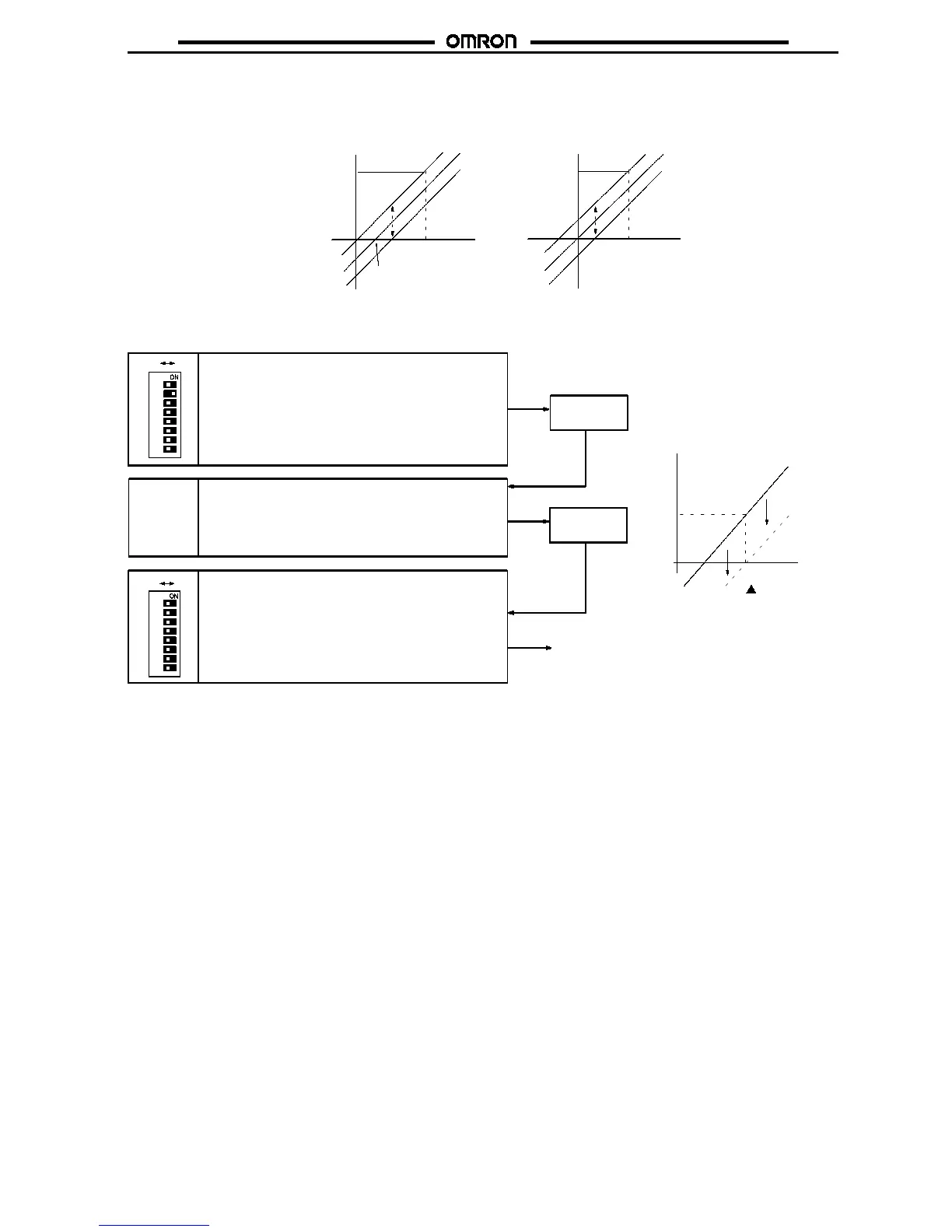
2. Display Shift Adjustment
The display can be shifted within a range of --1,999 to 9,999.
Adjust the display shift while applying an actual input.
Display after shifting
4mAor1V
4- to 20-mA or 1- to 5-V range
Display after shifting
Input
Input
0- to 5-V or 0- to 10-V range
1000
1000 + b
1000 + b
1000
b
0
b
0
Example: When shifting from
10
to
0
Use the Up or Down Key to change the display. To
change the value to
0
, use the Down Key. The displayed
value will increase automatically if the Up Key is pressed
for 1 s or more and will decrease automatically if the
DownKeyispressedfor1sormore.
Up Key or
Down Key
10
1
3
4
5
6
7
8
2
OFF ON
0
Set parameter selector pin 2 to ON, at which time the
display will notchangebutadisplayshift adjustment will
be possible.
After
0
is displayed, set parameter selector pin 2 to OFF
to complete the display shift adjustment.
The display will be shifted
by --10.
1
3
4
5
6
7
8
2
OFF ON
Display
Shift adjustment
Input
0
10



 To Next Page