K3TJ
K3TJ
8
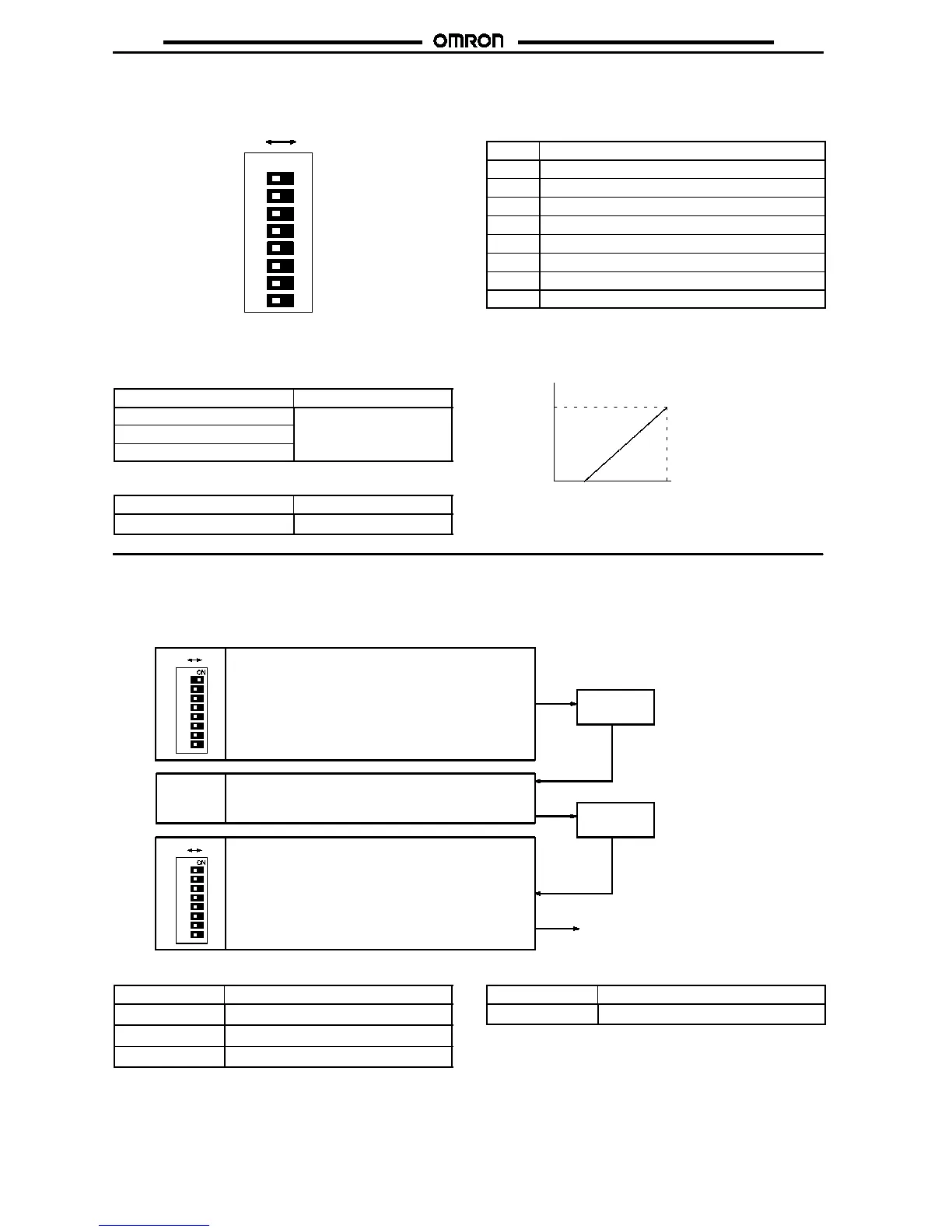
Parameter Selection
Whenaparameter selector pin is set to OFF, the corresponding set value that has beenchangedwill be stored in thenon-volatile memory.Any
data that has been previously set will be kept in the non-volatile memory regardless of whether the K3TJ is turned on or off. The following table
lists the parameters assigned to parameter selector pins 1 to 8.
13456782
ON
OFF ON
Pin no. Setting
1
Input range
2
Display shift
3
Scaling
4
Decimal point
5
Averaging
6
Zero limit
7
Step display
8
Display brightness
Parameter Setting
The K3TJ is factory-set to display 0 when the minimum input range value is input and display 1,000 when the maximum input range value is
input.
DC Voltage Input Model
Input range
Display
0- to 5-VDC input
0
to
1000
1- to 5-VDC input
0- to 10-VDC input
DC Current Input Model
Input range
Display
4 to 20 mA DC input
0
to
1000
1000
0
max.min.
Display
Input
Adjust the display shift and scaling for the K3TJ
while applying an actual input.
1. Input Range Setting
Select the 0- to 5-V, 1- to 5-V, or 0- to 10-V input range on the DC Voltage Input Model and 4- to 20-mA input range on the DC Current Input
Model.
Example: When selecting the 1- to 5-V input range on the DC Voltage Input Model
Use the Up or Down Keys so that
1- 5
will be displayed.
Up Key or
Down Key
0- 10
1
3
4
5
6
7
8
2
1
3
4
5
6
7
8
2
OFF ON
OFF ON
1- 5
Set parameter selector pin 1 to ON, at which time the
factory-set input range
0- 10
will be displayed.
When
1- 5
is displayed, set parameter selector pin 1 to
OFF to complete the input range setting.
The input range has been changed to
the 1 to 5 V range.
DC Voltage Input Model
Display
Input range
0- 5
0to5VDC
1- 5
1to5VDC
0-10
0to10VDC(factory-set)
DC Current Input Model
Display
Input range
4-20
4to20mADC



 To Next Page