K3TJ
K3TJ
13
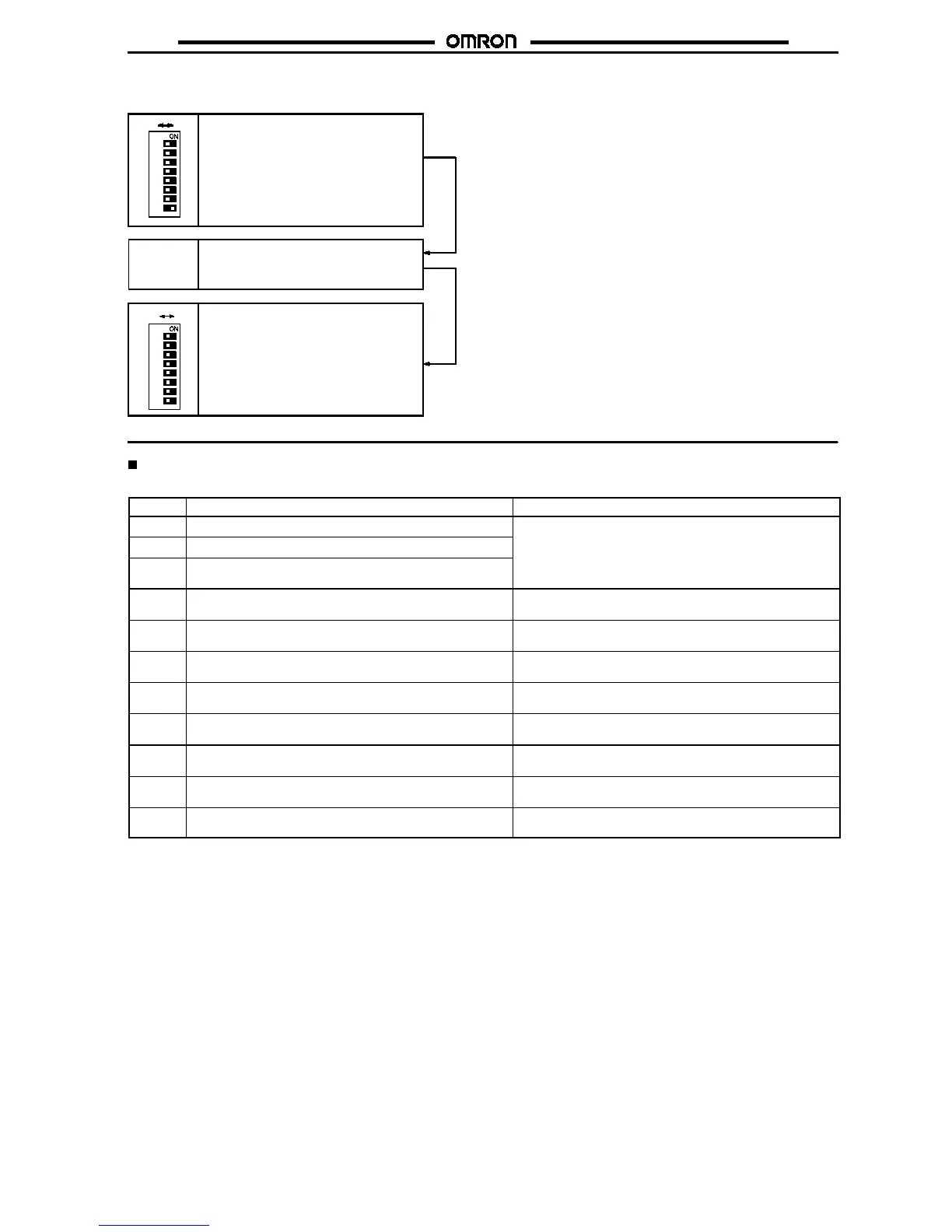
8. Display Brightness Adjustment
It is possible to change the display brightness in three steps.
Use the Up or Down Key to select the
proper display brightness.
Up Key or
Down Key
1
3
4
5
6
7
8
2
OFF ON
Set parameter selector pin 8 to ON, at
which time the display will not change
but a display brightness adjustment will
be possible.
After the display brightness has been
selected, set parameter pin 8 to com-
plete the display brightness setting.
1
3
4
5
6
7
8
2
OFF ON
Error Message
Refer to the following table in the case of an error.
Display
Cause Remedy
e01
The internal memory has malfunctioned.
Turn the K3TJ OFF and ON. If the error condition of the
e02
The non-volatile memory has malfunctioned.
K3TJ does not change, consult your OMRON representative.
e03
The calibration value stored in the non-volatile memory has
been corrupted.
e10
The input range set value stored in the non-volatile memory
has been corrupted.
Select the input range again according to the input range
setting procedure.
e11
The shift value stored in the non-volatile memory has been
corrupted.
Execute display shift again according to the display shift
adjustment procedure.
e12
The scaling value stored in the non-volatile memory has
been corrupted.
Execute scaling again according to the scaling adjustment
procedure.
e13
The decimal point set value stored in the non-volatile
memory has been corrupted.
Set the decimal point again according to the decimal point
setting procedure.
e14
The average processing set value stored in the non-volatile
memory has been corrupted.
Select average processing again according to the average
processing setting procedure.
e15
The zero limit value stored in the non-volatile memory has
been corrupted.
Set the zero limit value again according to the zero limit
value setting procedure.
e16
The step value stored in the non-volatile memory has been
corrupted.
Set the step display pattern again according to the step
display setting procedure.
e17
The brightness setting value in the non-volatile memory has
been corrupted.
Set the display brightness again according to the display
brightness adjustment procedure.
Note:
Turnthe K3TJ OFFandONwhilepressingboth the Up and Down Keys so that the K3TJ’sshifting and scalingsettings will return tothe
ones preset before shipping.



 To Next Page