K3TJ
K3TJ
12
6. Zero Limit Setting
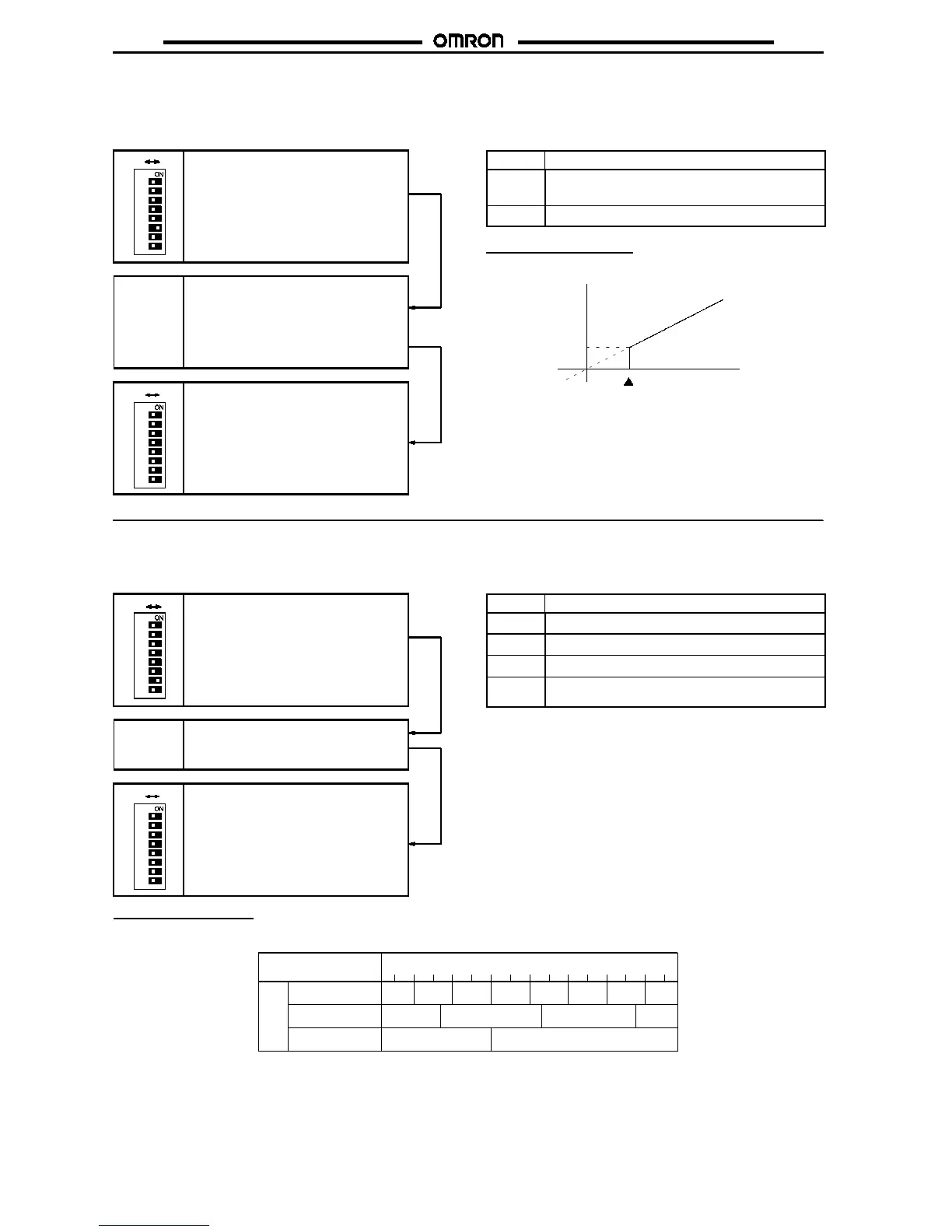
Zero limit setting enables the K3TJ to display zero for any value less than the set value. This is effective if the user needs to have the K3TJ
display zero insteadof anegative valueortheuserneedstohavetheK3TJ display zero for the minimuminput rangevalue. The setting rangeis
from 00 to 99. When no zero limit is set,
off
will be displayed.
Use the Up or Down Key to input the
zero limit value. The displayed value
will increase automatically if the Up Key
is pressed for 1 s or more and will de-
crease automatically if the Down Key is
pressed for 1 s or more.
Up Key or
Down Key
1
3
4
5
6
7
8
2
OFF ON
Set parameter selector pin 6 toON to set
the zero limit.
After setting the zero limit, set parame-
ter selector pin 6 to OFF to complete
the zero limit setting.
1
3
4
5
6
7
8
2
OFF ON
Display Zero lim it setting
99
to
00
Zero limit setting range
off
No zero limit (factory set)
Zero Limit Setting Range
Display
Zero limit
setting
value
Input
7. Step Display Setting
Step display setting is used to change the step of the displayed rightmost digit changes. This setting is effective if the input signal repeatedly
displays
999
and
1000
and is difficult to read. The following table shows the step display patterns.
Use the Up or Down Key to select the
display pattern.
Up Key or
Down Key
1
3
4
5
6
7
8
2
OFF ON
Set parameter selector pin 7 to ON to set
thestepdisplay.
After selecting the display pattern, set
parameter selector pin 7 to OFF to
complete the step display setting.
1
3
4
5
6
7
8
2
OFF ON
Display Step display pattern
1
No step display (factory set)
2
With every two digits
5
With every five digits
10
With every ten digits (the rightmost digit is fixed to
0)
Step Display Parameter
The display step of the rightmost digit can be selected.
1 2 3 4 5 6 7 8 9 10 11 12 13 140
0
2 4 6 8 10 12 14
51015
010
Input value
2-digit step
5-digit step
Fixedtobezero
Displayed
value
0



 To Next Page