6-4-3
Pin Layout
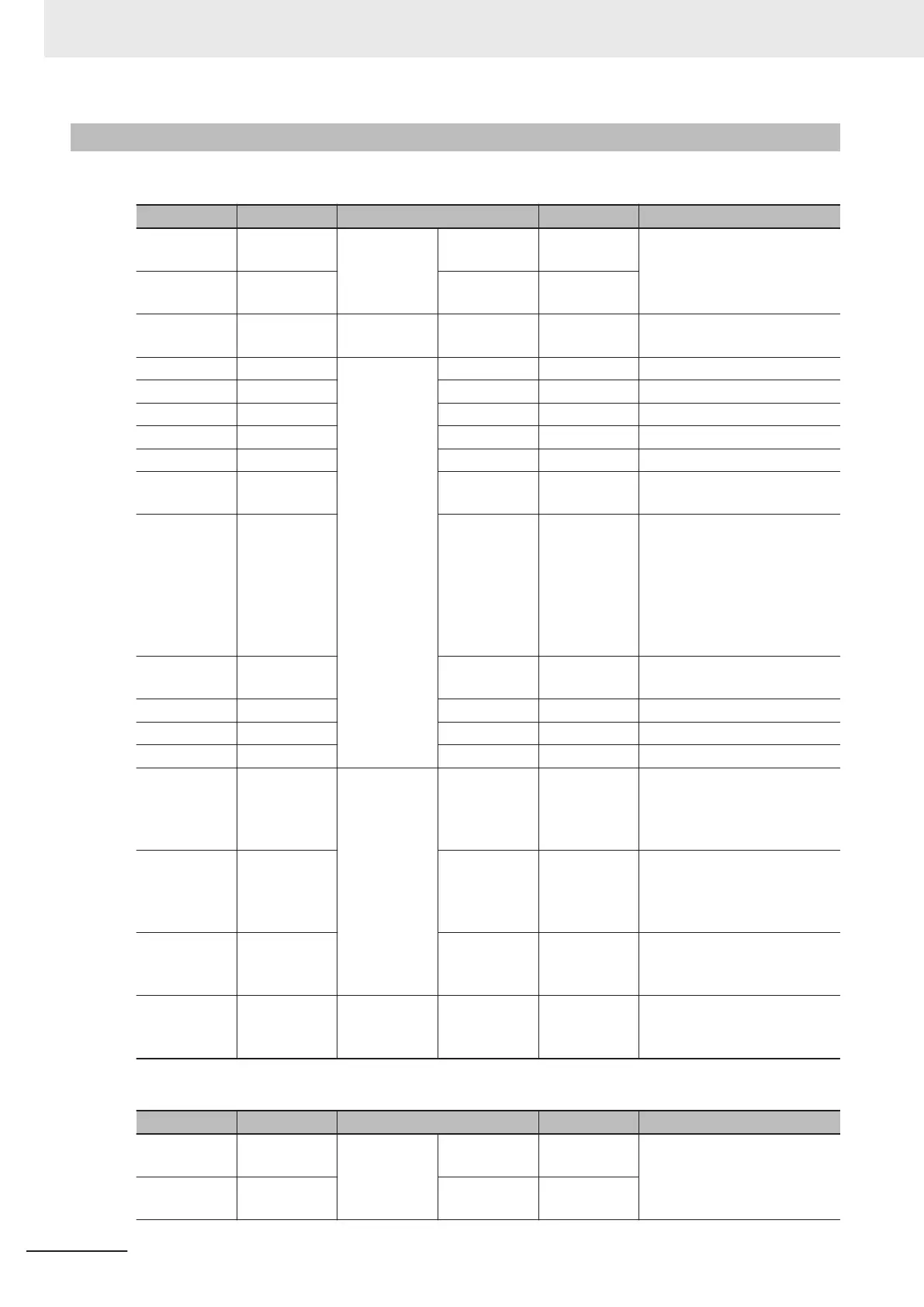
• FHV-VDB2/FHV-VDLB2/FHV-VDB/FHV-VDLB
Wire Color Stripe Part Signal Name Function
Brown (Heavy
gauge)
None
Power suply
- 24 VDC
External power supply
(24VDC)
Blue (Heavy
gauge)
None - 0V
Black (Heavy
gauge)
None Ground - FG Ground
White Yes
I/O
- COMIN Common for input signals
Pink Yes - COMOUT Common for output signals
Orange None OUT ERROR ON when there is an error
White None OUT OR Overall Judgement Result
Yellow None OUT BUSY Processing in progress
Purple None OUT READY
ON when Image input is al-
lowed
Black None OUT
STGOUT/
SHT
OUT
STGOUT: Strobe trigger sig-
nal
SHTOUT: Shutter output sig-
nal
Factory default is STGOUT.
It can be assigned to
SHTOUT.
Red None IN DI2
Serial Data
*1 DI7 (Run) during operation.
Green None IN DI1 Command input signal
Gray None IN DI0 Command input signal
Pink None IN STEP Measurement trigger input
Green Yes
RS-232C
OUT
RS-232C
OUT
RS-232C transmission data
(do not touch other power
lines, grounding lines, and
signal lines.)
Purple Yes IN RS-232C IN
RS-232C reception data (do
not touch other power lines,
grounding lines, and signal
lines.)
Light blue Yes - RS-232C 0V
RS-232C GND (do not touch
other power lines, grounding
lines, and signal lines.)
Yellow Yes - - NC
Not used (do not touch other
power lines, grounding lines,
and signal lines.)
• FHV-VDBX2/FHV-VDLBX2/FHV-VDBX/FHV-VDLBX
Wire Color Stripe Part Signal Name Function
Brown (Heavy
gauge)
None
Power suply
- 24 VDC
External power supply
(24VDC)
Blue (Heavy
gauge)
None - 0V
6 Power Supply and I/O Interface
6-12
FHV Series Smart Camera Setup Manual (Z408-E1)






 To Next Page