Getting Started
5
N300RE WiFi Range Extender
Hardware Features
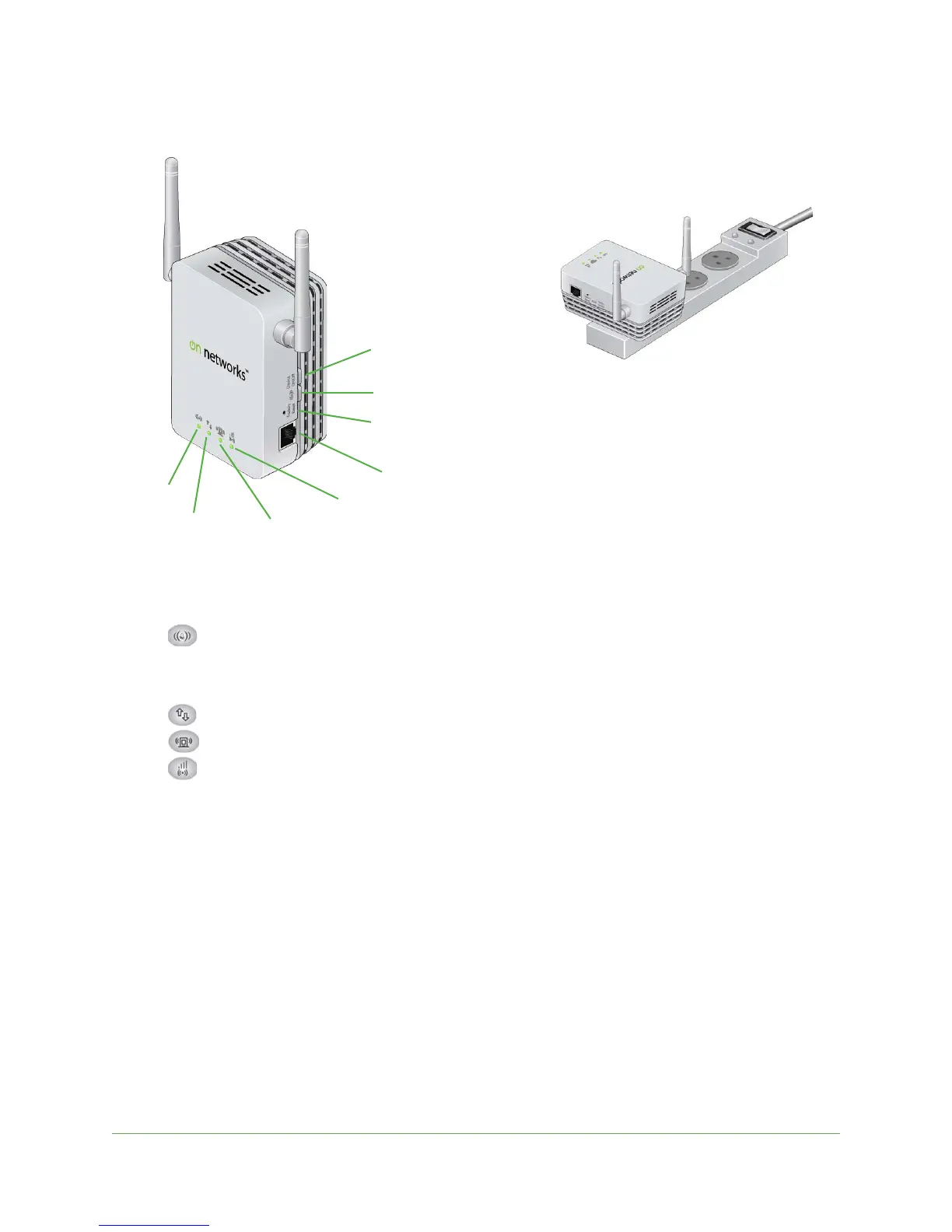
Figure 1. Extender
The LEDs on the front show how the extender is working:
•
WPS. This LED indicates a WPS wireless connection.
- Solid gre
en. The wireless connection uses wireless security (WPA or WPA2).
- Blinki
ng green. A WPS connection is in progress.
•
PC to Extender. The LED is lit when the extender is connected to a computer.
•
Status. This LED is lit when the extender is powered on.
•
Link Rate. This LED indicates a wireless connection between the extender and the
router.
- Green is be
st.
- Amb
er is good.
- Red is p
oor.
The side panel has the following features:
• Ethernet port. Y
ou can use this port for a wired connection to a computer or other device.
• Fac
tory Reset button. To use this button, stick a paper clip into the reset hole and hold it
until the Status LED flashes.
• WPS button. Press the
WPS button to connect the extender to your wireless router.
• Device On/Off button. This bu
tton turns the extender on and off.
WPS
Ethernet port
Factory Reset button
WPS button
Device On/Off button
PC to Extender Status
Link Rate
Note: For best performance,
position antennas pointing up.

 To Next Page
 Loading...