EasyManua.ls Logo

Onan 200 DFP - Troubleshooting

Onan 200 DFP
30 pages
Print Icon
To Next Page IconTo Next Page
To Previous Page IconTo Previous Page
Loading...
Troubleshooting
The
generator
set
has
a
number
of
sensor
units
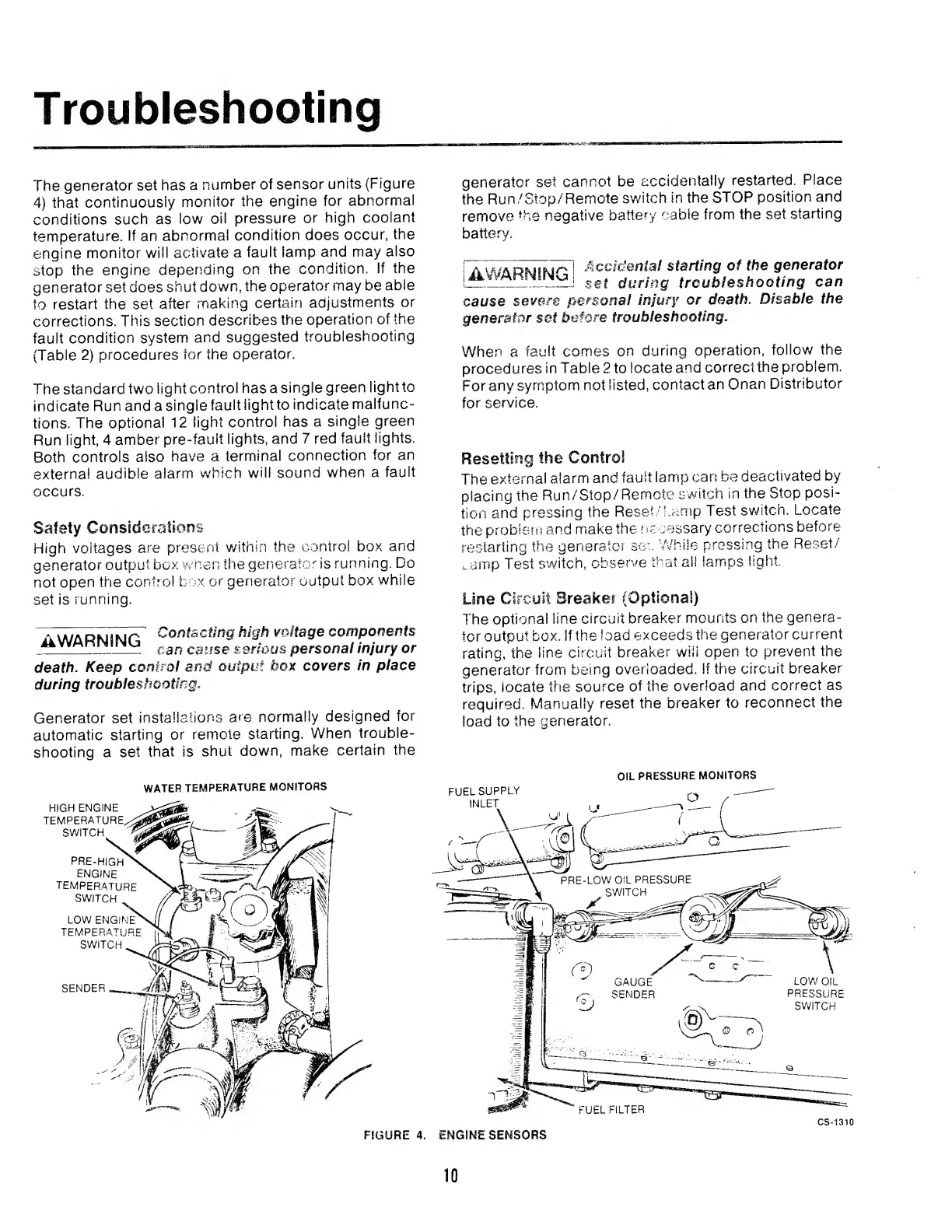
(Figure
4)
that
continuously
monitor
the
engine
for
abnormal
conditions
such
as
low
oil
pressure
or
high
coolant
temperature.
If
an
abnormal
condition
does
occur,
the
engine
monitor
will
activate
a
fault
lamp
and
may
also
stop
the
engine
depending
on
the
condition.
If
the
generator
set
does
shut
down,
the
operator
rnay
be
able
to
restart
the
set
after
making
certain
adjustments
or
corrections.
This
section
describes
the
operation
of
the
fault
condition
system
and
suggested
troubleshooting
{Table
2)
procedures
for
the
operator.
The
standard
two
light
control
has
a
single
green
light
to
indicate
Run
and
a
single
fault
light
to
indicate
malfunc¬
tions.
The
optional
12
light
control
has
a
single
green
Run
light,
4
amber
pre-fault
lights,
and
7
red
fault
lights.
Both
controls
also
have
a
terminal
connection
for
an
external
audible
alarm
which
will
sound
when
a
fault
occurs.
Safety
Considerations
High
voltages
are
present
within
the
control
box
and
generator
output
box
when
the
generator
is
running.
Do
not
open
the
control
box
or
generator
output
box
while
set
is
running.
~A
WARNIMP
Contacting
high
voltage
components
ikWAn
N
I
F
MU
can
catl§e
serious
personal
injury
or
death.
Keep
control
and
output
box
covers
in
place
during
troubleshooting
,
Generator
set
installations
are
normally
designed
for
automatic
starting
or
remote
starting.
When
trouble¬
shooting
a
set
that
is
shut
down,
make
certain
the
WATER
TEMPERATURE
MONITORS
HIGH
ENGINE
TEMPERATURE
SWITCH
PRE-HIGH
ENGINE
TEMPERATURE
SWITCH
generator
set
cannot
be
accidentally
restarted.
Place
the
Run/Stop/Remote
switch
in
the
STOP
position
and
remove?
the
negative
battery
cable
from
the
set
starting
battery.
rAv^APKiiAjr'l
Accidental
starting
of
the
generator
se
f
during
troubleshooting
can
cause
severe
personal
injury
or
death.
Disable
the
generator
set
before
troubleshooting
.
When
a
fault
comes
on
during
operation,
follow
the
procedures
in
Table
2
to
locate
and
correct
the
problem.
For
any
symptom
not
listed,
contact
an
Onan
Distributor
for
service.
Resetting
the
Control
The
externa!
alarm
and
fault
lamp
can
be
deactivated
by
placing
the
Run/Stop/Remote
switch
in
the
Stop
posi¬
tion
and
pressing
the
Reset/Lamp
Test
switch.
Locate
the
problem
and
make
the
necessary
corrections
before
restarting
the
generator
sec
While
pressing
the
Reset/
,.
amp
Test
switch,
observe
that
all
lamps
light.
Line
Circuit
Breaker
(Optional)
The
optional
line
circuit
breaker
mounts
on
the
genera¬
tor
output
box.
If
the
load
exceeds
the
generator
current
rating,
the
line
circuit
breaker
will
open
to
prevent
the
generator
from
being
overloaded.
If
the
circuit
breaker
trips,
locate
the
source
of
the
overload
and
correct
as
required.
Manually
reset
the
breaker
to
reconnect
the
load
to
the
generator.
OIL
PRESSURE
MONITORS
FIGURE
4.
ENGINE
SENSORS
CS-1310

Related product manuals