
 Need help?
Do you have a question about the onCare Dolphin Fluid Immersion Simulation System and is the answer not in the manual?
Warns about entrapment risk when the equipment is placed on bed frames leaving gaps.
Emphasizes patient assessment by a qualified clinician for optimal safety.
Prohibits use in the presence of flammable anesthetics or open flames.
Instructions to reduce the risk of electrical shock and equipment damage.
General warnings for safe use to reduce risk of burns, shock, fire, or injury.
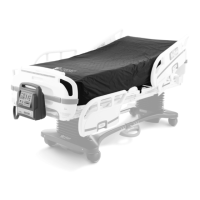
Introduces the Dolphin FIS system, its purpose, and key components.
Details how the system reduces shear and friction forces on skin.
Lists patient conditions and diagnoses for which the system is indicated.
Specifies the system's suitability for spinal cord injury patients.
Warns about entrapment risks with bed frames and gaps.
Explains the features and operation of the control unit.
Describes the quick deflation feature for CPR.
Explains the battery backup for continuous operation.
Details how to transport the patient with the system.
Explains the function of the storage switch.
Describes how to turn the unit on and off.
Explains how to select between Bed and Chair/Stretcher modes.
Details the alarm functions and fault conditions.
Explains how to lock and unlock the control panel.
Describes the battery status indicators.
Explains the Immersion Profile window and its LEDs.
Explains Autofirm, Comfort Adjust, and Auto Feedback.
Provides essential grounding instructions for safe installation.
Step-by-step guide for setting up the therapy mattress.
Lists checks for when the support surface fails to inflate.
Advises on resolving issues with mode or comfort adjustments.
Guidance on appropriate linens for the therapy mattress.
Instructions for placing and securing the therapy pad.
Advises on patient positioning for optimal pressure redistribution.
Describes positioning for sitting up and preventing shear.
Guidance on managing incontinence and skin moisture.
Discusses the risk of patient movement and entrapment.
Advises on using the system with traction equipment.
Emphasizes regular skin monitoring.
Guidelines for adjusting bed height to prevent falls.
Instructions for cleaning the control unit.
Procedures for general cleaning of the therapy mattress.
Steps for disinfecting the unit and mattress.
How to clean the therapy pad.
Warns against using steam cleaning devices.
Warns about authorized personnel for maintenance.
Guidelines for storing the system when not in use.
Lists the weight of system components.
Indicates maximum patient weight capacities.
Provides physical dimensions of system parts.
Details electrical requirements.
Specifies operating and storage environmental limits.
Lists agency approvals for the control unit.
Provides guidance on RF emissions and their impact.
Details immunity requirements for various electromagnetic tests.
Provides separation distances based on transmitter power.
Information on parts availability and service requests.
Details conditions that void the warranty.
 General
| Brand | onCare |
|---|---|
| Model | Dolphin Fluid Immersion Simulation System |
| Category | Medical Equipment |
| Language | English |

 To Next Page