EasyManua.ls Logo

One for All PVR 6 - Key Charts

One for All PVR 6
45 pages
Print Icon
To Next Page IconTo Next Page
To Previous Page IconTo Previous Page
Loading...
OWNERS MANUAL
Features and Functions 3
KEY CHARTS
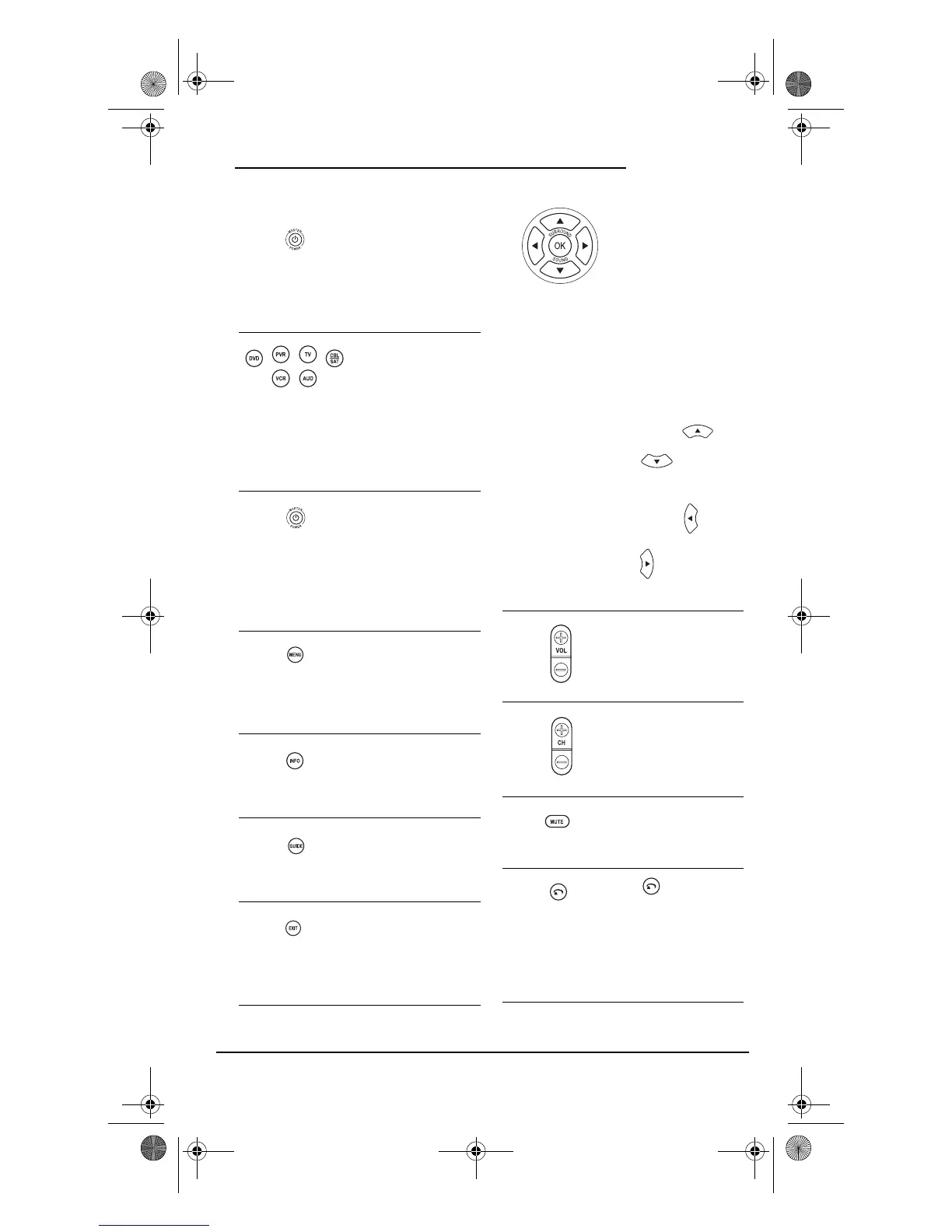
When the LED (red
light) blinks, the
remote control is
working and (after
programming) is
sending signals.
Press TV, PVR, DVD,
CBL/SAT, AUD, or VCR
once to select a
desired home
entertainment device
to control. Also see
the “Device Table” on
page 5.
Press POWER once to
turn on or off the
selected device. For
master power control,
see “Programming
Master Power” on
page 9.
Press MENU once to
display your selected
devices main menu.
For PVR/DVRs, use
PVR Menu.
Use INFO to display
the current channel
and program
information.
Use GUIDE to display
your selected device’s
program guide or
setup menu.
Use EXIT to exit from
your selected device’s
guide or menu.
Use the Cursor Keys
to move the cursor in
the program guide
and menu screens.
Use OK to choose
options from your
selected devices
menu or guide.
In the AUD mode, use
SELECT to set the
surround
sound.Use
(or ) to adjust
the volume higher (or
lower).Use
(or ) to adjust the
balance left (or right).
Use VOL + (or VOL -)
to raise (or lower) the
sound volume.
Use CH + (or CH -) to
select the next higher
(or lower) channel.
Press MUTE once to
turn the sound off or
on.
Use to command
your PVR/DVR to
instantly replay the
last 7 seconds of a
program you are
viewing.
PVR 6 Owners Manual.fm Page 3 Monday, December 20, 2004 11:17 AM

Table of Contents

Related product manuals