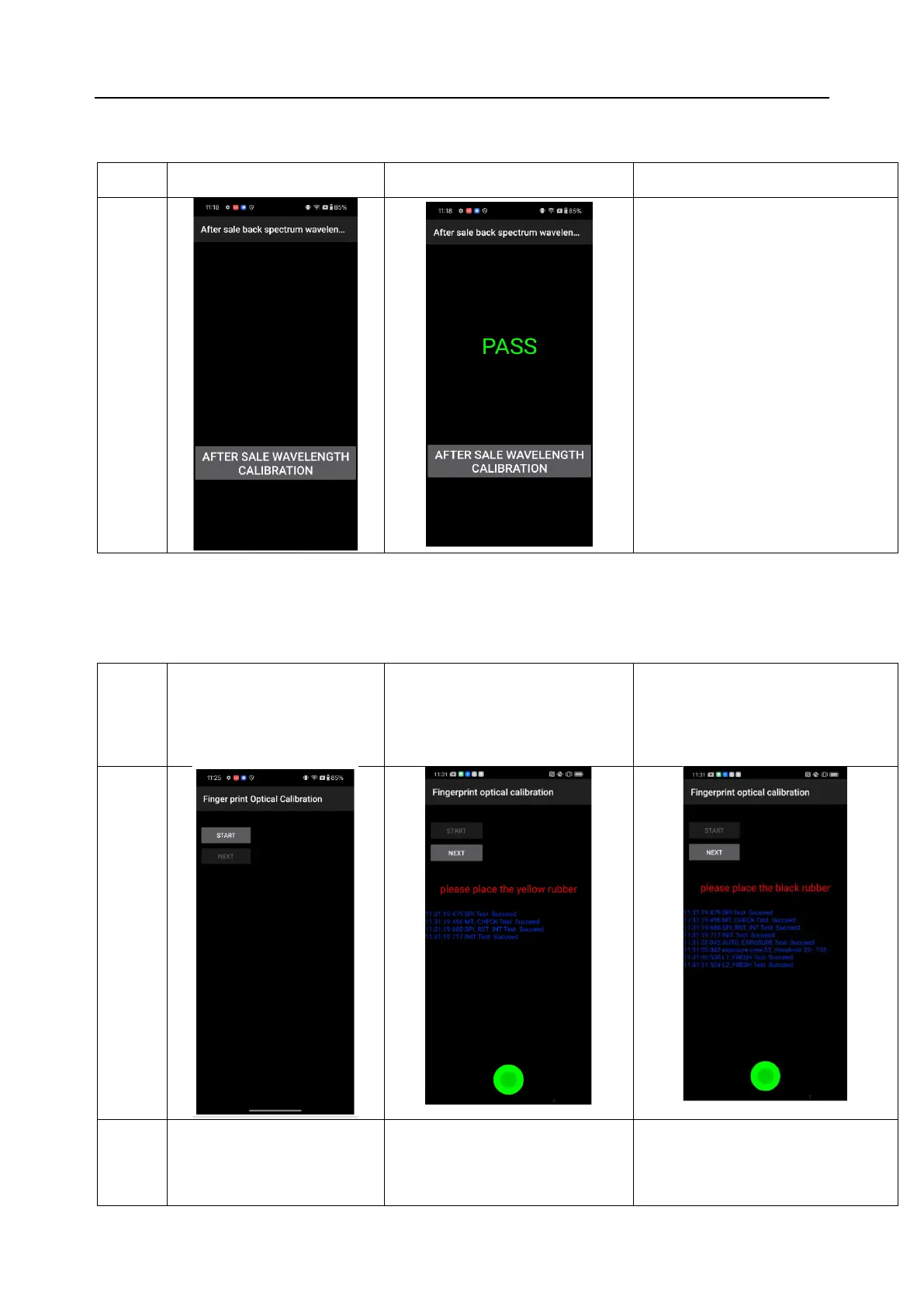
6.3 After Sale back spectrum wavelength calibration
1. Manually click “After Sale back
spectrum wavelength Calibration”
2. “Pass” means calibration is successful
3. Manually return and confirm the result
6.4 Fingerprint optical calibration
1.Click "START" to start calibration
after it jumps into the fingerprint
optical calibration
2.According to the prompt "please place
the yellow rubber ", put the yellow
rubber on the fingerprint spot area (the
groove is facing down), and click "NEXT"
until it prompts " please place the black
rubber".
3. According to the prompt "please place
the black rubber", put the black rubber on
the fingerprint spot area (the groove is
facing down), click "NEXT" until the "please
place the yellow stripe rubber " prompts to
remove the black rubber ;
4. According to the prompt “Please
place the yellow- striped rubber”,
put the yellow stripe rubber
(striped down) in the spot area,
click “NEXT”;
5. Note: The stripe direction of the
yellow stripe rubber should follow the
long side of the phone
6. Use the new fingerprint calibration tool



 To Next Page