Advanced
Setup-Continued
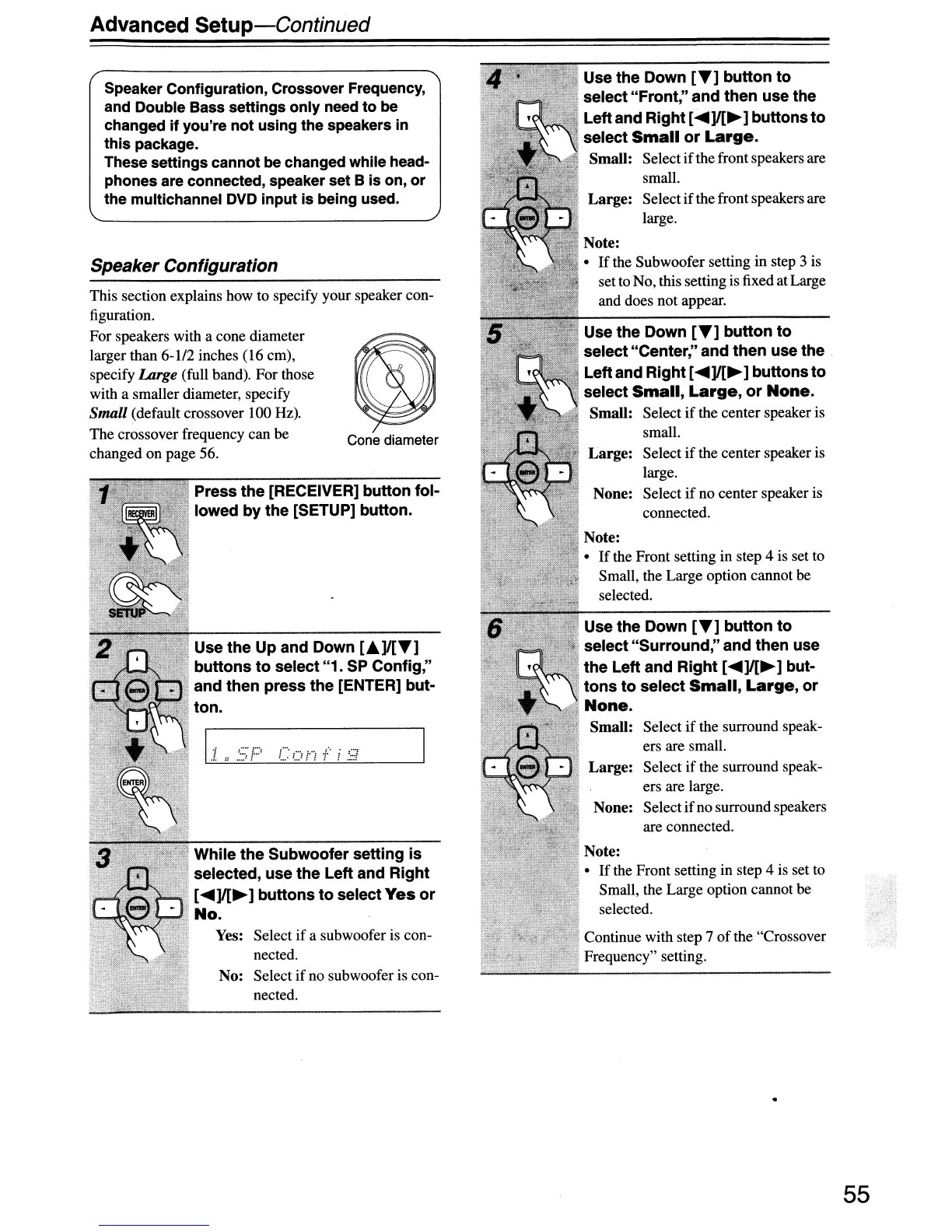
Speaker Configuration
Use the Down
[T]
button
to
select
"Front;'
and
then
use the
Leftand Right [
.....
]I[~]
buttons
to
select
Small
or
Large.
Small: Select
if
the front speakers are
small.
Large:
Select
if
thefront speakers are
large.
Use the Down
[T]
button
to
select "Surround," and then use
the
Left and
Right
[
.....
]I[~]
but-
tons
to
select
Small,
Large,
or
None.
Small: Select
if
the surround speak-
ers are small.
Large:
Select
if
the surround speak-
ers are large.
None: Select ifno surroundspeakers
are connected.
Note:
•
If
the Subwoofer setting in step 3 is
set to No, this setting is fixed atLarge
and does not appear.
Note:
•
If
the Front setting in step 4 is set to
Small, the Large option cannot be
selected.
Use the Down
[T]
button
to
select "Center," and
then
use the
Leftand Right [
.....
]I[~]
buttons
to
select
Small,
Large,
or
None.
Small: Select
if
the center speaker is
small.
Large:
Select ifthe center speaker is
large.
None: Select
if
no center speaker is
connected.
Note:
•
If
the Front setting in step 4
is
set to
Small, the Large option cannot be
selected.
Continue with step 7
of
the "Crossover
Frequency" setting.
Cone diameter
1'1
'::·:'1:::'
.:.
::
.....
:
.
:,i,
While
the
Subwoofer setting
is
.
,".'1
selected, use the Left and Right
[
.....
]I[~]
buttons
to
select
Yes
or
No.
Yes: Select
if
a subwoofer is con-
nected.
No: Select
if
no subwoofer is con-
nected.
~ Press
the
[RECEIVER] button fol-
,'''-'--'-.'''~:'
lowed
by
the [SETUP] button.
Use
the
Up and Down [
....
]I[T]
•
~
buttons
to
select "1.
SP
Config,"
~.
" and then press
the
[ENTER] but-
ton.
Speaker Configuration, Crossover Frequency,
and Double Bass settings only need
to
be
changed
if
you're not using the speakers in
this package.
These settings cannot be changed while head-
phones are connected, speaker set B is on,
or
the multichannel
DVD
input is being used.
This section explains how to specify your speaker con-
figuration.
For speakers with a cone diameter
larger than
6-112
inches (16 em),
specify
Large (full band). For those
with a smaller diameter, specify
Small (default crossover 100 Hz).
The crossover frequency can
be
changed on page 56.
55


 To Next Page
 Loading...