Need help?
Do you have a question about the Onkyo TX-NR787 and is the answer not in the manual?
Guide to selecting and connecting speaker layouts for optimal audio.
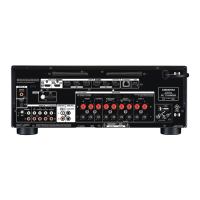
Instructions for connecting the unit to a TV, with or without ARC.
Examples for connecting AV components with and without HDMI jacks.
How to connect AV components for multi-zone audio playback.
Instructions for connecting FM and AM antennas for radio reception.
Steps for connecting the unit to a network via wired LAN or Wi-Fi.
Connecting IR receivers for remote control operation.
Proper procedure for connecting the unit's power cord.
How to play audio from AV components like Blu-ray players through the unit.
Wireless audio playback from Bluetooth-enabled devices.
Instructions for enjoying internet radio services like TuneIn Radio.
How to enjoy music playback wirelessly via Spotify Connect.
Wireless music playback from iOS devices using AirPlay.
Wireless music playback and group playback via DTS Play-Fi.
Enjoying group playback and music from various sources via FlareConnect.
Playing music files stored on a USB storage device.
Streaming music files from PCs or NAS devices on the network.
Saving and playing favorite playlists (Play Queue) from USB or network sources.
Receiving AM and FM radio stations using the built-in tuner.
Enjoying audio in separate rooms (Zone 2/Zone 3) while playing in the main room.
Adjusting sound quality settings like tone.
Selecting the optimum listening mode for movies, TV, music, and games.
Overview of advanced settings configurable via the Setup menu.
Making network settings using an Internet browser on a PC or smartphone.
Updating the unit's firmware via network or USB port for improved operations.
Guided setup process for initial configuration upon first use.
Procedures to resolve operational issues by restarting or resetting the unit.
Troubleshooting steps for issues related to the unit turning on or off.
Troubleshooting steps for audio output problems and settings.
Troubleshooting issues related to selecting or listening to specific audio modes.
Troubleshooting steps for video display issues, including no image or flickering.
Troubleshooting issues with HDMI linked operation and CEC devices.
Explanation of HDMI interface, compatible functions, and standards.
List of audio file formats supported by the unit for playback.
Technical details of the unit's amplifier, video, and tuner sections.
 General
| Channels | 9.2 |
|---|---|
| THD+N (Total Harmonic Distortion + Noise) | 0.08% |
| Total Harmonic Distortion | 0.08% |
| Input Sensitivity and Impedance (Line) | 200 mV/47 kΩ |
| Signal to Noise Ratio (Line) | 106 dB |
| Speaker Impedance | 4 - 16 ohms |
| HDMI Outputs | 2 |
| Audio Return Channel (ARC) | Yes |
| Digital Audio Inputs | 2 Optical, 1 Coaxial |
| Analog Audio Inputs | 5 |
| Phono Input | Yes |
| Zone 2 Audio Output | Yes |
| Zone 3 Audio Output | Yes |
| Speaker Outputs | 9 |
| Subwoofer Outputs | 2 |
| USB Input | 1 (Front) |
| Ethernet | Yes |
| Wi-Fi | Yes |
| Bluetooth | Yes |
| Radio Tuner | FM/AM |
| Surround Sound Processing | Dolby Atmos, DTS:X |
| Audio Decoders | Dolby TrueHD, DTS-HD Master Audio |
| Standby Power Consumption | 0.15 W |
| Input Sensitivity and Impedance (Phono MM) | 3.5mV/47kΩ |
| Frequency Response | 10 Hz - 100 kHz |
| Signal to Noise Ratio (Phono MM) | 80dB |
| HDMI Inputs | 7 |
| HDMI Support | 4K/60Hz, HDR10, Dolby Vision, HLG, HDCP 2.2 |
| USB Port | Yes |
| Streaming Services | Spotify, Tidal, TuneIn |
| FM Tuning Range | 87.5MHz-108MHz |
| Video Support | 4K/60Hz, HDR10, Dolby Vision, HLG |
| Dimensions (W x H x D) | 435 x 177 x 379.5mm |
| AM Tuning Range | 530 kHz-1, 710 kHz |


 To Next Page