6
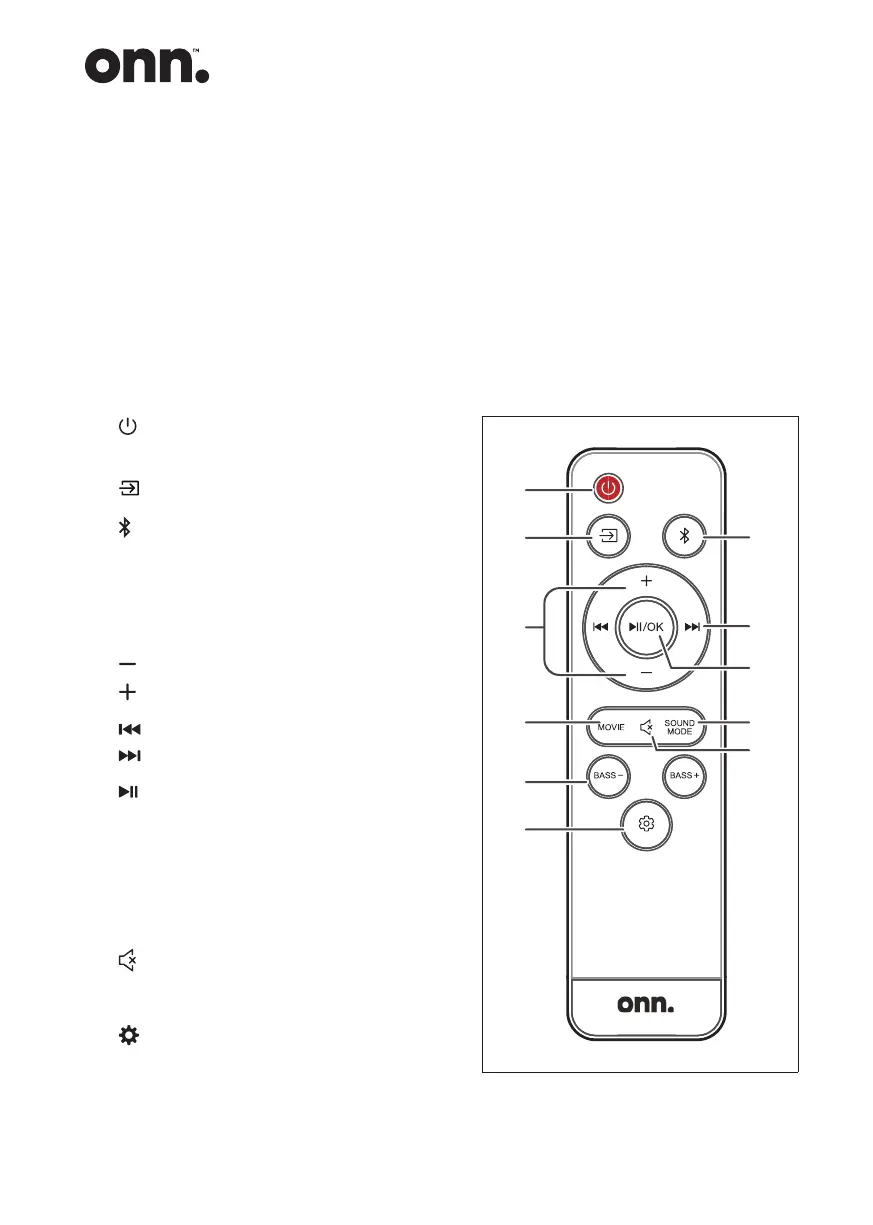
Recognis the remote control buttons
1 : Switch the unit between ON and
STANDBY mode.
2 : Select the play function.
3 : Select the Bluetooth mode.
Press and hold to activate the
pairing function in Bluetooth mode
or disconnect the existing paired
Bluetooth device.
4 : Decrease the volume level.
: Increase the volume level.
5 : Skip to next track.
: Skip to previous track.
6 /OK : Play/pause/resume playback.
Conrm a selection.
7 MOVIE : Select a preset sound effect.
8 SOUND MODE : Select a preset sound
effect.
9 (MUTE) : Mute or resume the sound.
10 BASS+/- : Adjust bass level.
11 (MENU) : Enter setup menu.
• Remove the battery from the
remote control when not in use for
a long period of time, as corrosion
or battery leakage may occur and
result in physical injury, and/or
property damage, and/or re.
• Do not use any batteries other
than those specied.
• Do not mix new batteries with old
ones.
• Never recharge a battery unless it is
conrmed to be a rechargeable type.


 To Next Page