Quick Reference Guide
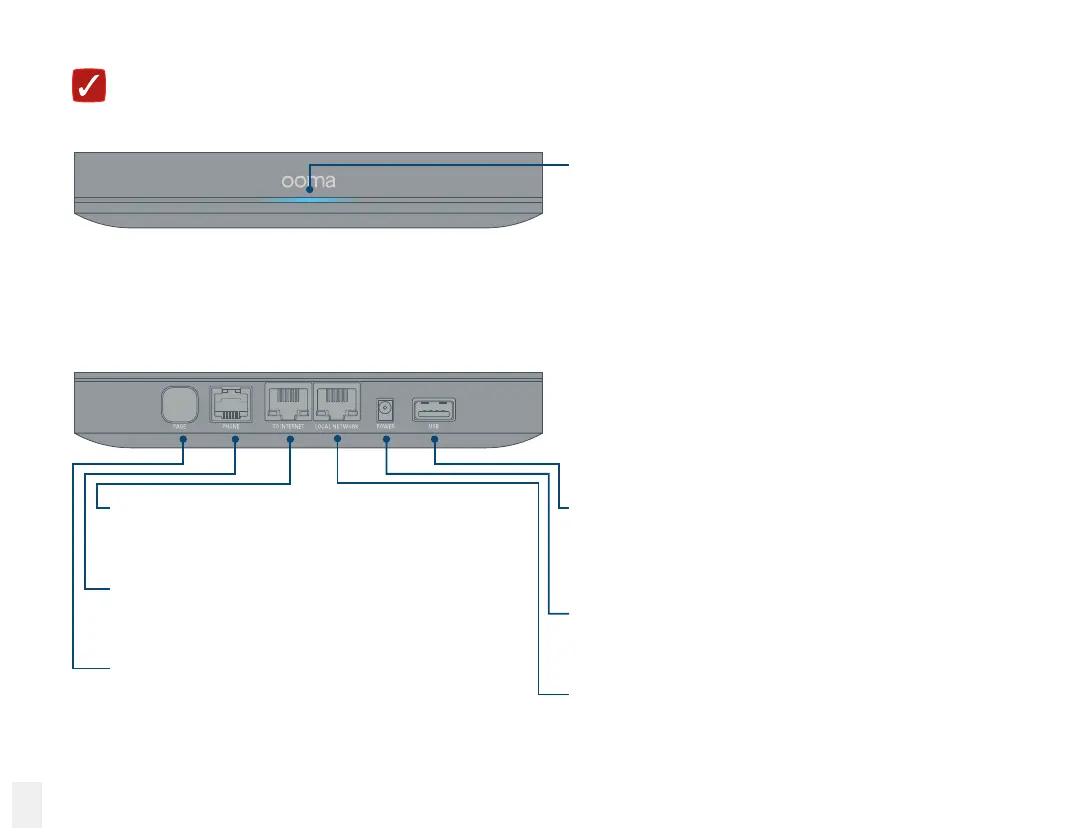
TO INTERNET port
Link with your modem or router to connect
your Base Station to the Internet.
PHONE port
Connect your telephone or telephony device
with a standard telephone cable.
PAGE button
•
Press once to page handsets.
•
Press and hold to register a new device.
USB port
Connect optional accessories such as
the Ooma Bluetooth Adapter or the
Ooma Wireless Adapter.
POWER port
Connect the included AC adapter to
power the Base Station.
LOCAL NETWORK port
Connect a computer to the Base Station
for additional setup options.
Front view
Back view
18
Ooma Office Base Station
System status indicator
•
Lights up blue when system is operational.
•
Blinks amber when device is booting up.
•
Lights up amber when Ooma service is
not working.
•
Blinks blue rapidly when device is in
registration mode.
•
Alternately blinks blue and amber during
a software upgrade.



 To Next Page