Page 27
Using the OontZ app for Support
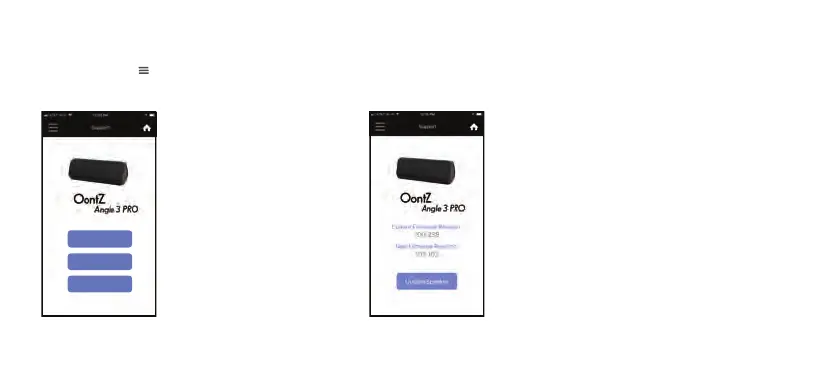
Select the Menu in the upper left hand corner of the app and select ‘Support’ from the menu to access the Support
screen.
Press ‘User Guide’ to display the
latest version of the online user
guide and FAQ for the OontZ
Angle 3 Pro.
Press ‘Update Speaker’ to
check the version of the
current firmware version on
the OontZ Angle 3 Pro and
whether there is a new version
available.
The firmware version of the OontZ Angle 3 Pro is
shown under ‘Current Firmware Version’.
If there is a new version of firmware for the OontZ
Angle 3 Pro it will be displayed under ‘New Firmware
Version’ along with the version number of the
update.
To update the OontZ Angle 3 Pro to the ‘New
Firmware Version’ press ‘Update Speaker’ and follow
the instructions in the OontZ app.
Note: The update may take up to 30 minutes. Make
sure the OontZ Angle 3 Pro is plugged into power
and the iPhone or Smartphone is not interrupted by
a phone call during the update of the OontZ Angle 3
Pro.
Press ‘Contact Us’ to display
the customer support form.
Fill in the information in the
displayed form to email to our
OontZ support team.
User Guide
Update Speaker
Contact Us














 To Next Page