The OontZ Angle 3 is a portable Bluetooth speaker designed and engineered by Cambridge SoundWorks, offering a range of features for audio playback and hands-free communication.
Function Description:
The OontZ Angle 3 serves as a portable Bluetooth speaker, capable of playing audio wirelessly from various devices such as iPhones, iPads, smartphones, tablets, Apple Macs, Windows laptops/computers, and Amazon Echo devices. It also supports audio playback from non-Bluetooth sources via a 3.5mm audio cable. A key feature is its OontZ Dual Speaker model, which allows two OontZ Angle 3 speakers to connect wirelessly for enhanced stereo separation or to play in separate areas. The speaker also functions as a wireless hands-free personal speakerphone for calls when connected to smartphones and iPhones.
Usage Features:
Physical Orientation:
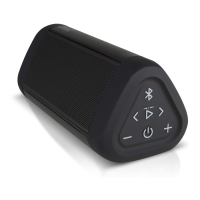
The speaker can be played either horizontally or vertically. When played horizontally, the controls are on the side, and when played vertically, the controls are on the top. The design includes Dual Precision Stereo Drivers and a Passive Bass Radiator, which has its own grille and faces bass away from the stereo drivers to prevent interference with mids and highs.
The OontZ Angle 3 features several buttons for intuitive control:
- Power Button: Turns the speaker on and off. Press and release to turn on. Press and hold for 2 seconds to turn off.
- Bluetooth/Speakerphone Button: Used for Bluetooth pairing and speakerphone functions. Press and release to answer/end calls. Press and hold for 3 seconds to reject calls or disconnect the current Bluetooth device.
- Volume Down (-) Button (Dual Function): Press and release to decrease volume one level. Holding it down results in track back.
- Volume Up (+) Button (Dual Function): Press and release to increase volume one level. Holding it down results in track advance.
- Play/Pause Button: Press and release to pause or play audio.
Lights and Indicators:
The speaker uses LED lights to indicate its status:
- Blue Light (when speaker is on):
- Flashing Blue: Speaker is in pairing mode.
- Solid Blue: Speaker is connected to a device.
- Solid Blue (after 3.5mm cable connection): Blue light turns solid blue when a 3.5mm audio cable is plugged into the AUX IN Jack.
- Red Light (when charging):
- Slowly Flashing Red: Battery is charging.
- Solid Red: Battery is fully charged.
- Rapidly Flashing Red: Battery charge is less than 15%.
- White/Orange Light (Dual Speaker Mode):
- Solid White: Speaker is the second speaker connected in OontZ Dual Speaker mode (Left Channel - Right Channel).
- Solid Orange: Speaker is the second speaker connected in OontZ Dual Speaker mode (Dual Mode).
Battery and Power:
The OontZ Angle 3 has a rechargeable battery. It comes with a partial charge and is ready to play out of the box. For maximum playtime, it should be fully charged. The speaker can be used while charging.
- Music Play Time: Up to 14 hours on a full charge at 2/3 volume. Louder volumes will reduce playtime.
- Low Charge Remaining: When the battery charge is less than 15%, the Red Light flashes rapidly, and the volume decreases to preserve remaining battery charge.
- Power Saving Feature: When playing from battery power, the speaker turns off after 15 minutes of inactivity to conserve battery. This feature is disabled when connected to certain devices like Amazon Echo Dot or Amazon Echo, in which case the speaker remains on until manually turned off.
Charging:
The speaker is charged using the included USB Type C Charging Cable. The small end of the cable connects to the USB Type C Charging Connector on the speaker, and the larger end connects to a USB wall charger (5V = 3.0A maximum, UL listed) or a USB port on a laptop/computer. A full charge from a low battery takes up to 6 hours.
Pairing and Connecting (Bluetooth):
- Step 1 (Turning On and Pairing Mode): Turn on the OontZ Angle 3. It will enter pairing mode with a flashing Blue Light. The speaker automatically reconnects to the last connected device if it's within range. To connect to a new device, disconnect the currently paired device by pressing and holding the Bluetooth button for 3 seconds until the Blue Light flashes.
- Step 2 (Connecting to Devices):
- Smartphones/Tablets: Go to Bluetooth settings on your device, ensure Bluetooth is on, and select 'OontZ Angle 3 TWS xxx' (where xxx are unique characters for your speaker). The Blue Light will turn solid blue, and a quiet chime will sound, indicating a successful connection.
- Apple Mac/Windows Laptop/Computer: Refer to TheOontZ.com/pairing for specific instructions.
- Amazon Echo Devices: Use the Alexa app. Open the app, go to 'Devices', then 'Echo & Alexa', select your Echo device, then 'Bluetooth Devices', and 'Pair A New Device'. Select 'OontZ Angle 3 TWS xxx'. The speaker will make a 'ding' sound when connected. For subsequent connections, turn on the speaker and say "Alexa, connect my speaker" or "Alexa, pair". It is recommended to keep the speaker plugged into a USB wall charger when connected to an Echo device to prevent battery drain, as the power saving feature is disabled.
Connecting to Non-Bluetooth Audio Sources:
A 3.5mm audio cable can be used to connect the speaker to non-Bluetooth devices. Plug one end into the AUX IN Jack on the speaker and the other into the headphone jack of your audio source. The Bluetooth function is disabled when the 3.5mm cable is connected.
Wireless Hands-Free Personal Speakerphone:
This feature works with Bluetooth-connected smartphones and iPhones. It is not supported with PCs, laptops, Apple Macs, or other device types.
- Answering/Ending Calls: Press and release the Bluetooth button.
- Rejecting Calls: Press and hold the Bluetooth button for 3 seconds.
- Keep the speaker close to ensure clear audio for the listener.
OontZ Dual Speaker Mode (Connecting Two OontZ Angle 3 Speakers):
This feature allows two OontZ Angle 3 speakers to play music wirelessly up to 100 feet apart.
- Left Channel - Right Channel Mode (Stereo Separation):
- Turn on both speakers.
- Pair and connect one speaker (the "Play Control Speaker") to your device. Its Blue Light will be solid blue.
- Ensure the second speaker's Blue Light is flashing (not connected to any device). If it's connected, disconnect it by holding the Bluetooth button for 3 seconds.
- On the Play Control Speaker, press and hold the Play/Pause button for 3 seconds until it says "Dual Pairing".
- After a few seconds, the Play Control Speaker will say "Left Channel", and the second speaker will say "Right Channel". The Play Control Speaker's light will remain solid Blue, and the second speaker's light will be solid White.
- In this mode, buttons on the Play Control Speaker control play/pause, track back/forward, and answer/end calls. The second speaker's controls are disabled. Speakerphone audio only plays through the Play Control Speaker.
- Dual Mode (In Separate Areas):
- First, connect the speakers in Left Channel - Right Channel mode.
- To switch to Dual Mode, quickly press the Bluetooth button twice on the Play Control Speaker. The second speaker's light will turn from solid White to solid Orange. Both speakers will say "Dual Mode".
- To switch back to Left Channel - Right Channel, quickly press the Bluetooth button twice on the Play Control Speaker. The second speaker's light will turn from solid Orange to solid White. Both speakers will say "Left Channel" and "Right Channel" respectively.
- Turning Off/On in Dual Speaker Mode: Turning off the Play Control Speaker turns off both speakers. Turning off the second speaker first will only turn off that speaker, and the Play Control Speaker will continue to play as a single speaker. When turning both speakers back on, they will automatically try to reconnect to each other.
- Disconnecting Speakers from Each Other: With both speakers on, press and hold the Play/Pause button on the Play Control Speaker for 3 seconds. The White Light on the second speaker will turn off, and the speakers will be disconnected.
- Note on Video Playback: Playing audio from a video or TV in OontZ Dual Speaker mode is not recommended due to potential audio/video sync delays.
Maintenance Features:
Water Resistance (IPX5):
The OontZ Angle 3 is IPX5 water-resistant, meaning it can resist gentle water spray and splashes. It is suitable for use in the shower, at the beach, or by the pool. However, it cannot be partially or fully submerged in water, nor should it be left in a wet environment for extended periods, as this can cause irreparable damage.
Rubber Flap:
A rubber flap covers the connectors (AUX IN Jack and USB Type C Charging Connector) to maintain water resistance. This flap needs to be closed to keep the speaker water-resistant and dustproof. When the flap is open for charging or using the 3.5mm audio cable, the speaker is not water-resistant and should be kept away from water.
Resetting the Speaker:
To reset the OontZ Angle 3:
- Remove any Micro USB charging cable and 3.5mm Audio cable if connected.
- Press and hold down the Power button and the (+) button together for 1 second, then release.
- The speaker will be reset and can then be turned on.
Safety and Precautions:
- Never use the speaker in the shower, bath, or near water when it is plugged into a charging source to prevent electric shock.
- Protect the USB Type C Charging Cable from being pinched.
- Unplug the charging cable during lightning storms or when unused for long periods.
- Do not place the speaker near heat sources (radiators, stoves, etc.) or naked flame sources (candles).
- Do not expose the speaker to excessive heat (direct sunlight, fire).
- Do not make alterations to the speaker.
- The battery is not replaceable.
- Use only agency-approved power supplies that meet local regulatory requirements (UL, CSA, VDE, CCC).
- If the battery leaks, avoid contact with skin or eyes and seek medical advice if contact occurs.

 Need help?
 General












 To Next Page
