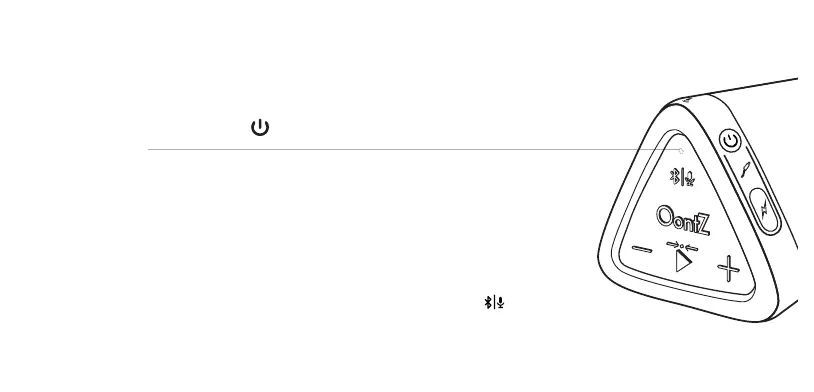
7XUQ21\RXU2RQW=$QJOH
)ODVKLQJ%OXH/LJKW
- The OontZ Angle 3 is ready to pair and connect.
6ROLG%OXH/LJKW
- The OontZ Angle 3 has automatically reconnected to the last device it was connected to
and is ready to play.
- The OontZ Angle 3 will automatically try to connect to the last device it was connected to each
time it is turned on and that device is within range.*
7KH2RQW=$QJOHFDQEHFRQQHFWHGWRRQHGHYLFHDWDWLPH
7RSDLUDQGFRQQHFWWRDGLHUHQWGHYLFH\RXQHHGWRȴUVWGLVFRQQHFWWKHFXUUHQWO\SDLUHGdevice.
- To disconnect the current device, press and hold down the %OXHWRRWKEXWWRQ for 3 seconds.
- The %OXH/LJKWwill begin ȵDVKLQJand the OontZ Angle 3 is ready to pair and connect to your device.
Pair & Connect -- Step 1
Page 10
0DNHVXUH\RXU2RQW=$QJOHEDWWHU\KDVDVXɝFLHQWFKDUJHLWLVQRWDEOHWRFRQQHFWZKHQWKHFKDUJHLVWRRORZ
- Your device needs to be within 100 unobstructed feet of the OontZ Angle 3 to pair and connect. If there is an
issue when connecting please move your device closer to the speaker, then pair and connect.
([FHSWLRQFHUWDLQGHYLFHVPD\QRWDXWRPDWLFDOO\UHFRQQHFW
$PD]RQ(FKRGHYLFHVZLOOQRWDXWRPDWLFDOO\UHFRQQHFW<RXZLOOQHHGWRVD\$OH[DFRQQHFWP\VSHDNHU














 To Next Page