USE AND MAINTENANCE INSTRUCTIONS
MANUALE DI USO E MANUTENZIONE
26
Box passerelle
Passerella a scomparsa
EDITION OF 02/2012
ã Control panel retractable gangway
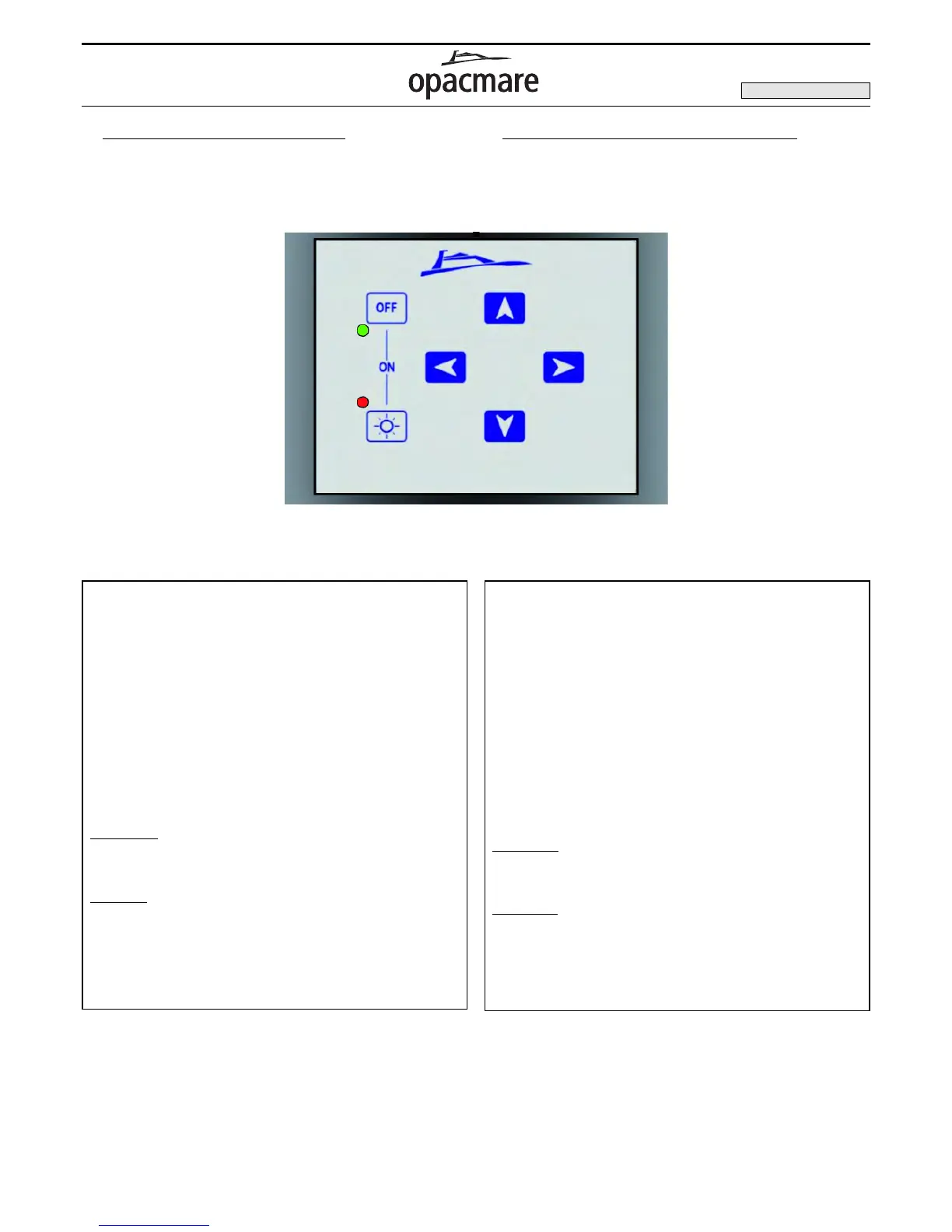
The command panel is of short dimension and it is constituted from one
digital keyboard to 6 (8 optional for port garage) buttons: put to stern the
boat in a position that permits to see all the drivings.
ã Pannello comandi passerella a scomparsa
Il pannello comandi è di ridotte dimensioni costituito da una tastiera dig-
itale a 6 (8 optional per portello garage) tasti: collocato a poppa dell'im-
barcazione, in posizione tale che permetta di seguire a vista tutti gli
azionamenti.
1 Operates the RAISING of the gangway
2 Operates the LOWERING of the gangway
3 Operates the RETRACTION of the gangway and lining up
pushing
4 Operates the EXTENSION of the gangway
5 Operates the RAISING of the port (optional)
6 Operates the LOWERING of the port (optional)
OFF-LIGHTS button enables the electronics
LIGHT button enables or disables the optical fiber illumination
on the gangway (optional)
OFF button disables the electronics
Gr
een light: it lights up when the ON button is pushed, it shows
that the gangway controls can be operated and it turns off after
2 minutes.
Red light:
this shows that the electrical system is OFF.
IMPORTANT: The gangway is provided with sensors which
avoid incorrect operating.
1 Comanda il SOLLEVAMENTO della passerella
2 Comanda l’ABBASSAMENTO della passerella
3 Comanda il RITIRO della sezione telescopica delle
passerella e l’autoallineamento tenendolo premuto
4 Comanda l’ESTENSIONE delle sezione telescopica delle
passerella
5 Comanda l’APERTURA del portello (optional)
6 Comanda la CHIUSURA del portello (optional)
Tasto
OFF+LIGHTS per l’accensione dell’elettronica
Tasto
LIGHTS comanda l’accensione e lo spegnimento dell’il-
luminazione a fibre ottiche (optional)
Tasto OFF per lo spegnimento dell’elettronica
Spia verde:
si accende quando si premono i tasti OFF+LIGHTS
segnala che sono attivi i comandi della passerella e si spegne
dopo 2 minuti
Spia rossa:
segnala che le luci sono accese (fibre ottiche)
manualmente e tali rimarranno fino a che non verrà ripremuto
il tasto LIGHTS.
Importante: la passerella con i sensori impedisce di generare
manovre errate.
Control panel / Pulsantiera elettronica Passerella
1
2
3
4



 To Next Page