Introduction 7
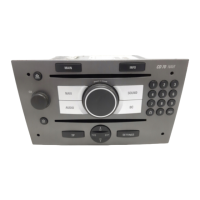
1 e knob ................................. 11
Briefly press: switch on/off
Infotainment system .............. 11
Press and hold: activate/
deactivate mute ..................... 11
Turn: adjust volume .............. 11
2 a button ................................ 31
Eject audio/MP3 CD .............. 31
3 Audio/MP3 CD slot ................ 38
4 NAVI ...................................... 38
Navigation menu ................... 38
5 MAIN ..................................... 11
Recall main display .............. 11
6 Multifunction knob ................. 11
Turn: select menu items
and commands ..................... 11
Press: confirm a selection
(OK) ...................................... 11
7 INFO ..................................... 11
Additional, situation-
dependent information .......... 11
8 SOUND ................................. 19
Sound settings ...................... 19
9 0...9 station buttons .............. 22
Long press: save station ....... 22
Short press: select station ....22
10 u button ............................... 57
Repeat last navigation
message ............................... 57
11 G button ................................ 44
Recall home address ............ 44
12 BC ........................................... 6
Trip computer (if available) ..... 6
13 SETTINGS ............................ 11
Settings menu, depending
on the selected function ........ 11
14 Rocker switch ........................ 24
Radio: search backwards/
forwards ................................ 24
CD/MP3: skip track
backwards/forwards .............. 31
Navigation: scroll through
map displays and select
options .................................. 63
15 TP ......................................... 26
Activate or deactivate
radio traffic service ................ 26
16 AUDIO ................................... 22
Switch between radio and
CD menu ............................... 22
17 Navigation CD slot ................ 31
18 b button ............................... 38
Eject navigation CD .............. 38








 To Next Page