- Sender: input a name.
- SMTP Server: select a preset server in the list or input available mail service provider.
- SMTP User: your email address.
- SMTP password: your password.
- Receiver 1, 2, 3, 4: e-mail addresses who will receive alarm notification.
Press "Test" to check if everything is working correctly, and finally submit.
Note: the email notification is an image captured when the alarm is triggered. In case e-
mail notification is not needed, there is no need to fill this part.
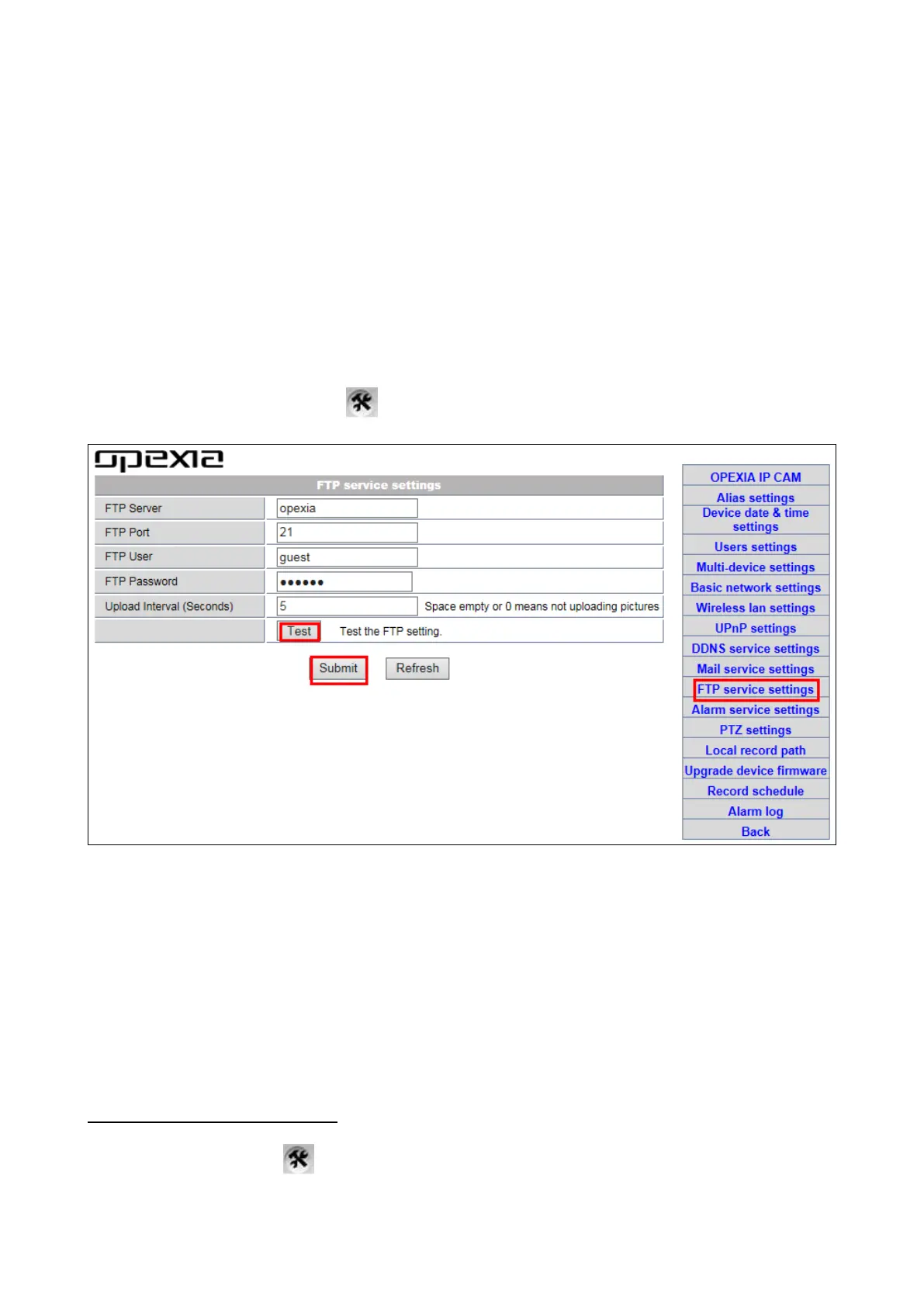
b) FTP Service Setting: this function is similar to “Mail server settings”. Images are sent to
the FTP when alarm is triggered.
Step 1. Login the camera, click >“FTP service settings".
Step 2. Input information requested
-FTP Server: ftp server address.
-FTP Port: ftp server port.
-FTP User: the ftp user.
-FTP Password: user password.
-Upload Interval: time frequency of pictures upload. Once alarm is triggered, the camera
will capture pictures & upload to FTP.
Note: leaving the field empty or set as "0" means not uploading pictures.
3.3-6 Alarm Service Settings
Login the camera, click >“Alarm Service Settings".


 To Next Page