b) Reboot Device
In case any error is caused and rebooting the device is needed, click [Reboot Device] and
confirm by clicking [OK]. This process might require 1 minute.
c) Upgrade Firmware & Web UI
Note that upgrading is risky and can cause further functional issues.
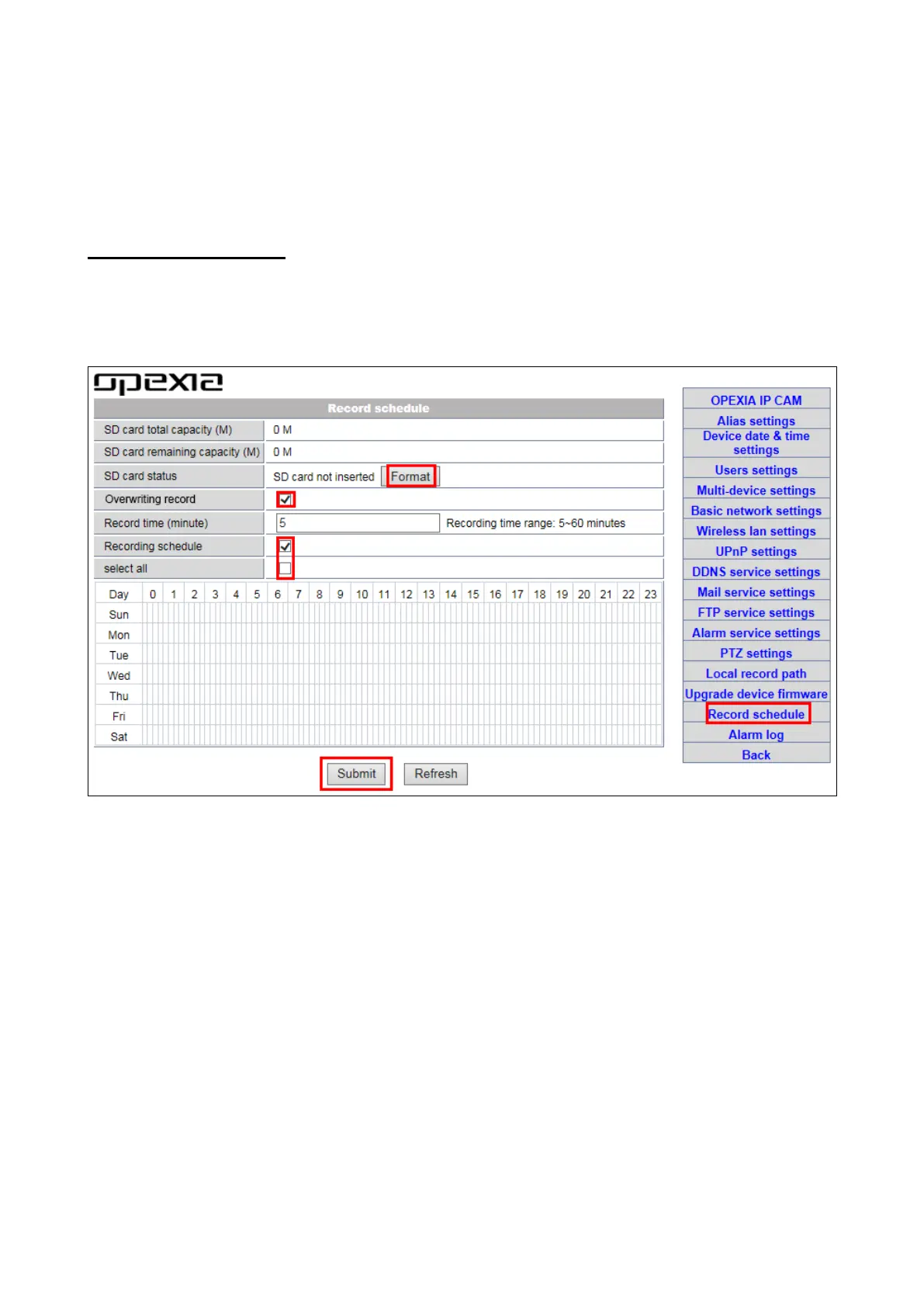
3.3-9 Record schedule
OPEXIA OP-CS01 supports memory card (micro SD) recording function. "Record
schedule" settings can be seen in the following image. After micro SD card is inserted,
the capacity is shown. Do format memory card before using.
Video playback online is available via IE browser. For details please refer to3.1-4.
4. Notice
Thank you for choosing OPEXIA security products.
Read carefully and pay attention to the following manual and keep it in a place that is
convenient to refer to.
Warranty does not cover damage caused by improper use or installation.
This alarm system does not warrant preventing any personal injury or property loss by
burglary, robbery, fire or otherwise. Therefore, the product does not compromise that in all
cases it will provide adequate warning or protection.
However, a properly installed and maintained alarm may reduce the risk of a burglary, fire
or other events occurring. Note that it is not insurance or a guarantee.


 To Next Page