OPT MACHINE VISION TECH.CO. LTD
ADD:8 JingSheng Road, JingXia ChangAn DongGuan China 523853
TEL: 0769-82716188 FAX: 0769-81606698
E-mail:optmv1@optmv.com Website:Http://www.optmv.net
4、Software Operation Instructions
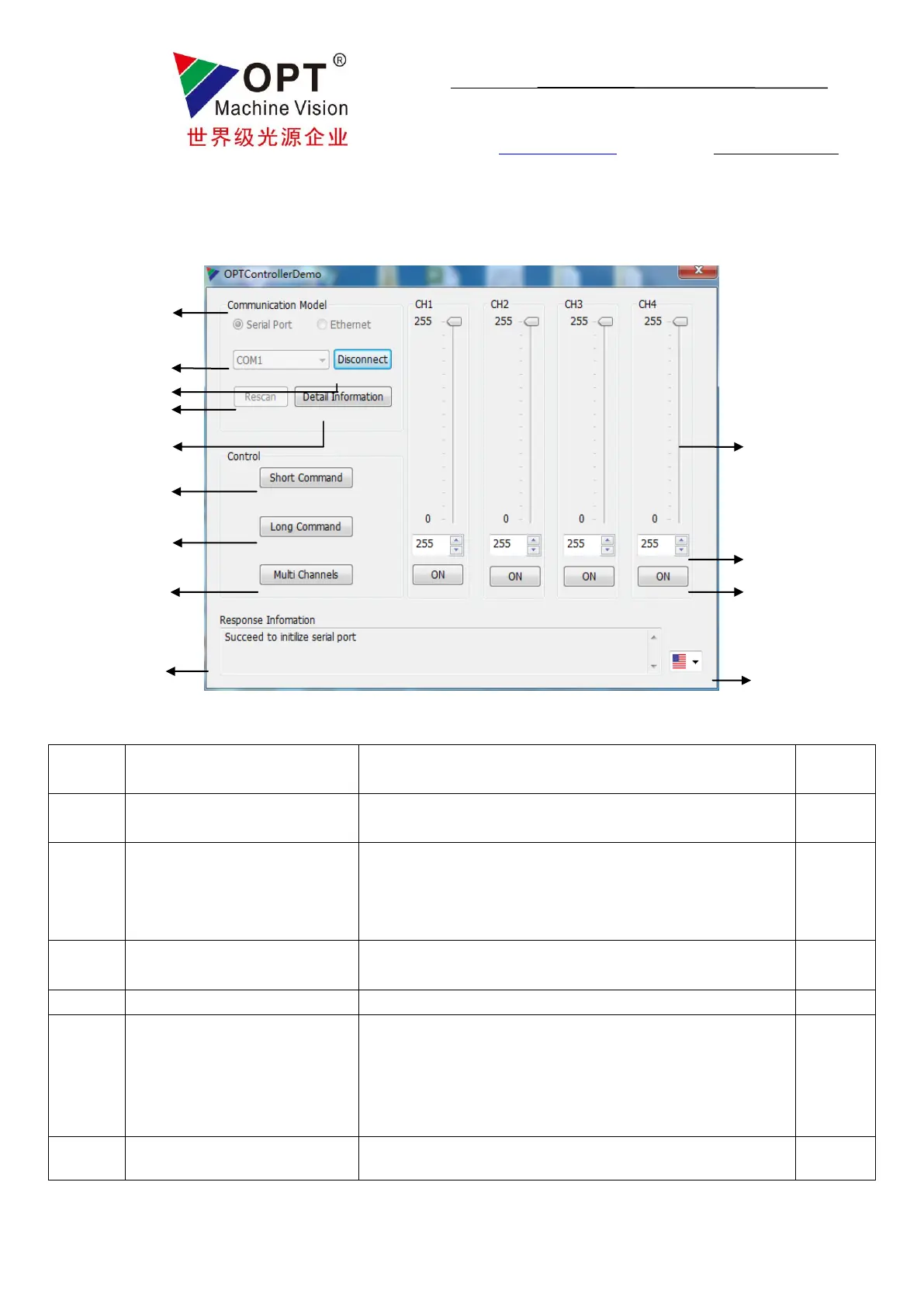
4.1 Software interface description
Fig.4.1: Main window
Choose communication mode
RS232 (serial port) or Ethernet communication
For serial port communication, proper communication is
determined by serial port number. Ethernet communication is
determined by unique serial number (can be found on the
right-upper panel of the controller) of the controller.
After choosing the proper device, click “connect” to establish
communication or “disconnect” to destroy the communication.
Searching available devices.
Verify/modify information
Click “Detailed information”, one can verify or modify the
detailed communication parameters. For serial port
communication, one can verify serial port number and for
Ethernet communication, one can verify the IP configuration
but only the IP address can be modified.
short command communication
common functions for single channel communication
6、short command
communication
7、long command
communication
5、check/modify
information



 To Next Page