OPTIMUM 600M // 7
OPERATION INSTRUCTION
DISASSEMBLY OF THE DEVICE
REMARKS:
Your device is equipped with built-in overload protection and overheat protection functions. If the device
is ever overfilled, or if its operation exceeds the suggested 10-minute limit, these preventative protection
features will be triggered. In the event of overheating, the device is designed to cease functioning to
allow the motor to cool down. To resume juicing, switch the power button to the OFF position and unplug
the device from the outlet. Wait approximately 30-40 minutes, to allow the juicer’s protection features to
recover and reset. When the device has cooled down, plug it into the socket again. Switch the power
button to the ON position to test the device. If it has recovered, the motor will run. If not, please unplug
the device again and continue to wait for the motor to cool. When the functions have reset, you will be
allowed to resume juicing.
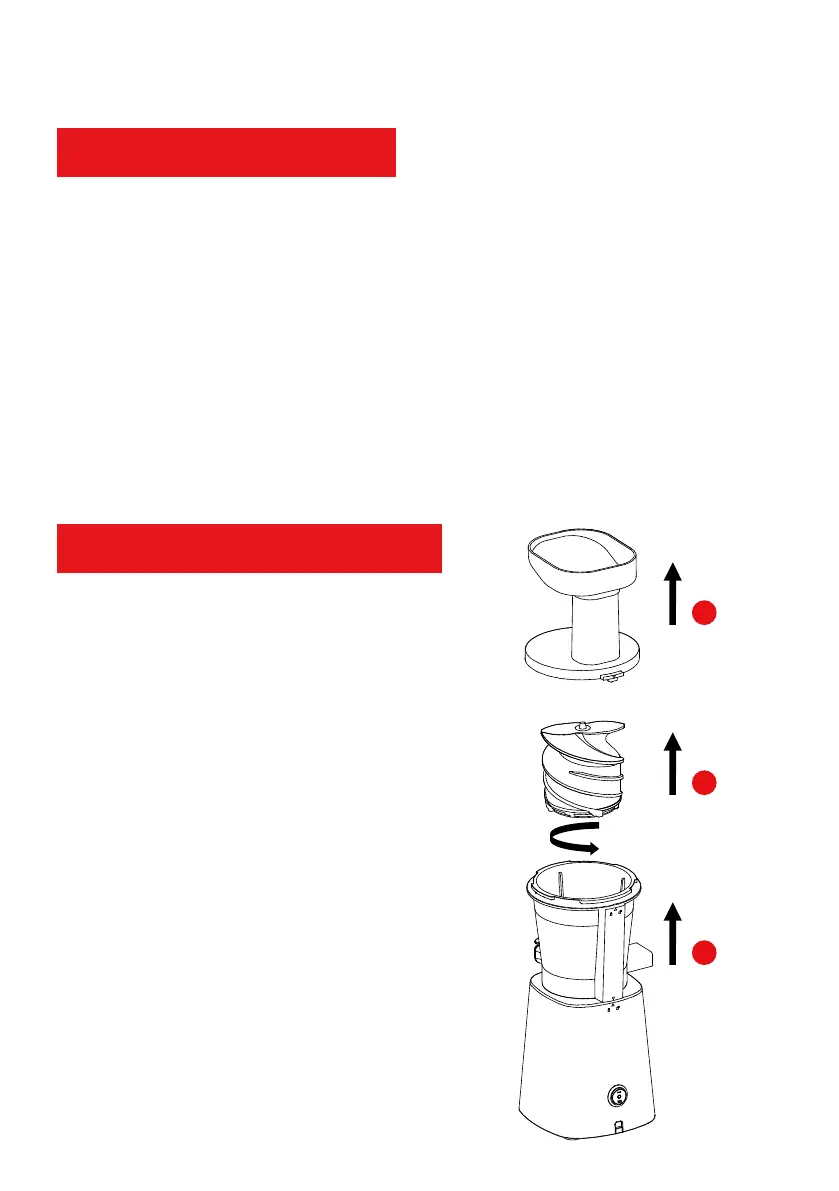
1. When the device has stopped, rotate the
hopper assy, following the arrow direction in
the figure to the right. Then, pull the hopper
assy upward.
2. Pull the auger (it comes out with the strainer)
upward.
3. Follow the direction of the arrow in the figure
and rotate the bowl. When it is dislodged, pull
it upward to remove it from the device.
Note: Disassembling the components of the
device follows the sequence of assembly in
reverse.
1
2
3
6. Clean the machine after juicing.


 To Next Page