CONNECTING TO
AC
POWER
1. Check
all
connections, especially the
speaker connections, to ensure that
they are firm and that there are no
stray wires.
2.
Be
sure the [POWER] button
is
in
the
out position.
3.
Set the VOLUME control to MIN.
4.
Plug the receiver's
AC
power cord in-
to a standard AC outlet.
10
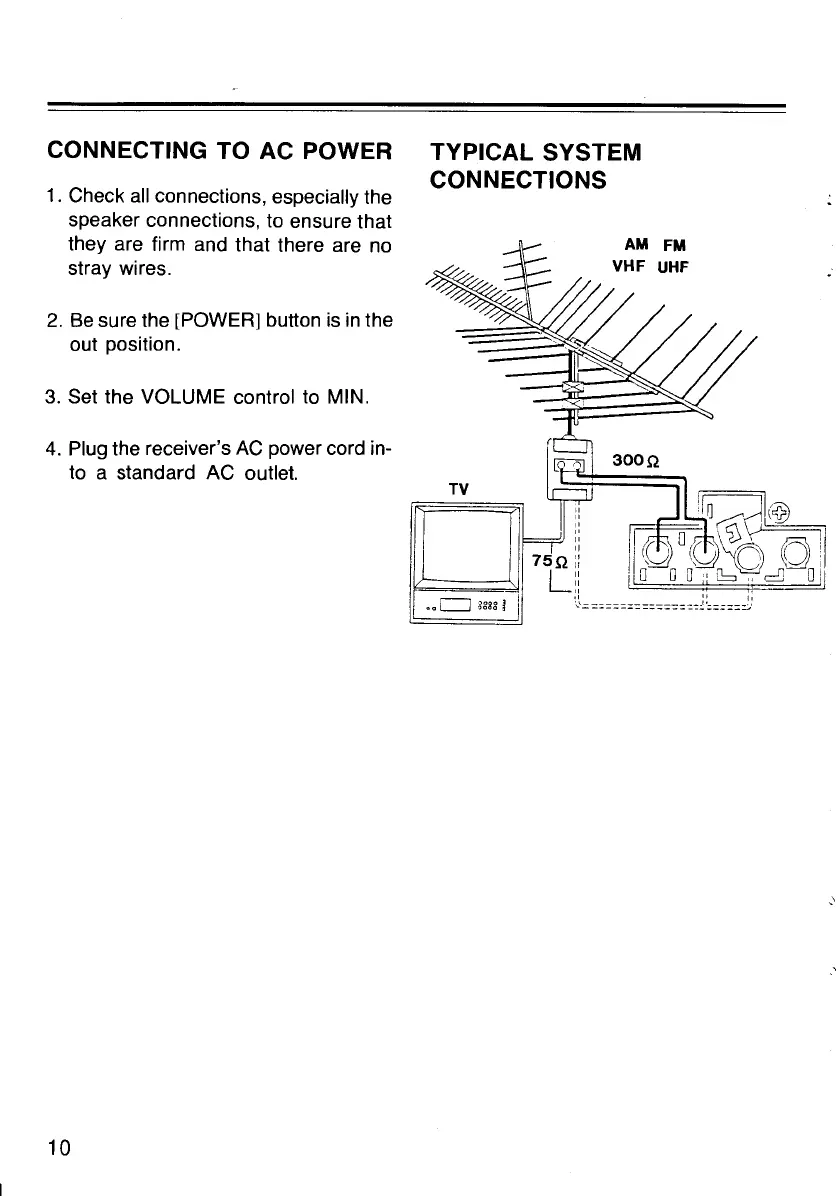
TYPICAL SYSTEM
CONNECTIONS
TV
"
"
::
"
,,
75Q
::
L
ll
II
"
AM
FM
!~'=
======~======
-:.-:-1
:======~:
·'
6.
Repeat Steps 4-5 to connect the let
speaker
to
the
receiver's
lef'
SPEAKERS push terminals.
Caution:
•
Do
not use speakers that have
an
im·
pedance of less than 8 ohms.
• To avoid a short circuit, do not allow
stray wires to touch another terminal.
• Use only the length of wire necessary
to connect the speakers to the
receiver.
POSITIONING
YOUR SPEAKERS
Placement of your speakers
depend~
largely
on
the arrangement of
yoUI
listening room and the way you listen
tc
music.
Experiment
with differenl
speaker locations to achieve the
besl
sound.
Stereo speakers should
be
several
fee1
apart. Putting them too close together
reduces the stereo effect, while placing
them too far apart reduces the bass
effect and creates a
"hole"
in
the
middle. Speakers usually disperse the
sound at about a 60-degree angle,
so
ideally, your listening position should
be
in the overlap area. You might want
to
angle the speakers toward
you
for a
bet·
ter stereo effect.


 To Next Page