An
outside VHF-TV antenna provides
excellent FM reception. A "splitter"
(available
at
all
Radio Shack stores)
permits you to connect a TV set and
your
receiver to the same antenna.
Your local Radio Shack store also
sells a full line of outside antennas to
help you achieve adequate recep-
tion in fringe areas.
you use a 300-ohm flat cable, con-
ect it to the antenna's 300-ohm ter-
linals.
If you use a 75-ohm coaxial
able, connect it to the antenna's
5-ohm terminals. When you use the
5-ohm coaxial cable, attach the
enter wire of the cable to the com-
lon
terminal between the 75-ohm
.nd
300-ohm antenna terminals.
·hen, connect the braided ground
11ire
under the clamp
as
shown
tel
ow.
Center
Wire
•
Note: To protect your receiver, use a
lightning arrestor on any outdoor
antenna .
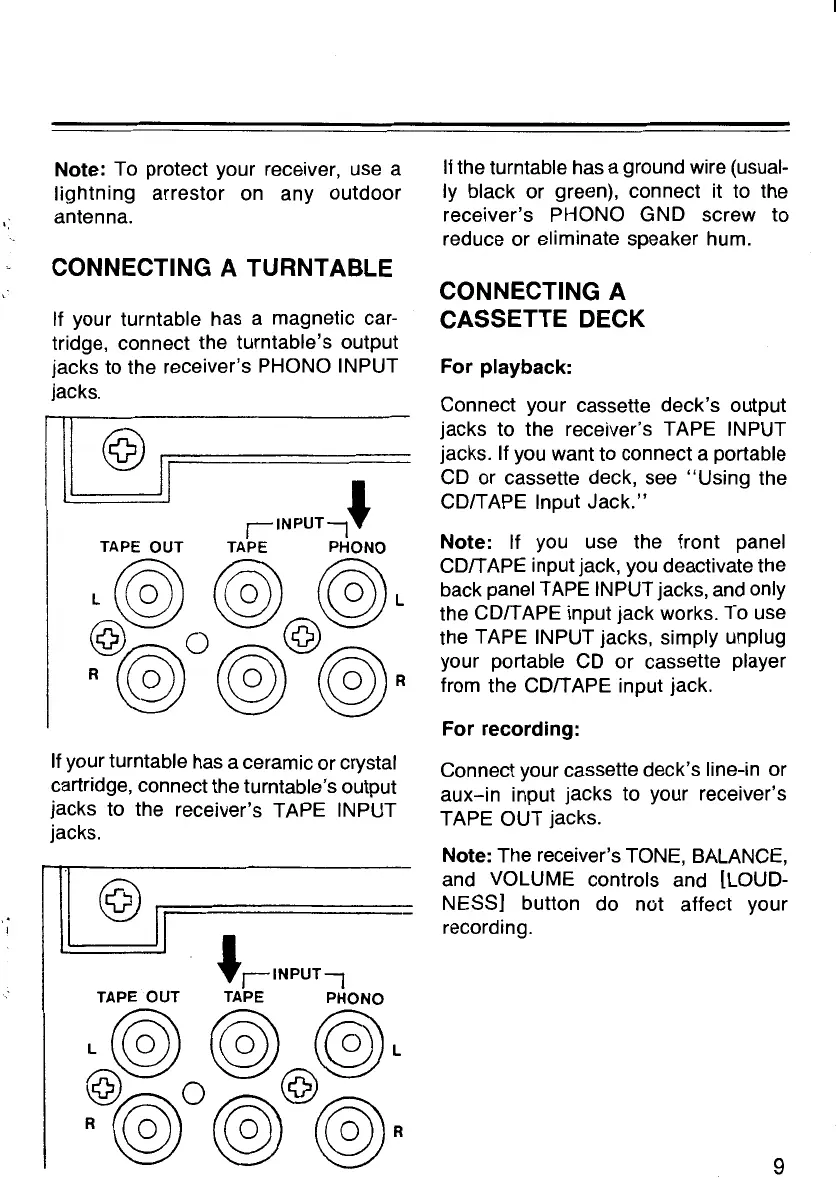
CONNECTING A TURNTABLE
If your turntable has a magnetic car-
tridge, connect the turntable's output
jacks to the receiver's PHONO INPUT
jacks.
~
©
IJ
J
jiNPUTj
TAPE
OUT
TAPE
PHONO
L@)
(@)
@)L
@ 0 @
R
(@
@)
@)·
If your turntable has a ceramic or crystal
cartridge, connect the turntable's output
jacks to the receiver's TAPE INPUT
jacks.
@
~==============
'JINPUTl
TAPE
OUT
TAPE
PHONO
L@)
(@)
@)L
@ 0 @
·@@)
@)·
If the turntable has a ground wire (usual-
ly black or green), connect it to the
receiver's PHONO GND screw to
reduce or eliminate speaker hum.
CONNECTING A
CASSETTE DECK
For playback:
Connect your cassette deck's output
jacks to the receiver's TAPE INPUT
jacks. If you want to connect a portable
CD
or cassette deck, see
"Using
the
CD/TAPE Input
Jack."
Note: If you use the front panel
CD/TAPE input jack, you deactivate the
back panel TAPE INPUT jacks, and only
the CD/TAPE input jack works. To use
the TAPE INPUT jacks, simply unplug
your portable
CD
or cassette player
from the CD/TAPE input jack.
For recording:
Connect your cassette deck's line-in or
aux-in
input jacks to your receiver's
TAPE OUT jacks.
Note: The receiver's TONE, BALANCE,
and VOLUME controls and [LOUD-
NESS] button do not affect your
recording.
9


 To Next Page