17
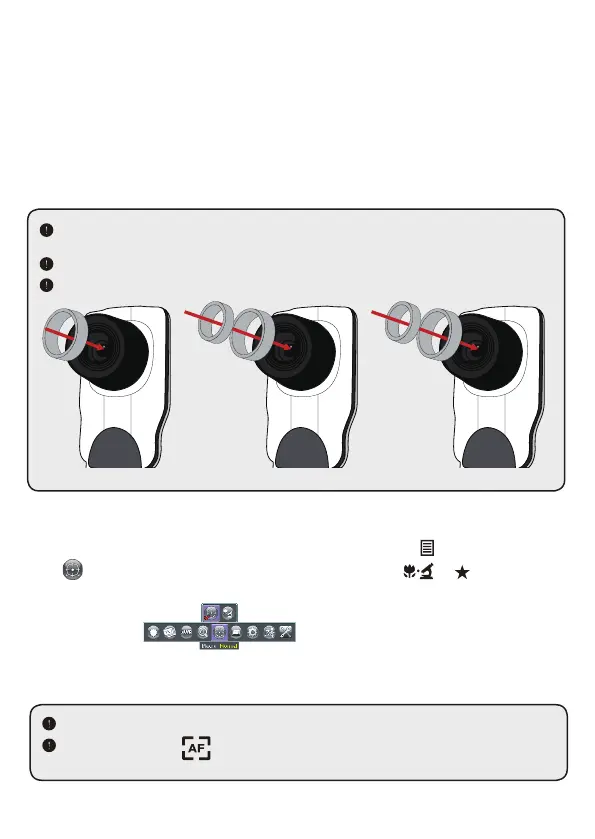
4. Mount the microscope adapter onto the Lens.
5. Switch the focus mode to Macro. Press MENU (
)--> select Focus
(
) -->select Macro or press Macro button ( )( ) on remote
controller.
6. Connect the lens with microscope adapter to the microscope.
• Connect to a microscope
Connect to a microscope enables you to examine microscopic objects
on a big screen.
1. Adjust the microscope and focus objects.
2. Choose an appropriate microscope adapter.
3. Microscope adapter accessories are applicable to Ø28mm,Ø31mm,
Ø33mm, and Ø34mm eyepieces.
For eyepieces of about Ø33mm and Ø34mm, only a microscope adaptor with Ø28 or
Ø34mm label should be installed.
For
a
Ø28mm
eyepiece, insert the Ø28mm adapter into the microscope adapter.
For a
Ø31mm
eyepiece, insert the Ø31mm adapter into the microscope adapter.
Ø33 Ø34 mm
Ø33 Ø34 mm
Ø33 Ø34 mm
Ø28 mm Ø31 mm
If the image is not clear, please adjust the focus of microcope.
Press the AF button ( ) or use the manual focus button on remote control to
fine-tune the focus.


 To Next Page