8
»
Basic Operation
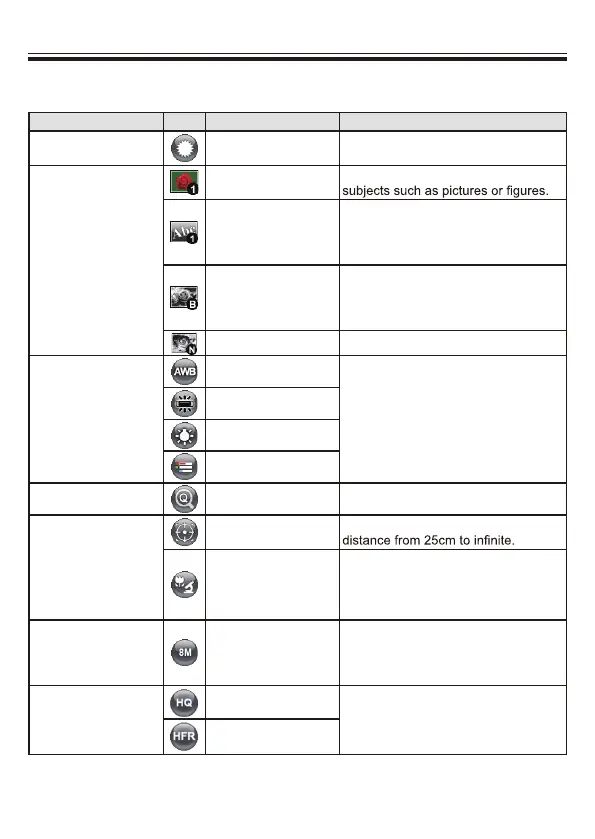
• Menu options in Preview Mode
Name Icon Option Description
Brightness
-
Use the Right / Left buttons to make
the image brighter / darker
Effect
Graphic
To improve the tint of color-based
Text
The function is designed especially for
text-based documents to which can
be enhanced white and black subjects
such as characters and lines.
B&W
To output a black & white camera
image.To make the image easier to
view,select this when shooting black &
white documents etc.
Negative To output a negative image.
White Balance
Auto
Fluorescent
Tungsten
Custom
Quick Zoom
2X / 4X Set the quick zoom to 2X or 4X.
Macro
Normal
Select standard mode for focus
Macro /
Microscope
Select Macro/Microscope mode to
take close-ups or while connecting to
a microscope.
Image Size
0.8M / 2M / 5M /8M
/13M
Select the desired still image
resolution.
Video Mode
High Quality
Select the desired video quality.
High Frame Rate
There are various modes (Auto,
Flurescent, Tungsten and Custom)
for users to choose and fit in different
surroundings.


 To Next Page