12
Making the Connections
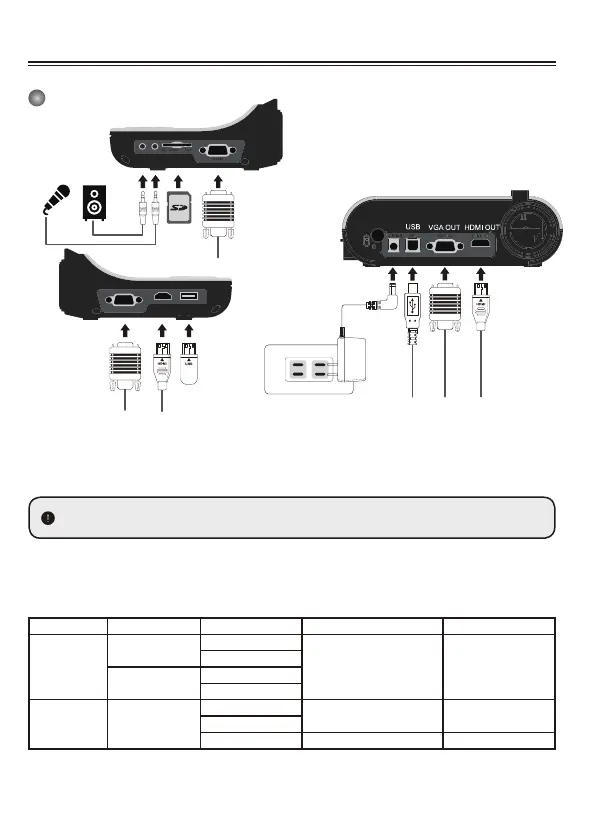
System Diagram
Step 1 / Plugging in the Power Outlet
Use power adapter to connect DC IN connector on the product to a standard 100V~240V AC
power outlet.
Step 2 / Output Resolution and Aspect Ratio.
Various output resolutions are available depending on the output and aspect ratio setting.
Please refer to the table listed below :
Output Aspect-Ratio Resolution Vertical Frequency Model
VGA
4:3
1024 x 768
50 / 60 Hz DC552 / DC556
1600 x 1200
16:9
1280 x 720
1280 x 800
HDMI 16:9
1280 x 720
50 / 60 Hz DC552 / DC556
1920 x 1080
3840 x 2160
30 Hz DC556
*Document camera will downgrade the output resolution automatically when the connected display
DC
VGA IN
HDMI IN USB DISK
USB DISK
HDMI IN
VGA IN
SD Card
RS 232
The type of power adapter is depends on your country / region.
device doesn’t support such higher resolution.


 To Next Page