EN-28
Adjusting the position using the vertical lens shift
function
If the projector is not positioned right in front of the center of the screen, you
can adjust the vertical position of projected image by moving the vertical lens
ring within the shift range of the lens.
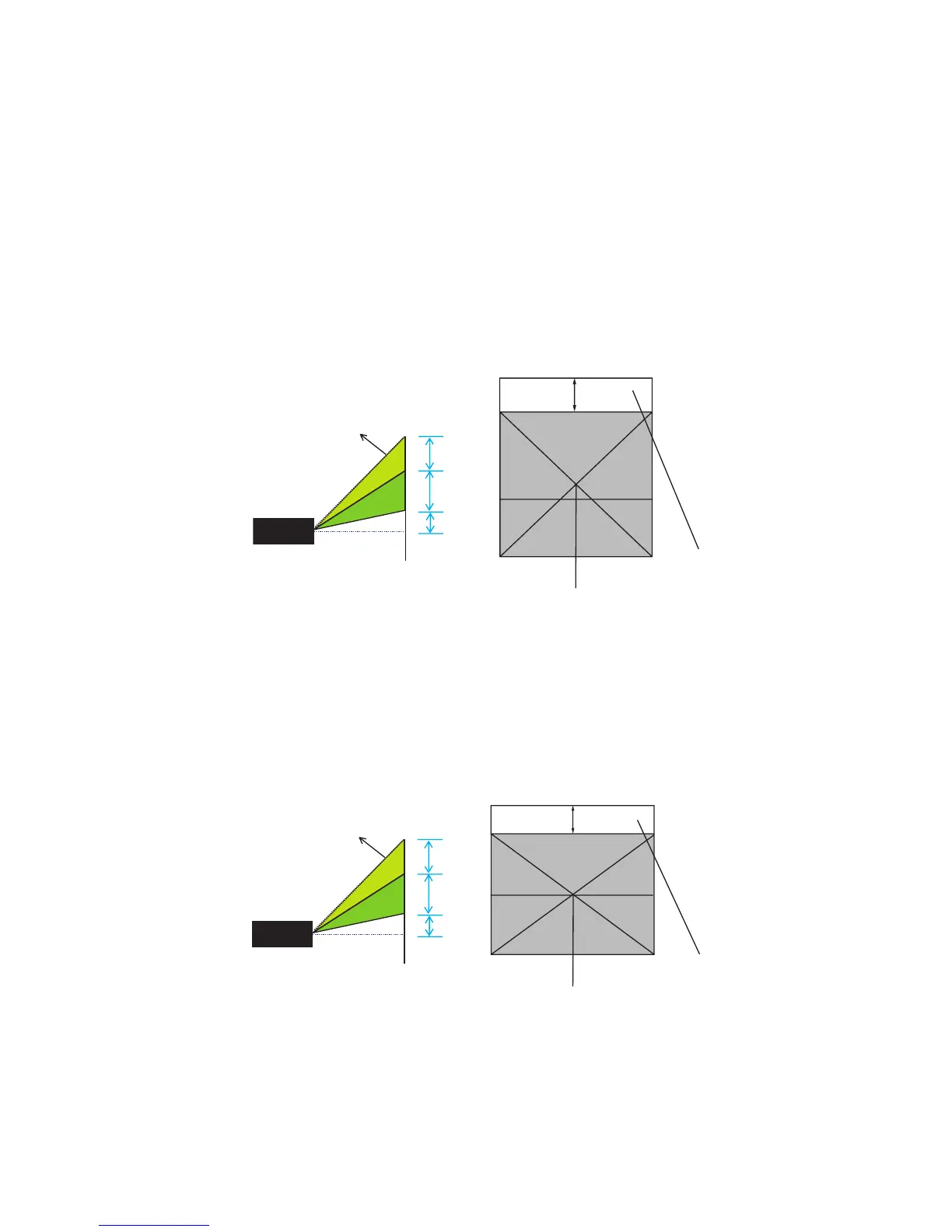
1. Lens shift adjustment for XGA
The display position can be shifted upward up to 6.5% elevation of the
display. (When turn the vertical lens shift ring to the right (left), the
display moves up (down)).
2. Lens shift adjustment for WXGA
The display position can be shifted upward up to 14.5% elevation of the
display. (When turn the vertical lens shift ring to the right (left), the
display moves up (down)).
Lens shift adjustable range
6.5%
Shift range
Lens shift center position
Shift to top
1V
0.15V
0.065V
Lens shift adjustable range
14.5%
Shift range
Lens shift center position
Shift to top
0.145V
1V
0.12V


 To Next Page