Rev. 03
Company Confidential Optoma_______________________ Delta____________
49
2007/02/08
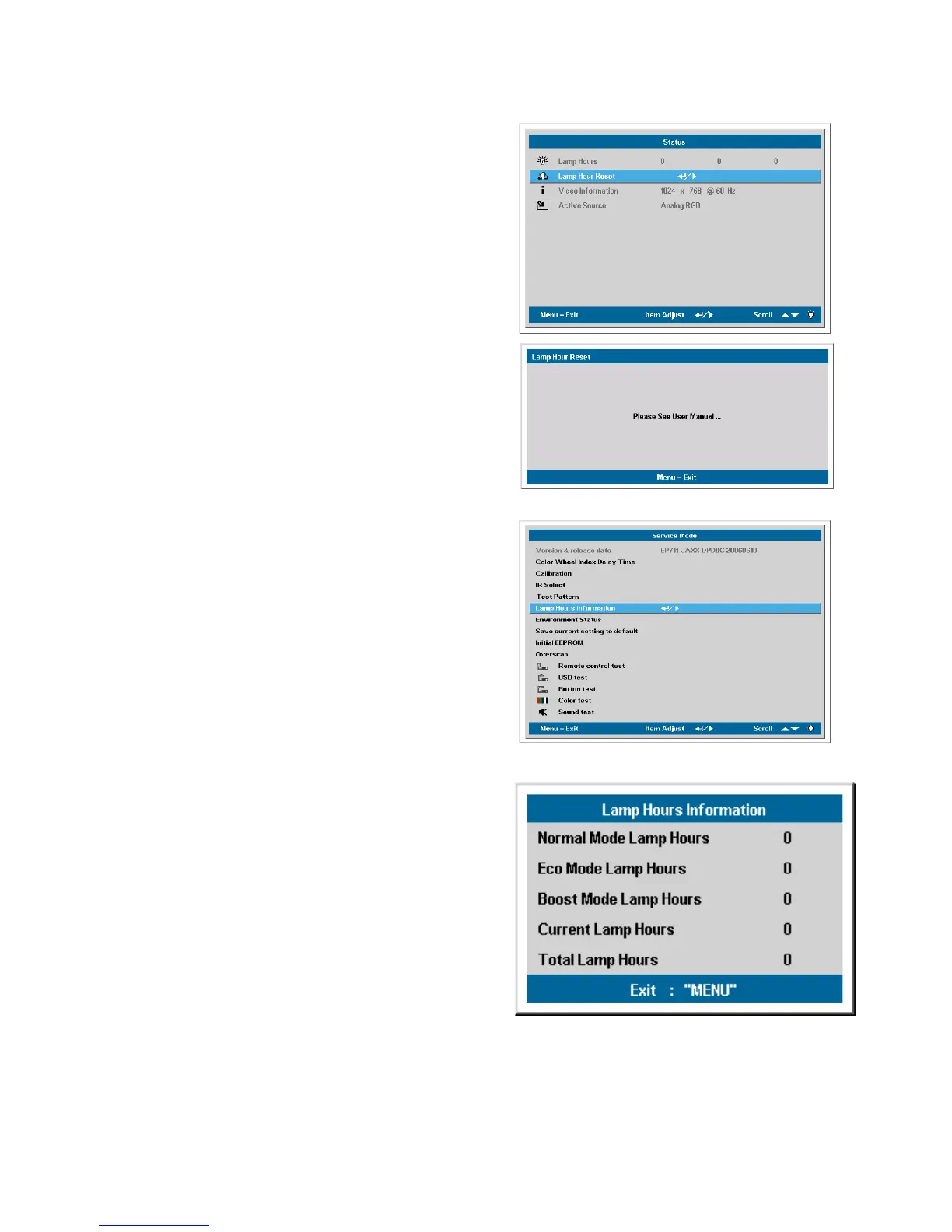
5-5 Check Lamp hours information in Service mode (J4P Series)
Step1
In Status Menu , select Lamp Hour Reset
function,and press “Enter” key on keypad or IR
controller to go into Lamp Hours Reset
sub-page。.
Step2
In Lamp Hours Reset sub-page press “Enter”,
“Enter”, “Up” , “Down” , “Left”, “Right” in
sequence。
Step3
After press password right , it will go into a
Service page。Used up / down key on keypad
or IR to highlight the item “Lamp Hours
Information” and press “Select/Right” to go
into Lamp Hours Information menu.
Step4
In Lamp Hours Information menu, “Normal
Mode Lamp Hours “ show normal mode lamp
hours usage in current lamp.
“Eco Mode Lamp Hours “ show eco mode
lamp hours usage in current lamp.
“Boost Mode Lamp Hours “ show boost mode
lamp hours usage in current lamp.
“Current Lamp Hours “ show current lamp
hours usage in current lamp(Normal + Eco +
Boost).
“Total Lamp Hours “ show all lamp hours
usage in projector (cann’t be reset).



 To Next Page