HD25/HD25LV/HD25e
Condential 2-4
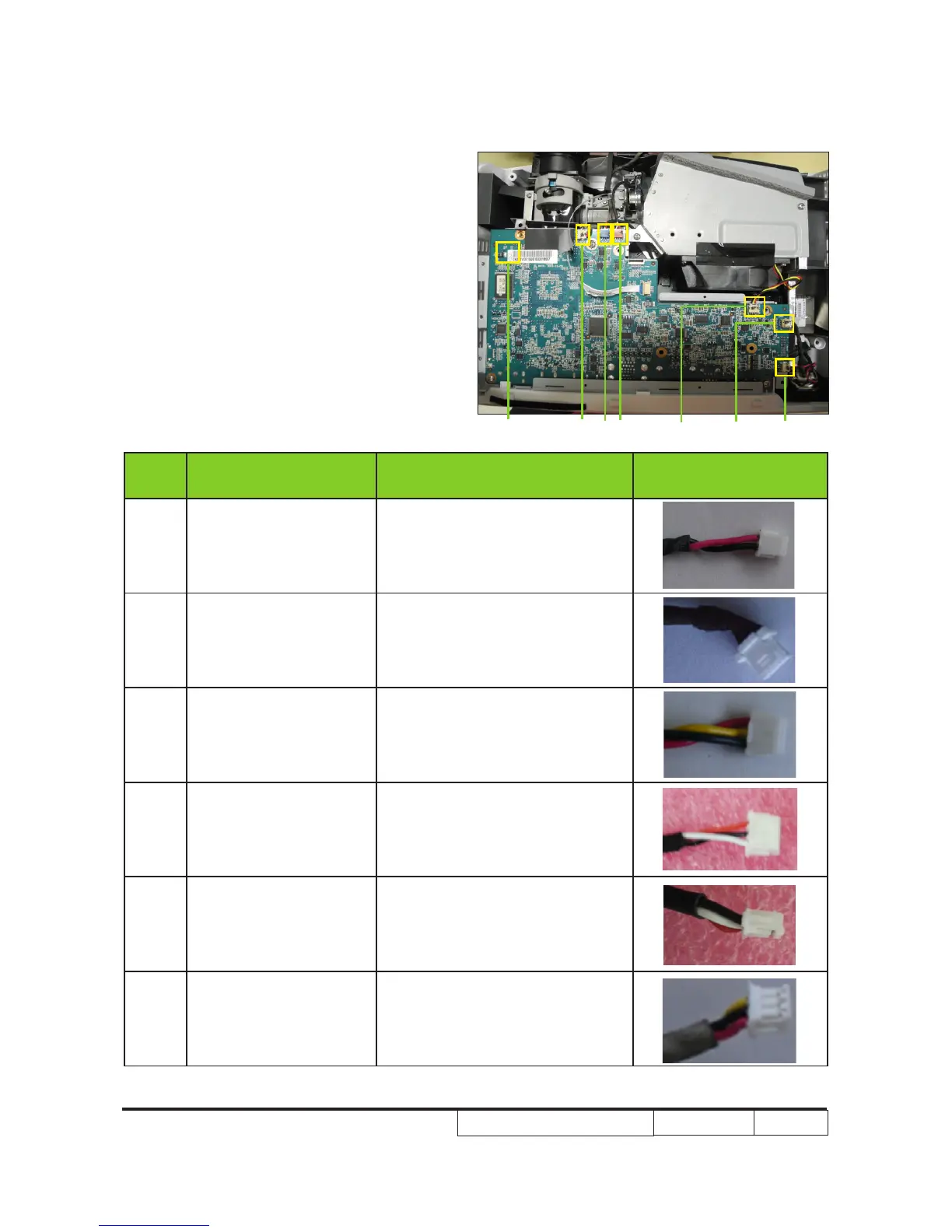
Note: - Make sure cables plug into the correct
ports when assembling the unit.
Please refer to the below table details of
each connector on Main Board.
Item
Male Connector
on Main Board
The key feature Figure
A & G
Speaker
(position G is not for
HD25e)
Compose of Red/Black Wire and
Black wire tube (2 pin)
B Lamp Driver Black wire tube (5 pin)
C System Fan
Compose of Red/Yellow/Black
Wire (3 pin)
D Photo Sensor
Compose of Red/Black/White
Wire and White wire tube (3 pin)
E Blower
Compose of Red/White/Black
Wire and White wire tube (3 pin)
F IR
Compose of Black/Yellow/Red
Wire and Gray wire tube (3 pin)
A
G
F
E
D
C
B



 To Next Page