12
Installation
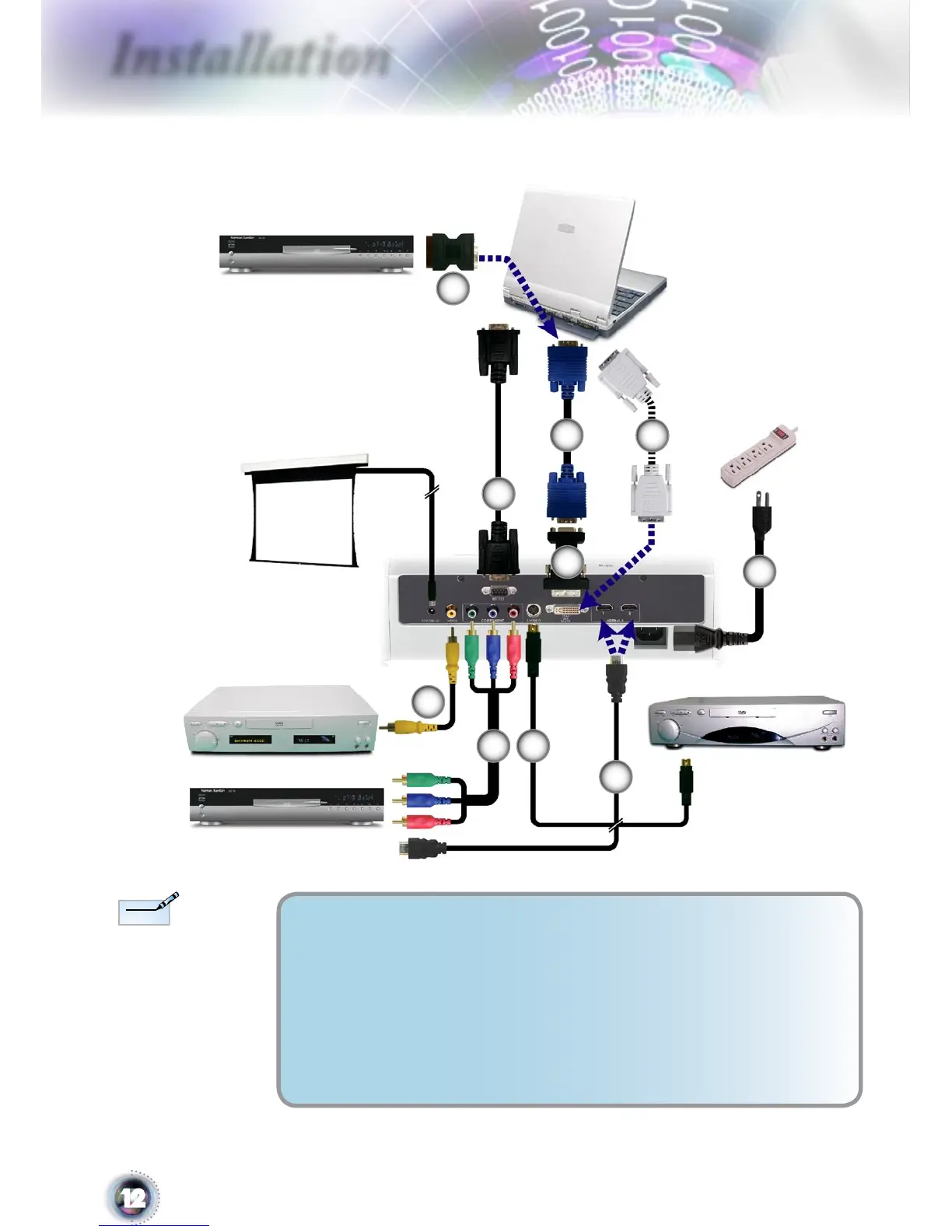
Connecting the Projector
Due to the difference
in applications for each
country, some regions
may have different ac-
cessories.
S-Video Output
Video Output
DVD Player, Set-top Box,
HDTV receiver
RGB
1. .............................................................................................................Power Cord
2. ...................................................... DVI to VGA Adaptor (For European Only)
3. ............................................................................................................ RS232 Cable
4. ..................................................Composite Video Cable (Optional Accessory)
5. ......................................................................RCA Component Cable for YPbPr
6. ...................................................................S-Video Cable (Optional Accessory)
7. ......................................SCART RGB/S-Video Adaptor (For European Only)
8. ........................................................................ VGA Cable (For European Only)
9. ......................................................................... DVI Cable (Optional Accessory)
10. ................................................................... HDMI Cable (Optional Accessory)
1
2
3
DVI
10
7
5
4
9
+12V Relay Output
SCART DVD Player
8



 To Next Page