4
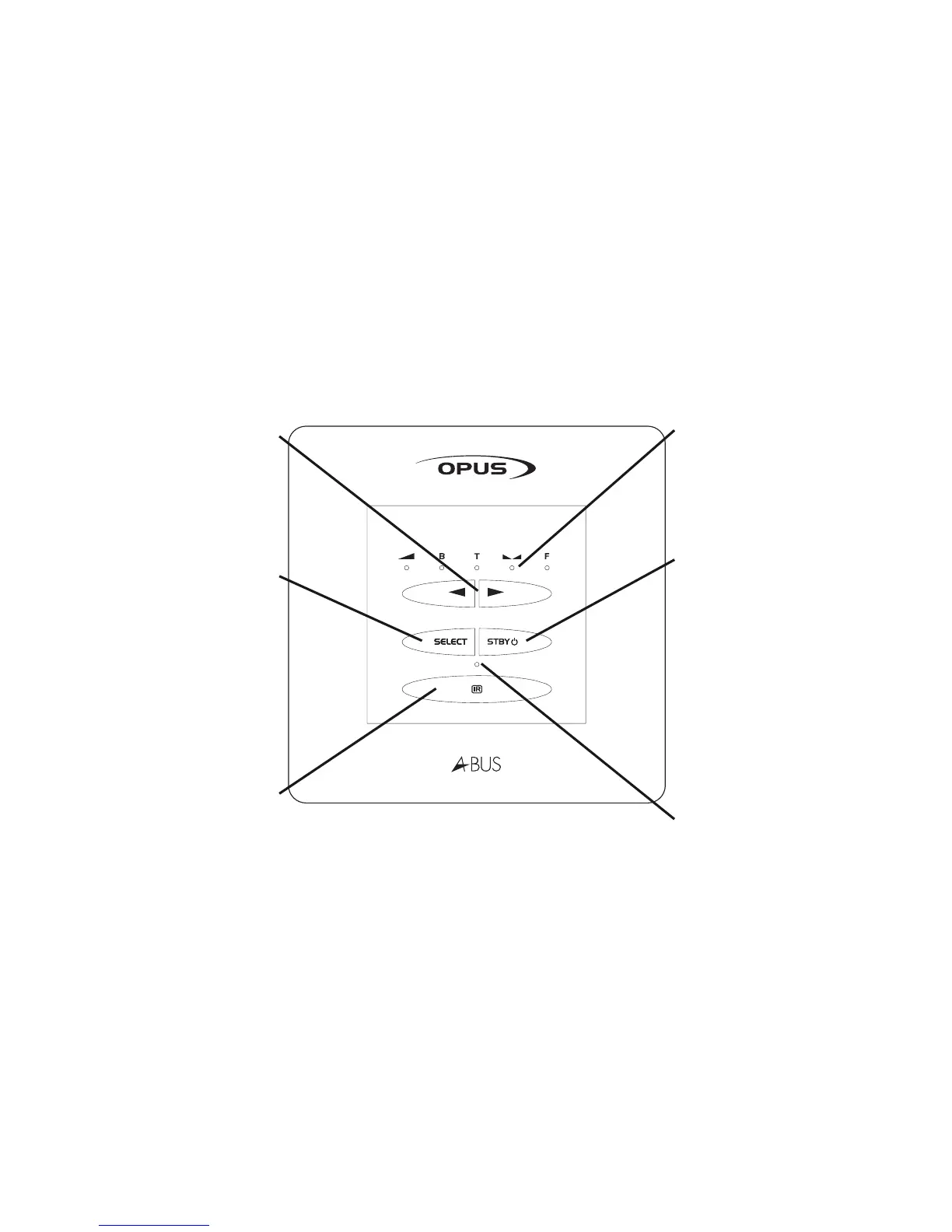
WCU300 - Keypad functions
Up / Down
Use these buttons to control the
sound adjustment functions (see
following page).
Defaults to volume control.
Select
A short push changes the selected
audio source. The status LED will
“blink” to indicate that a change of
audio source is being actioned
(Opus A-BUS Mode only—refer to
Installation Guide).
A long push (2 seconds approx.)
will activate the sound adjustment
functions (see following page).
IR sensor window
Sound adjustment LEDs
See following page.
Defaults to displaying volume
level.
Standby
A short push will turn the system
on and the status LED will
illuminate.
Another short push will turn the
keypad and it’s corresponding
zone off.
A long push (2 seconds approx.)
will switch the whole system to
standby and the status LED will
turn off (Opus A-BUS Mode only—
refer to Installation Guide).
Status LED



 To Next Page