8
Adding your source equipment - Audio connections
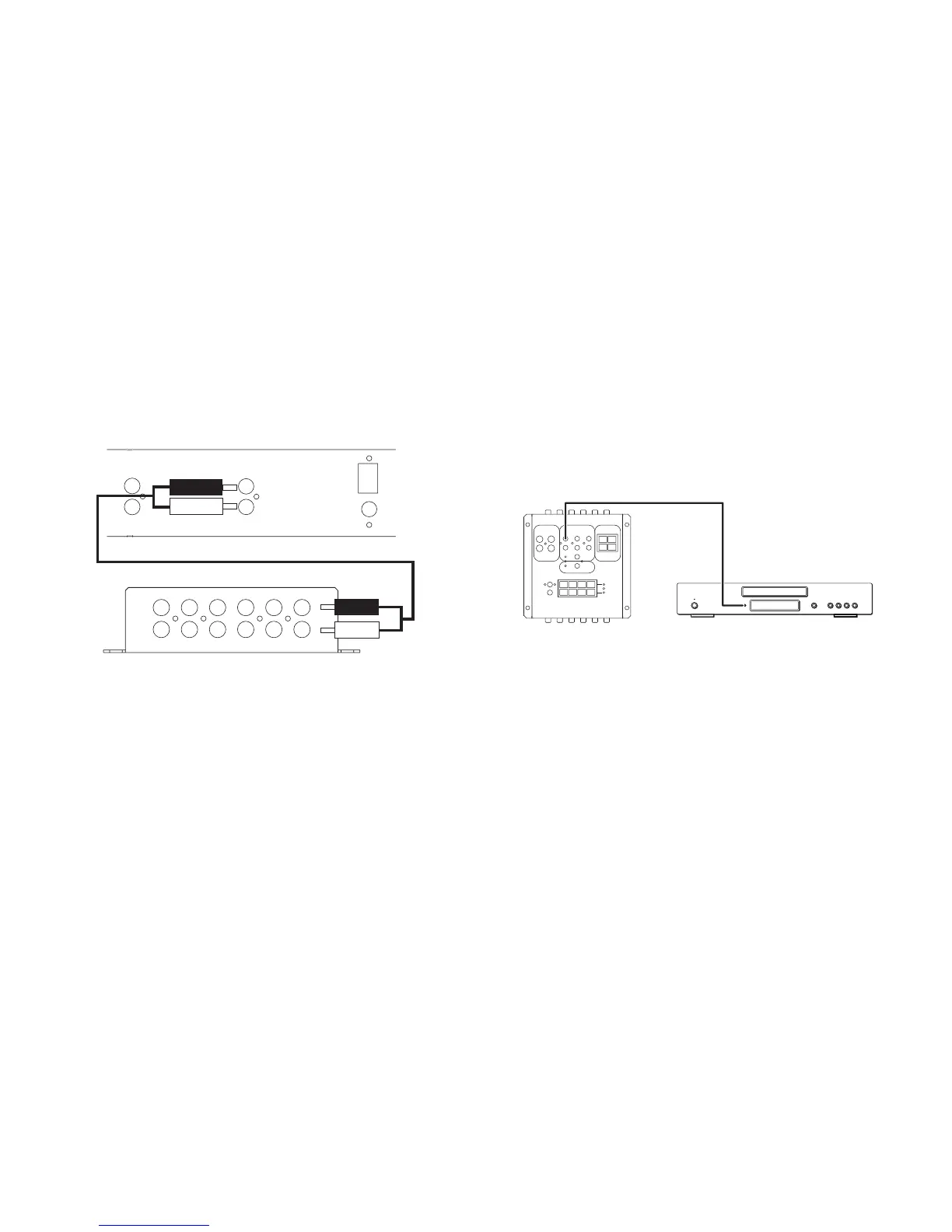
Audio source equipment connections
Up to six pieces of audio source equipment can be connected to an MCU.
Connections are made from the source equipments’ audio outputs to the
inputs on the MCU via RCA connections:
Audio
Output
Audio
Output
L
R
FM 75Ω
AM 300Ω
Control Bus
Control Bus
In
Out
In
Out
AUDIO INPUTS FROM SOURCES
AUDIO INPUTS FROM SOURCES
SOURCE 6SOURCE 5SOURCE 4SOURCE 3SOURCE 2SOURCE 1
SOURCE 6 SOURCE 5 SOURCE 4 SOURCE 3 SOURCE 2 SOURCE 1
L
R
L
R
Phono-Phono/RCA-RCA hi-fi interconnect cable
Audio
source
MCU300
Remote control of source equipment through the WCU300
For remote control of the source equipment, 6 routed IR outputs are
provided. Individual IR emitters are plugged into the appropriate IR output
(corresponding to the respective Audio input). The other end is stuck to the
IR receiving window of the source equipment:
MCU300 Audio source
Opus IR-1
cable



 To Next Page