Manual for Orange’s Tire Pressure Monitoring Systems, TPMS
5/14 www.orange-electronic.com
Orange Electronic Co., Ltd
Wireless Transmitter Sensor Installation
Step Operation Process Photograph
A Use a jack to raise the vehicle and place jack stands
underneath the vehicle for safety. Refer to vehicle owner’s
manual for full service advice. Seek the assistance of a
qualified motor mechanic if required.
B Take off the tires and bleed the air. Then take off the air
valve of the tire from the wheel. (NOTE: You must change
the valve to Orange’s valve). This part of the process will
normally require the service of a tire fitting service or
mechanic.
C
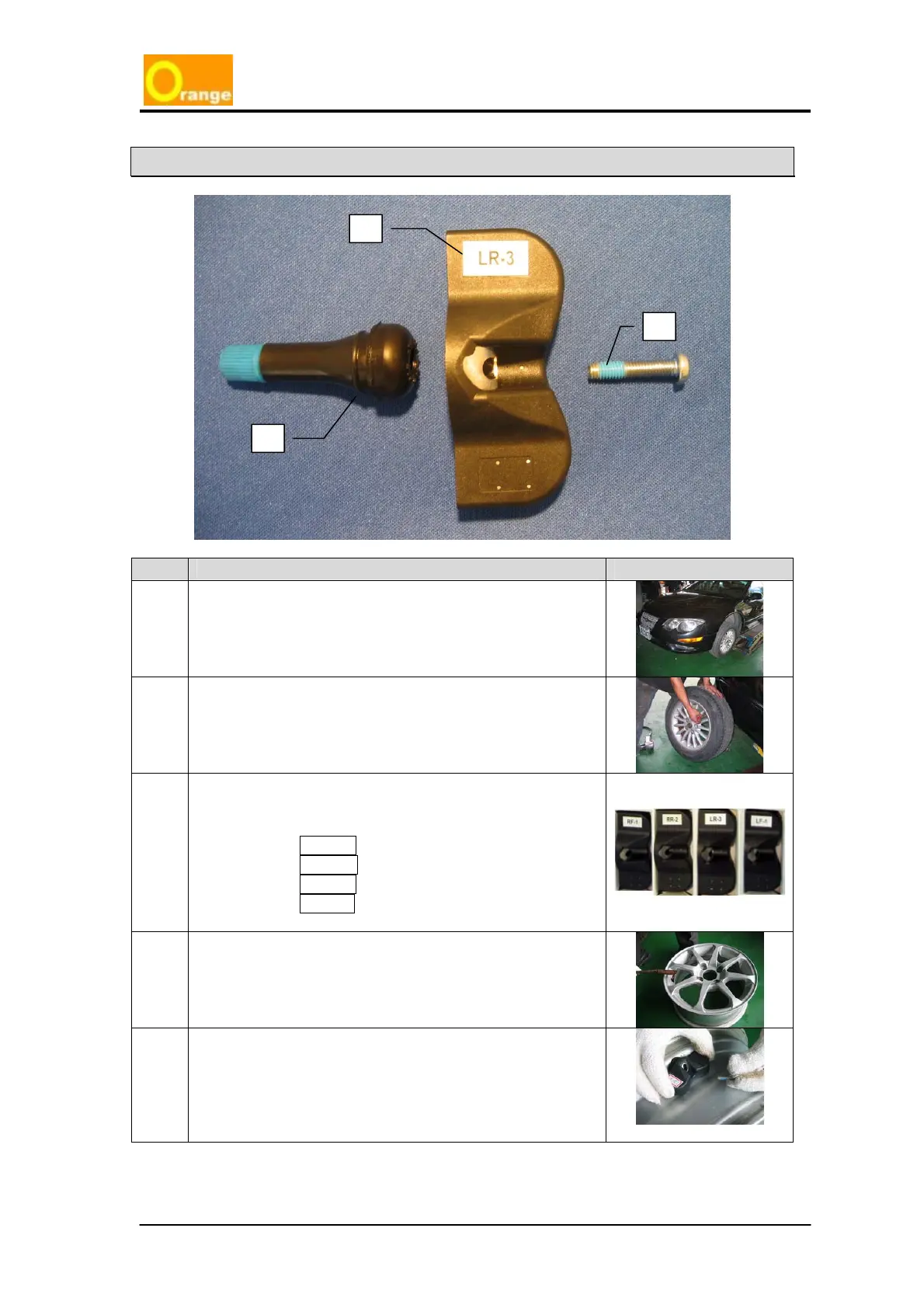
Recognize the number on each sensor
ⓓ with position of
tire on the vehicle. (VERY IMPORTANT)
a. RF – 1 = Right Front, No. 1
b. RR – 2 = Right Rear, No. 2
c. LR – 3 = Left Rear, No. 3
d. LF – 4 = Left Front, No. 4
D
Set up the new TPMS special valve
ⓔ in the wheel.
E
Use the new TPMS special Nylok screw
ⓕ to tighten the
transmitter sensor into the valve on the wheel.
d
f
e



 To Next Page