14
EN
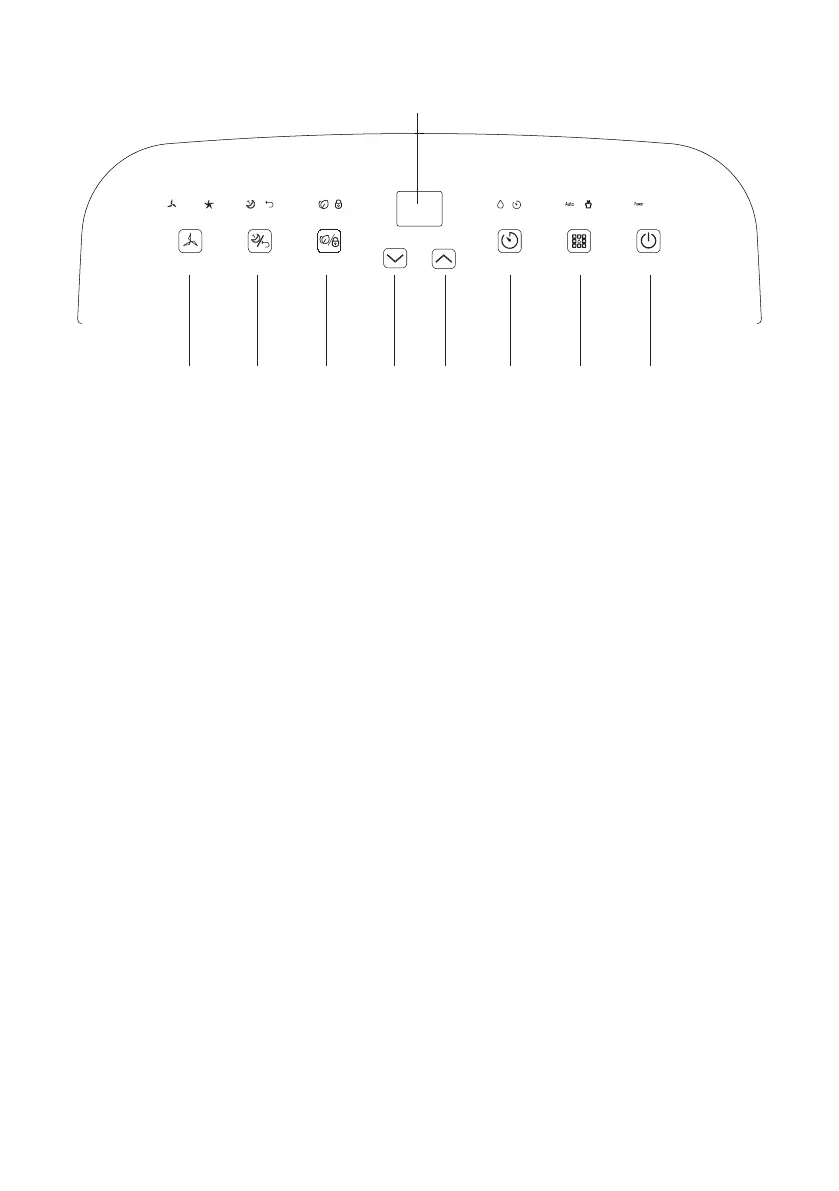
Control panel
1 STAND-BY button
Press to turn the device on or off.
2 MODE button
Press to select automatic and continuous dehumidifi cation mode.
3 TIMER button
Set the time to turn the device on or off automatically.
4 Increase button
Increasing the desired temperature, humidity and timer time setting.
5 Decrease button
Reducing the desired temperature, humidity and timer time setting.
6 ION/LOCK button
Press and hold this button to activate or deactivate the child lock function.
Press this button to activate or deactivate ionization function.
7 SLEEP/RESET button
Press to turn sleep mode on or off.
Turn and hold this button to reset the fi lter counter.
8 SPEED button (fan speed)
Press to toggle the fan speed between high and low.
9 Digital display
Display of humidity values, timer settings or temperature.
3 2 17 6 5
9
8 4
SPEED SLEEP/RESET ION/LOCK TIMER MODE STAND-BY



 To Next Page