9
Connection to TV
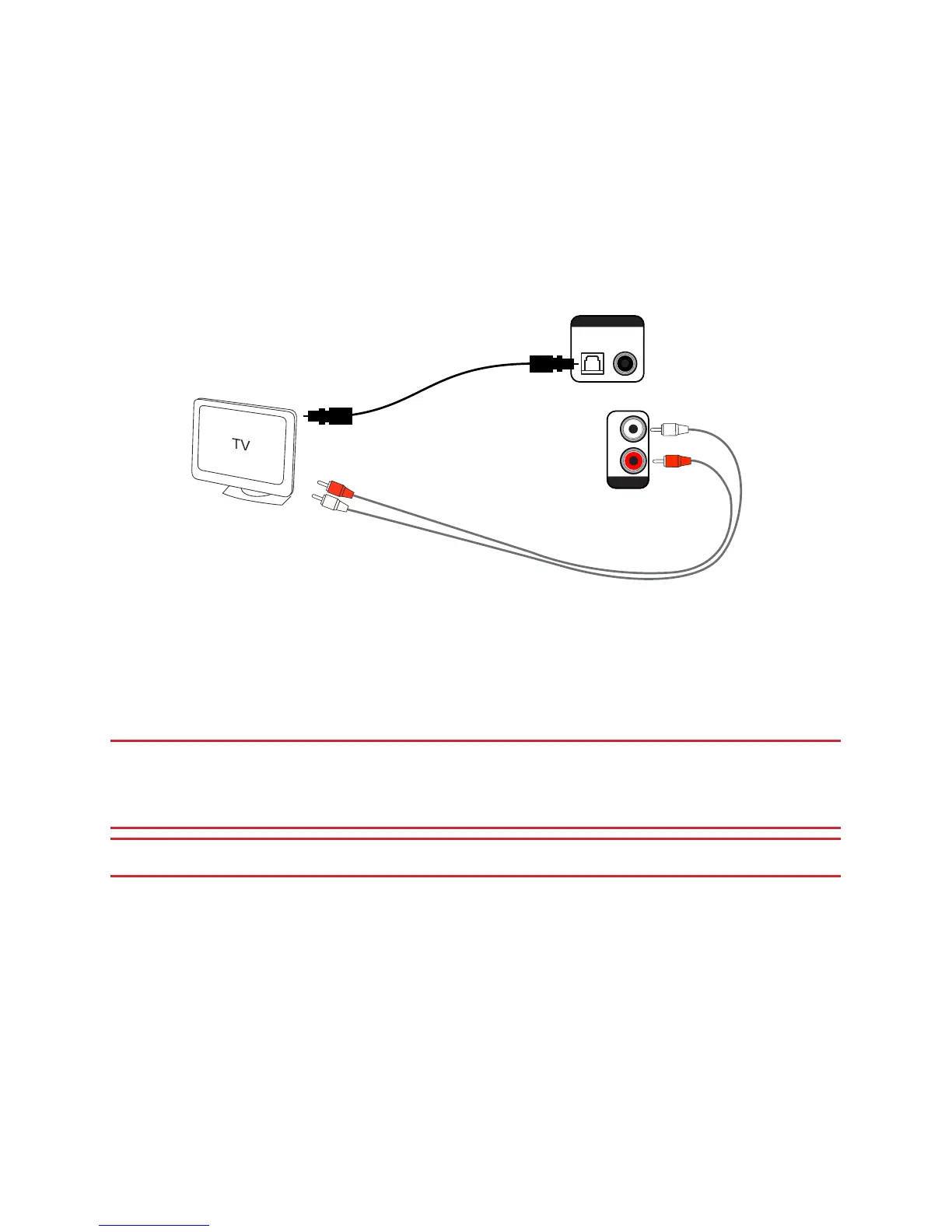
This conguration can be used for TVs with an optical digital output. The TV sends
stereo sound directly to the soundbar. Connecting sound from the TV like this
is usually the best sound connection method for many reasons. Connecting the
soundbar directly to a set-top box / Blu Ray can introduce A/V sync issues as some
TVs will delay the video a little. We recommend that the sound source should be the
TV’s optical output whenever possible.
Analogue connection (alternative)
R
L
CoaxialOptical
Aux In
Digital Input
Digital connection (preferred):
Use optical cable to connect to TV
sound output
OR
Connect to audio output
HINT: When using the soundbar in this way, it is normal that the speakers on the TV will
need to be turned down or muted to stop sound coming from the TV’s own speakers.
HINT: Make sure that the sound output mode for the optical output on the TV is set to
‘PCM’, or ‘Normal’. This provides the best overall listening experience.
IMPORTANT: Remember to remove the protective plastic covers from a new
TOSLINK (optical) cable before connecting to the optical sockets. Failure to
remove these covers may result in damage and will interrupt the sound output.
IMPORTANT: FIRMLY CONNECT THE TOSLINK UNTIL IT CLICKS INTO PLACE


 To Next Page