6
Basic operation
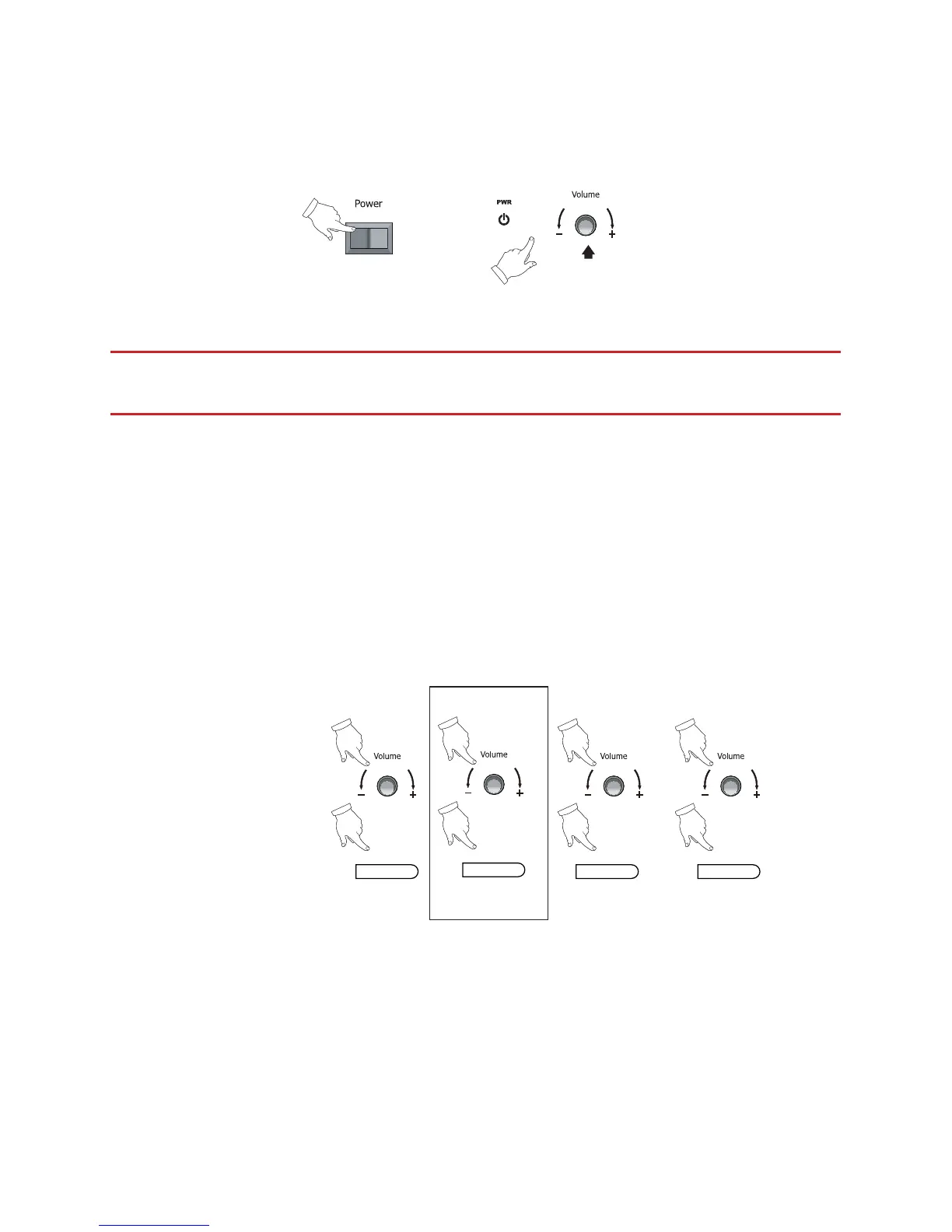
1. Power on
Power on Standby
or
ON OFF
Press & hold
(2 seconds)
IMPORTANT: The main power switch must be on for soundbar operation. This is
located on the rear of the soundbar unit.
Standby / On: The soundbar may be put into ‘standby’ or resumed on by pressing the
[power] button on the remote. Briey pressing the volume control on the rear of the
soundbar also switches on the unit when it is in standby. Pressing and holding the
volume button for 2 seconds will enable standby mode.
NOTE: The colour of the LED on the front of the soundbar shows the current status of the
unit. Red means the unit is in standby mode. Solid blue indicates that the unit is on.
2. Source selection
Optical iPod Coaxial Aux
or
(PUSH)
or
(PUSH)
or
(PUSH)
(when iPod connected)
Source Source Source
on soundbar
on remote
or
(PUSH)
Source
Source select: Press the ‘Source’ button on the remote (or briey press the volume
knob on the unit’s rear) to cycle the sound source from optical, to iPod, to coaxial
digital, to analogue Aux. The iPod selection is skipped if no iPod is present (i.e. only 3
inputs are available when no iPod is in use).


 To Next Page