5
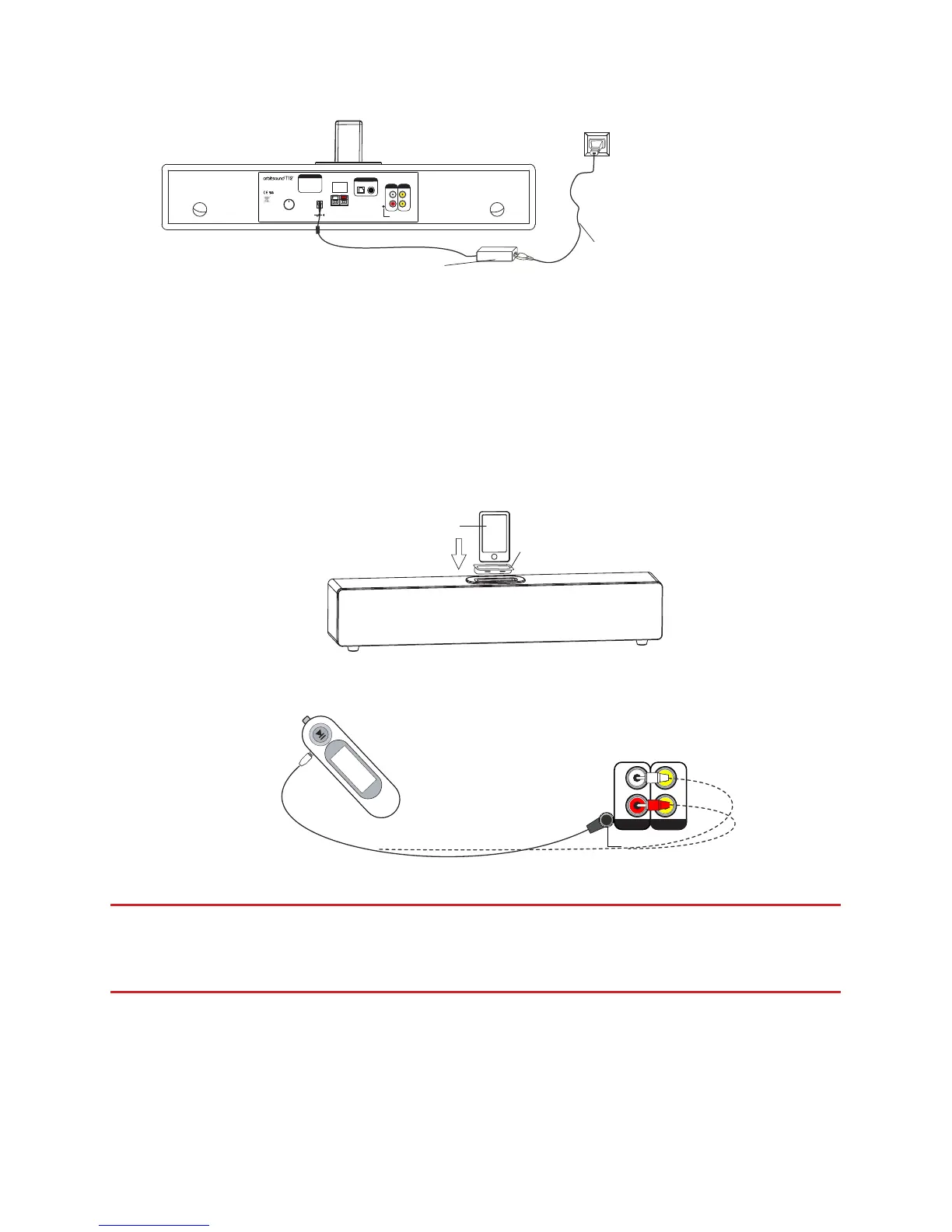
2. Connect power
AC Adaptor
Power Cable
- use correct country plug type
R
L
Stereo
Line In
Approved
components used
+
-
Subwoofer Output
4 ohm minimum
Only connect supplied subwoofer
DC In 22V 2.5A
DIGITAL In
CAUTION:
To prevent electric
shock, do not
remove screws. No
User serviceable
parts inside.
Volume Control
Press to switch inputs
Press and hold for standby
Press to resume from standby
POWER
ON OFF
AUX In VID OUT
Made in China
©2011 orbitsound ltd.
CoaxialOptical
Digital Input
v3
Connect the power supply as shown.
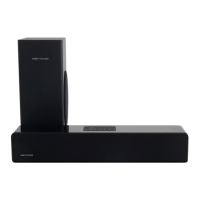
3. Connect a sound source
You can connect multiple sources to the unit and listen to either:
IMPORTANT: (A) It is advised that the iPod dock is used with the correct adaptor
for your iPhone / iPod model. The T12 comes with some adaptors for popular
models. More variants are available from Apple inc.
NOTE: (B) You can connect your sound source to either the 3.5mm line input OR dual
RCA (phono) AUX IN connectors OR optical (TOSLINK) inputs. Use which ever is most
convenient.


 To Next Page