3. airSOUND adjustment
airSOUND does not use digital processing or modify the original sound; The stereo
width selection switch on the rear of the unit simply changes the volume of the side
facing stereo speakers that deliver the airSOUND signal. Once the T12 is set up for the
best listening in your environment, choose the stereo width setting (stereo switch on
rear panel) that sounds the best.
IMPORTANT: The stereo switch does not alter the tone of the sound
reproduction; choose the setting that suits your listening preference best.
HINT: In rooms that are large, or if there are unavoidable obstructions near the side facing
speakers, ‘Wide’ is usually the best setting. You do not need to worry that the sound is
being ‘altered’ by a high setting as airSOUND does not work like this.
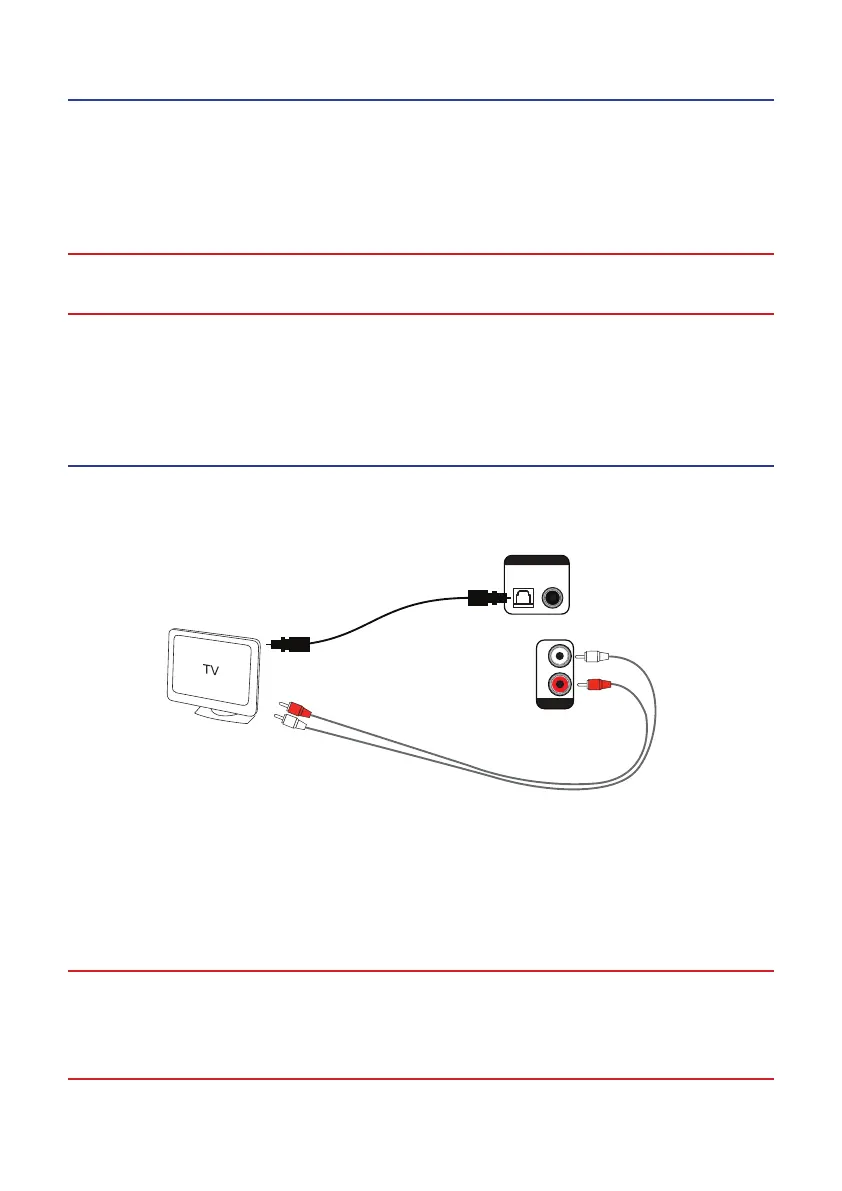
Connection to TV
This conguration can be used for TVs with optical/coaxial digital outputs or RCA
(phono) audio outputs. The TV outputs stereo sound directly to the T12.
Analogue connection (alternative)
Analogue audio connection cable
R
L
CoaxialOptical
Aux In
Digital Input
Digital connection:
Use optical cable to connect to TV sound
output (or coaxial RCA)
OR
HINT: When using the T12 in this way, it is normal that the sound output on the TV will
need to be turned down or muted to stop sound coming from the TV’s own speakers. It
will improve the overall listening experience if you do this.
HINT: You can also use the coax or optical (TOSLINK) digital inputs on the T12 with other
devices such as satellite units and DVD players that have an appropriate digital output.
IMPORTANT: Remember to remove the protective plastic covers from a new
TOSLINK cable before connecting to the optical port on the T12 or your TV.
Failure to remove these covers may result in damage and will interrupt the
sound output.


 To Next Page