Setting up the T12
1. Connect subwoofer
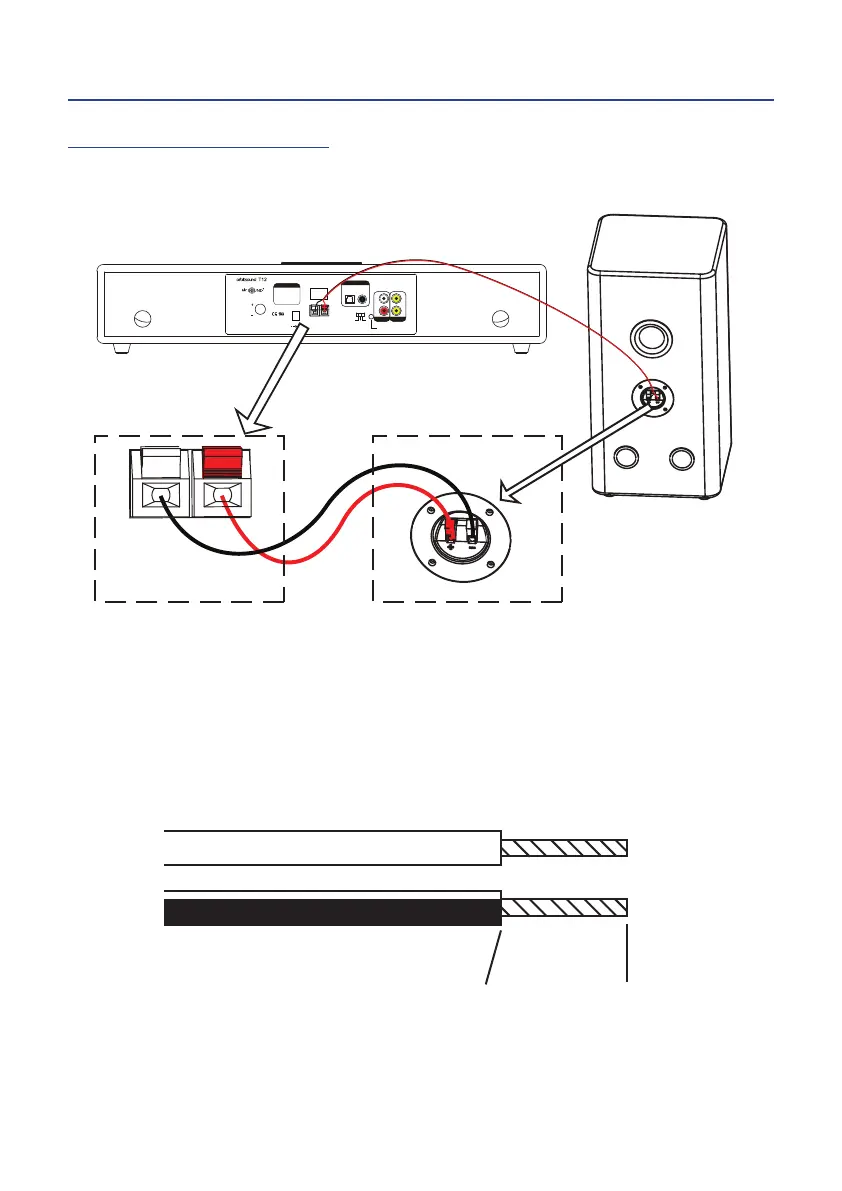
Connect the subwoofer to the subwoofer output on the stereo soundbar as shown:
Power
On O
R
L
Stereo Width
O
Norm
Wide
Stereo
Line In
Approved
components used
Manufactured under license
from airSOUND LLP.
®
Volume
Volume control:
Push to switch inputs
Press and hold for standby
Press to resume from standby
Subwoofer Output
8 ohm minimum
CoaxialOptical
Aux In
Digital Input
CAUTION:
To prevent electric
shock, do not remove
screws. No User
serviceable parts inside.
Video out
Subwoofer Output
8 ohm minimum
(Only connect to T12 subwoofer)
Note: The speaker wire is colour marked to make the job of identifying the correct wire for
speaker terminal easy. Connect the black striped wire to the black terminal at both ends,
and the red wire to the red terminals.
IMPORTANT: Make certain that the metal core of the wires only is inserted
into the wire socket to ensure metal-metal contact. The contact area is shown
below:


 To Next Page