7
ENGLISH
WARNING:Unplugcordfromelectricaloutletbeforeservicing.
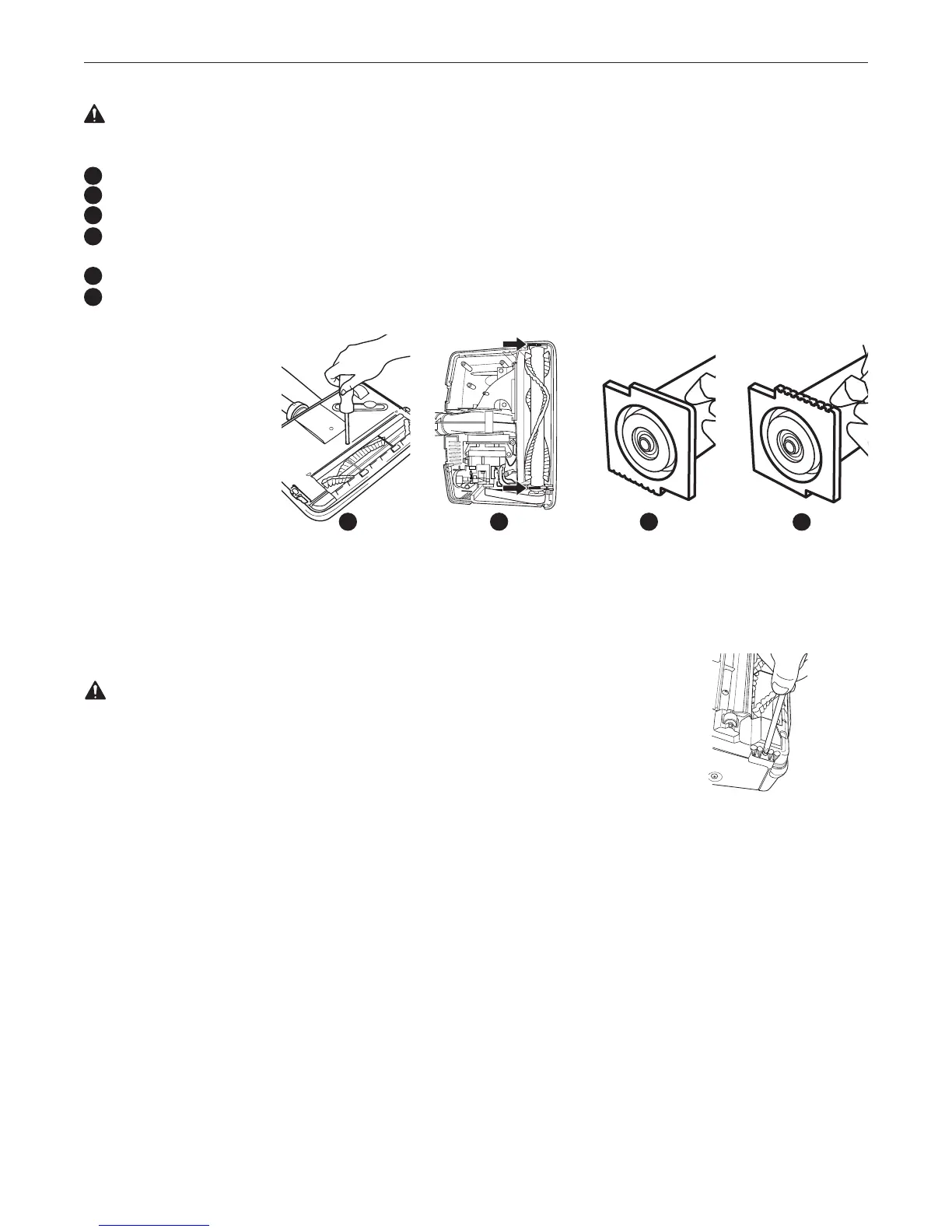
Todetermineifthebrushrollisworn,placeafirmstraightedgeacrossthenozzleopening.Ifbrushrollbristlesdonotextendbeyond
baseplate, brushroll should be adjusted.
Removethebaseplatebyremoving5screws.Then,removethebeltandbrushrollfromthehousing.
Rotatebothbearingassembliesatendsorbrushrolltoshow“OLD”andreplaceintheholdingchannelsinthehousing.
Note:Thebearingassemblysettingmarket“OLD”hasnoribsonthetopoftheassembly.
Theonemarked“NEW”hasseveralribs.Whenrotatingbearings,makesurebothbearingassemblysettingsarethesameandfaceupwhen
replacing the brushroll.
Reassemblethebelt.
Reassemblethebaseplate.
Adjusting or Replacing Brushroll
16
17
18
19
Ifapreviousadjustmenthas
alreadybeenmadeandbristle
heightdoesnotextendabovethe
baseplate,anewbrushassembly
should be ordered.
IMPORTANT:Unlessthebrush
iswornasindicatedabove,both
bearingsmustbeinthe“NEW”
position. When rotating, both
bearingsmustbeinthe“OLD”
position.Unmatchedsettingscan
causedamagetotheunit.
WARNING:Unplugcordfromelectricaloutletbeforeservicing.
Turnthepowerheadover.Withbaseplatefacingup,removethescrewsattachingthebaseplate(16)then
removethescrewlocatedinthecentreofeachedgebrush.
Removebothedgebrushesandreplacewithnewones.Replacebothscrewsandtighten.
Replacing Edge Brush
15
16
OLD
NEW
16
17
18
19




 To Next Page