Page
08
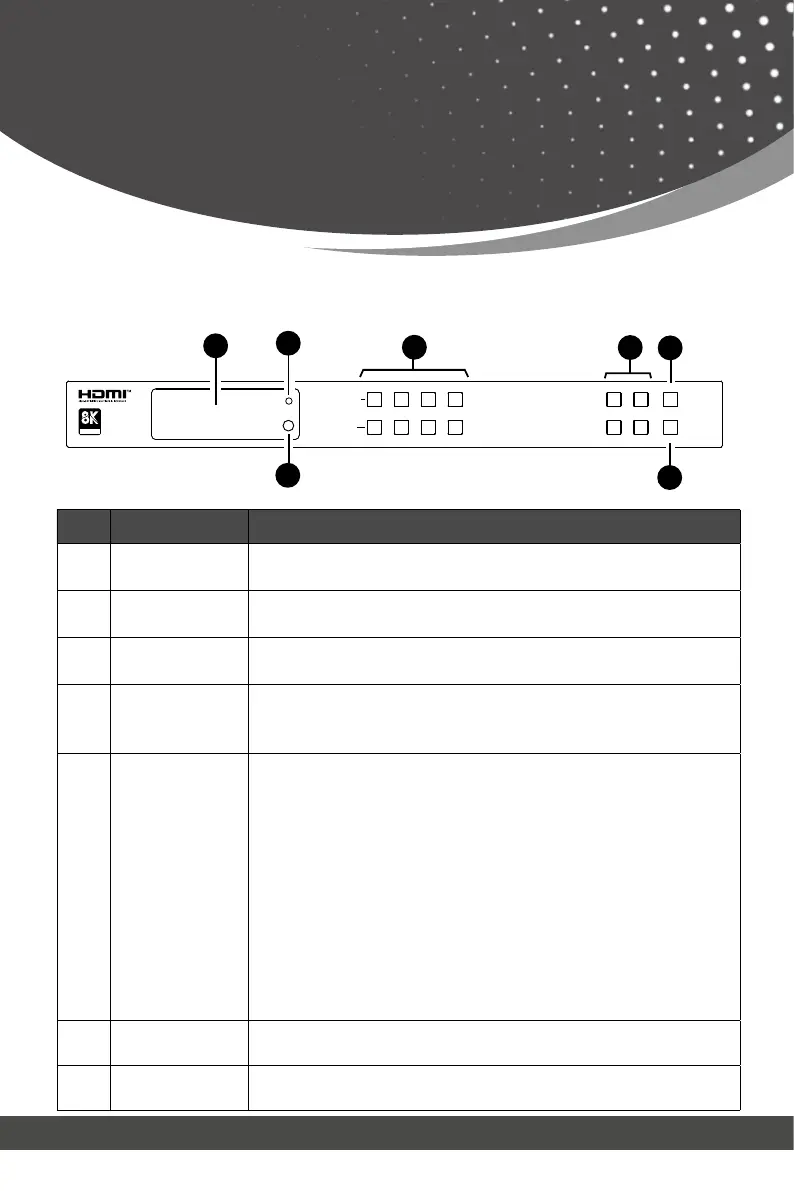
No. Name Function Description
1. LCD screen
Displays the matrix switching status, input/output port, EDID,
Baud rate, IP Address, etc.
2. PWR LED
The LED lights up Green when the unit is turned on. It lights
up Red when it is on standby.
3. IR
IR signal receiver window. Receives the signal from the in-
4.
INPUT / OUTPUT
buttons
You need to press an output button (1~4) first, and then
press an input button (1~4) to select the corresponding input
source for the output port.
5.
MENU / ENTER
/ UP / DOWN
① On the initial LCD display screen, press “MENU” button.
There are
OUTPUT/INPUT/EXTAUDIO/SETUP
items to be selected.
② Press the “UP/DOWN” button to select SETUP item.
③ Press the “ENTER” button to enter into the next menu.
There are LCD ONTIME/BAUDRATE/IP INFO/REBOOT/RESET
items to be selected.
④ Press the “UP/DOWN” button to select RESET item.
⑤ Press the “ENTER” button to confirm reset. It will prompt:
RESET SUCCESS!
Note: Pressing the “MENU” button will return to the previous
6. POWER button
Long press the POWER button for 1 second to enter the
standby mode, then short press it to wake up the device.
7. LOCK button
Short press the LOCK button to lock the front panel buttons
(Except the power button); Press it again to unlock.
LOCKDOWNENTER
POWERUPMENU
1
1
2
2
3
3
4
4
OUTPUT
INPUT
ASSOCIATION
CERTIFIED
4
5
PWR
IR
1
2
6
7
3
Operation Controls
and Functions
Front Panel



 To Next Page