Page
14
EDID Management
This Matrix has 36 factory defined EDID settings, 3 user-defined EDID modes
and 4 copy EDID modes. You can select defined EDID mode or copy EDID
mode to input port through front panel buttons, RS-232 control or Web GUI.
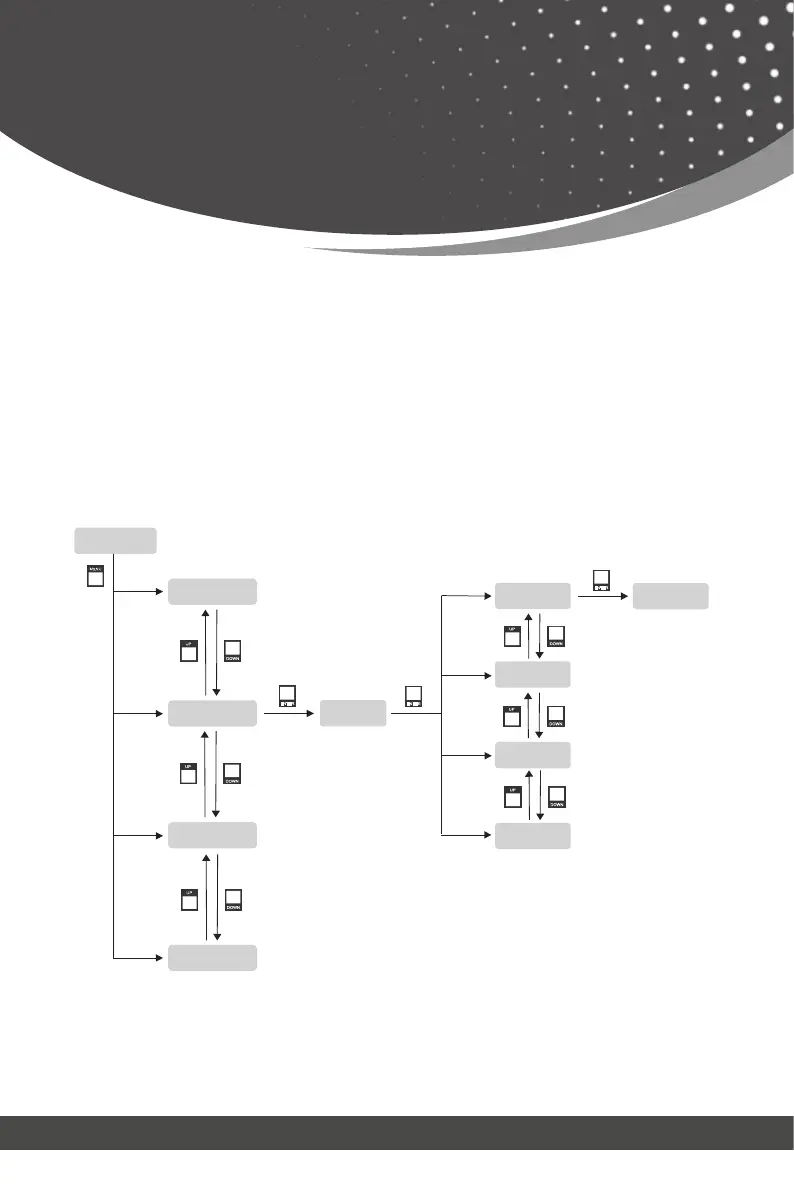
On-panel button operation: On the initial LCD display screen, press “MENU”
button to enter the first level menu, press “UP/DOWN” button to select INPUT,
and then press the “ENTER” button. Now the EDID item appears. Press the
“ENTER” button, and then press “UP/DOWN” button to select the EDID mode
you need. Then press “ENTER” button to confirm this operation.
RS-232 control operation: Connect the Matrix to PC with a serial cable, then
open a Serial Command tool on PC to send ASCII command “s input x EDID
z!” to set EDID. For details, please refer to “EDID Setting” in the ASCII com-
mand list of “RS-232 Control Command”.
OUTPUT: 1234
INPUT: 1234
MENU -> OUTPUT
INPUT -> EDID
IN1: 4K60, 2.0CH
INPUT -> EDID
IN1: 4K60, 2.0CH
INPUT -> EDID
MENU -> INPUT
MENU -> EXTAUDIO
MENU -> SETUP
Note: Pressing the “MENU” button will return to the previous menu.
MENU
DOWN
UP
DOWN
UP
DOWN
UP
ENTER
ENTER
ENTER
DOWN
UP
DOWN
UP
DOWN
UP
INPUT -> EDID
IN2: 1080P, 2.0CH
INPUT -> EDID
IN3: COPY OUT1
INPUT -> EDID
IN4: 4K60, 5.1CH



 To Next Page