Page
40
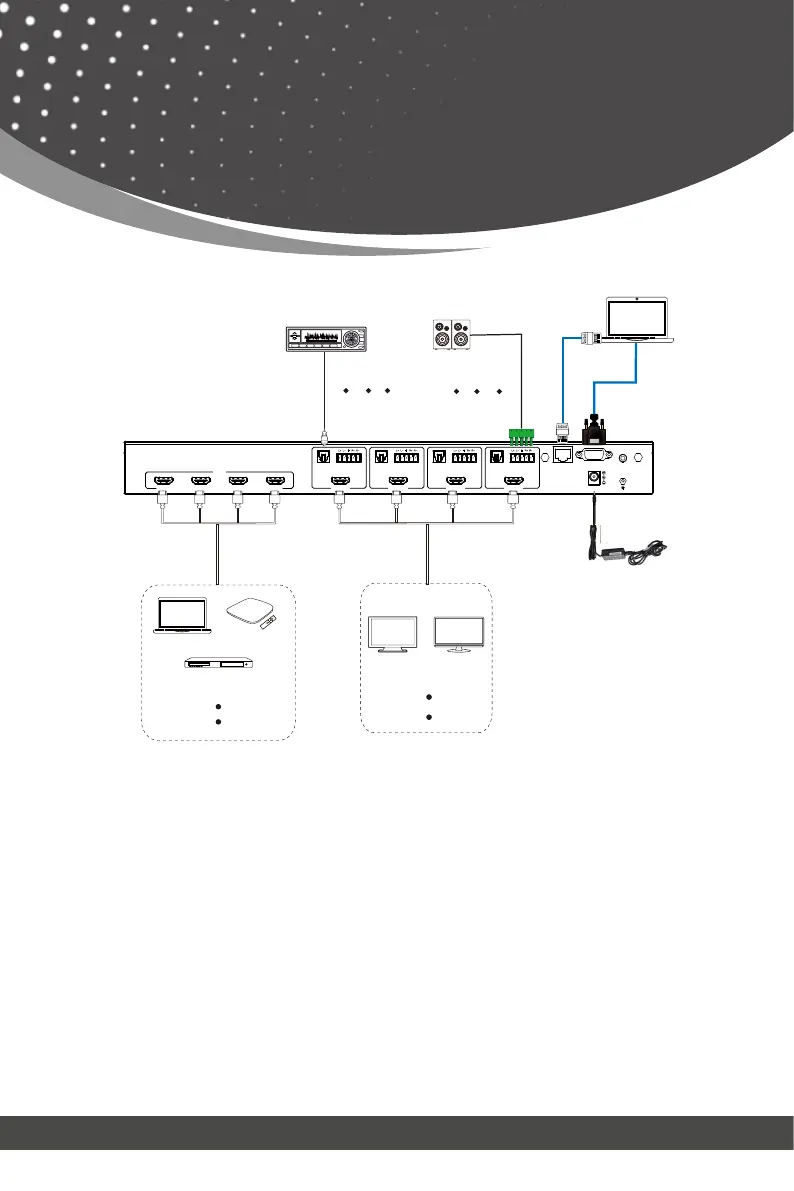
Application Example
RS-232 IR EXTTCP/IP
DC 24V
HDMI
AUDIOOPTICAL
OUTPUT 4
HDMI
AUDIOOPTICAL
OUTPUT 3
HDMI
AUDIOOPTICAL
OUTPUT 2
HDMI
AUDIOOPTICAL
OUTPUT 1
INPUT
HDMI 1 HDMI 2 HDMI 3 HDMI 4
TV
Monitor
PC
DVD or Blu-ray Player
TV box
Amplifier
PC
2.0 Speakers
Power Supply
LAN
LAN
1. Connect the media devices such as the Apple TV, FireTV Stick, etc. to the
HDMI Input ports on the Matrix.
2. Connect your display devices such as a TV, Monitor, etc. to the HDMI Output
ports on the Matrix.
3. Turn on all the devices and you should get an image on all the displays.
4. Use the IR Remote or the Front Panel buttons to select which input source
goes to which output.
5. If needed, you may also connect an audio device to the Optical or Analog
ports for audio extraction.
6. Connect a PC or Laptop to the RS-232 or TCP/IP port to control the device
through the WebGUI or RS-232 commands.
Steps To Connect:



 To Next Page